Published October 3, 2026 in SaaS Growth
How to Localize SaaS Product Videos Without Re-Recording

Founder & Content Creator at Vibrantsnap · 9 min read
Your product may be sold in English, but it is used in German, Japanese and Portuguese. The buyer who signed the contract reads English without trouble. The warehouse supervisor, the field inspector or the clinic administrator who uses your product every day may not, and they are the people who watch your onboarding and help center videos.
For a long time, video localization meant a voice actor per language, studio time, and an editor re-cutting every video to fit the new narration, then doing it all again at the next release. Most small SaaS teams reasonably decided not to localize their videos at all. AI has changed the cost. It hasn't changed the need for judgment: which videos to localize, in which languages, which words must never be translated, and who checks the result.
This guide covers those decisions, the three ways to localize a product video, what to do about an interface that is only in English, and a workflow to localize videos without re-recording them and keep every language version current when the product changes.
Why localize product videos at all
In a 2020 survey of 8,709 consumers in 29 countries, CSA Research found that 76% say they prefer to buy products with information in their own language, and 40% say they never buy from websites in other languages (CSA Research).
Those are consumers, and B2B buyers are often comfortable evaluating software in English. In B2B, language matters most after the sale. The person learning your product from a tutorial is often not the person who chose it, and a tutorial is usually watched by someone who is stuck. If they can't follow the explanation, the video has failed at the one moment it was needed, and the result is a support ticket or a feature nobody uses.
Which videos to localize first
Not every video is worth localizing. Start where a viewer's understanding has a direct effect on adoption and support.
| Video | Localize? | Why |
|---|---|---|
| Onboarding videos | First | New users meet them in their first days, when confusion turns into churn |
| Help center tutorials for the top questions | Next | Start with the 10 most viewed or most linked from support replies |
| Sales follow-ups | Per deal | When the prospect's team works in that language |
| Website overview | When you sell in that market | Pair it with a localized landing page, not on its own |
| Feature announcements | Only for your largest markets | They date quickly, so the effort pays back less |
| Internal or one-off videos | No | Nobody outside the team will watch them |
Which languages to start with
Pick languages from data you already have, not from the size of the market:
- Active accounts and revenue by country. Where your customers already are.
- Support tickets by language or country. Where people already struggle.
- Trials and sign-ups by country. Where demand is arriving.
- Your sales pipeline by market. Where deals are waiting on a local version.
Start with one or two languages. A language with ten active accounts and a steady flow of tickets is a better first bet than a large market where you have no customers yet. Measure, then add the next one.
Video localization: three ways to do it
| Approach | What the viewer gets | Effort per language | Watch out for |
|---|---|---|---|
| 1. Translated captions | Your original narration, with captions in their language | Low | The viewer reads and looks for the button at the same time |
| 2. Dubbing the finished video | The same video with a translated audio track | Low to medium | The translation has to fit the original timing |
| 3. Re-voicing from a script, with retiming | A script written in their language, read by a studio voice, with the video retimed to it | Low | The interface on screen stays in the language you recorded |
| Voice actors in each language | A professionally read narration | High | Every update means a new script, session and edit per language |
Voice actors remain an option, but every update is multiplied by the number of languages, which is why the rest of this guide focuses on the first three.
Translated captions are the cheapest option and are enough for overview videos, where the viewer watches more than they follow along. For tutorials they are weaker. A viewer following a how-to needs their eyes on the interface, and captions pull their eyes to the bottom of the screen.
Dubbing translates the audio of the finished video and lays it over the same footage. It is quick, but it inherits the original timing, which is a problem for languages that run longer than English.
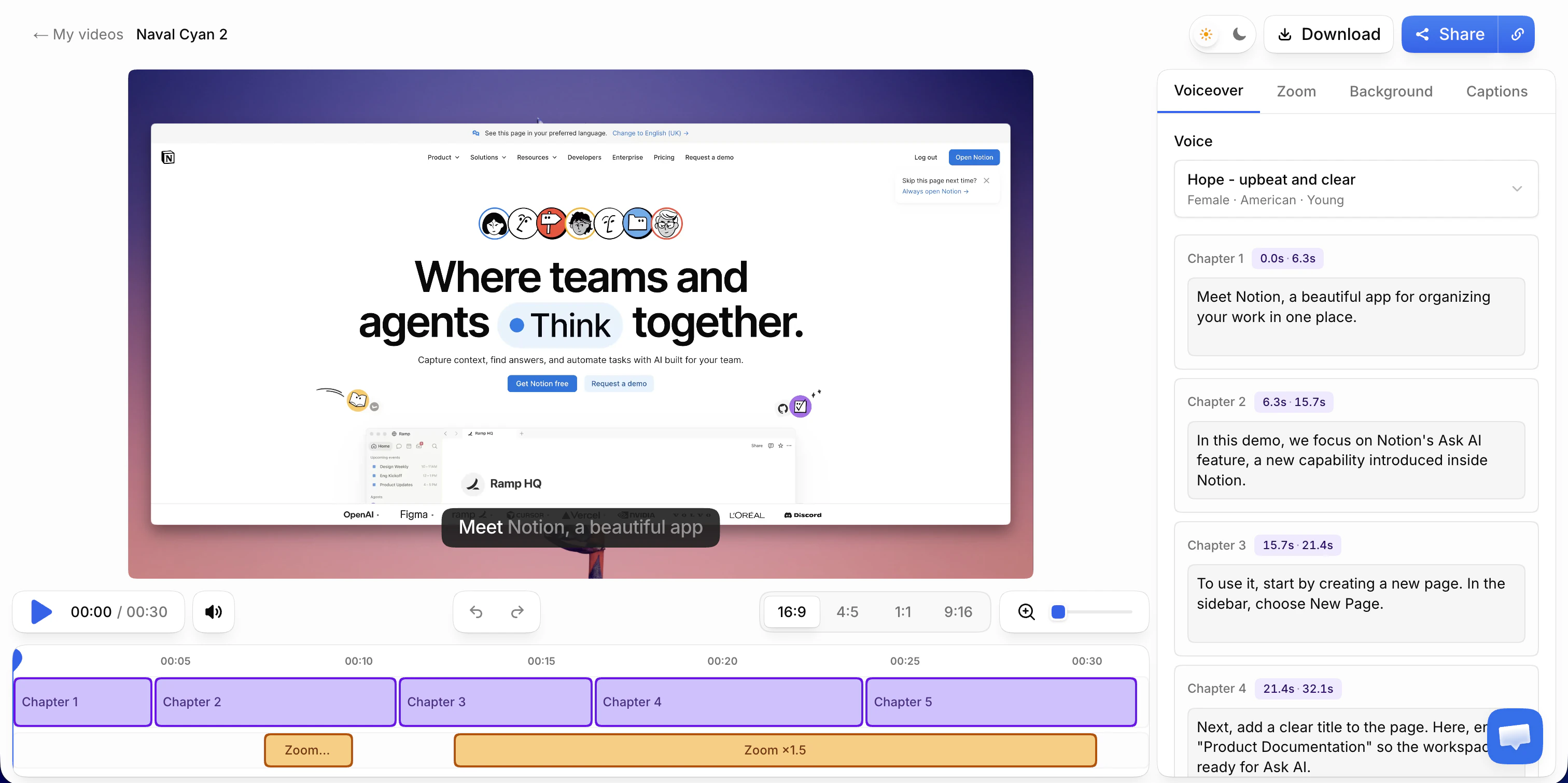
Re-voicing from a script works from the narration rather than the finished audio. The script is written in the target language, a studio voice reads it, and the video is retimed so each scene lasts as long as its narration. This is how Vibrantsnap handles another language.
Why timing is the hard part
Translated text is usually longer than the English it comes from. The W3C, summarizing IBM's guidelines, notes that short English strings of up to 10 characters can grow to two to three times their length in European languages, and that text over 70 characters typically grows by about 30% (W3C).
Longer text takes longer to say. If the video keeps its original timing, the new narration has to be spoken faster, cut short, or allowed to drift out of sync with the clicks, so that the voice describes a step after the screen has already moved on. Retiming solves it from the other side: the video adjusts to the narration, scene by scene, so "click Approve" still lands on the click.
What to do about the interface
This is the question most teams get stuck on. The answer depends on your product.
If your product is only in English, which is common in B2B, keep the labels in English in the narration. The viewer should hear the word they can see on the button. A French tutorial says "cliquez sur Approvals", not a translation the viewer will never find on screen. Vibrantsnap keeps interface labels and product names in their original spelling for this reason. When a label's meaning isn't obvious, explain it once: "cliquez sur Approvals, la liste des rapports à valider".
If your product is localized, the screen should match the narration. For how-to videos, record again on the localized interface, from the same outline, and name each label as it appears in that interface. This is the one case where recording again is worth it: a viewer who sees German buttons should hear German labels. For overview videos, where viewers watch the result more than the buttons, the original recording is often fine.
For sales demos, localize the data too. Names, addresses, currencies and date formats that look like the prospect's market tell them the product works for them. For tutorials this matters less, as long as the data is believable.
A localization workflow, step by step
- Finish the source video first. Review and publish the source-language version before you localize anything. Every fix made after that has to be made once per language.
- Build a glossary. List the terms that must never be translated, and the approved translation for each domain term in each language. Decide the form of address once per language. The example after these steps is a starting point.
- Generate each language version. In Vibrantsnap, choose the voiceover language: the script is written directly in that language, read by a studio voice and captioned, and the video is retimed to match. Pick one voice per language and keep it across the library.
- Check each script against the glossary. Search for every glossary term. Product names should be untouched, labels should match the screen, and the form of address should be the same throughout.
- Have a native speaker review the first videos. A colleague, a reseller or a friendly customer. Ask three questions: is anything wrong, is anything understandable but odd, and would your customers' teams say it this way? This matters most in the languages you can't read yourself, often Japanese, Korean, Chinese or Hindi, where the level of formality and the choice of technical terms are hard to judge from outside. Once the first videos pass, spot-check.
- Publish where that market looks. Many help center platforms support articles per language, so embed each version in the matching article. Name each video and exported file with a language code, such as
approve-report-de, and send onboarding emails with the version in the customer's language. - Log every version. Keep a video inventory with one row per video and one column per language, with the date each version was generated. When a screen changes, you know exactly which versions to redo.
| Term | Rule | French | German | Spanish |
|---|---|---|---|---|
| Your product name | Never translate | Unchanged | Unchanged | Unchanged |
| Labels on an English-only interface | Keep exactly as on screen | Unchanged | Unchanged | Unchanged |
| work order | Use the approved term | bon d'intervention | Arbeitsauftrag | orden de trabajo |
| invoice | Use the approved term | facture | Rechnung | factura |
| Form of address | Decide once per language | vous, in most B2B products | Sie or du, pick one | usted or tú, pick one |
One budget point: exports are metered in minutes. If you download a file for each language, plan for it. A three-minute tutorial exported in four languages uses 12 minutes of export.
Keeping localized videos current
Localized videos are only worth having if they stay accurate. Two kinds of change happen, and they cost very different amounts.
- The wording changes, the screen doesn't. A plan gets renamed or a step needs a clearer explanation. Edit that chapter's script in each language version and a new voiceover is generated. The footage stays. Check the glossary terms in the chapter you changed.
- The screen changes. Record the source video again, then generate each language from it. If your interface is localized, record each localized version again too. Because every version comes from a script rather than a recording session, an update costs review time, not studio time.
Either way, the inventory from step 7 tells you which versions to touch.
How to tell whether it's working
Pick a few signals per language and look at them a month after publishing:
- Views per language. On paid plans, Vibrantsnap counts views per share link, so each language version shows its own views. It doesn't report who watched or for how long.
- Support tickets from that market on the topics the localized videos cover.
- Activation in that market, if you track it: how many new accounts reach the first key action, and how quickly.
- What your customer success team hears. Customers rarely say "thanks for the German tutorials", but they stop asking the questions those tutorials answer.
Where Vibrantsnap fits
Vibrantsnap turns one recording into tutorials, onboarding videos and demos, in the language your customers work in.
- Record once. The Chrome extension records a tab, a window or the whole screen with your microphone, and you can import a video you already have. Narrate in the language you explain best in.
- Publish in 10 languages. English, French, Spanish, Portuguese, German, Italian, Japanese, Chinese, Korean and Hindi, read by 30 studio voices. The script is written directly in the voiceover language, and interface labels and product names keep their spelling.
- Retimed, not squeezed. The video is retimed to each language's narration, scene by scene, so longer languages don't have to be rushed.
- Captions in the same language. Captions are generated word by word from the voiceover and stay editable.
- Refresh an old library. An imported video goes through the same pipeline: new script, new voice, new language. Zooms are the one exception, since an imported file carries no cursor data and you place them yourself.
- Share per language. A share link with a call-to-action button, an embed in your help center, or an MP4 export in 1080p or 4K.
Recording, editing and previewing with every AI feature are free, with no credit card. On the free plan, the share link carries a watermark and a Vibrantsnap badge, and there is no export. Pro is $49/month with 25 min of export a month. For teams producing in several languages, Scale is $149/month with 65 min of export a month and a brand kit. See pricing for Business.
If the person recording is narrating in a second language, see recording product demos when English isn't your first language. For the help center side of the job, see how to build a customer support video library.
Frequently asked questions
What does it mean to localize a SaaS product video? It means adapting a demo, onboarding or tutorial video so a viewer in another market can follow it in their own language: the narration, the captions, the vocabulary and sometimes the interface and demo data on screen. Translating the captions is the lightest form of localization. Re-voicing the narration in the viewer's language is the most complete one short of recording again.
Are translated subtitles enough to localize a product video? For an overview video, often yes. For a tutorial, usually not. Someone following a how-to has to read the captions and find the button at the same time, and on a dense interface they miss one or the other. Narration in the viewer's language lets them keep their eyes on the screen.
Do I need to localize my product's interface before my videos? No. Many B2B products ship in English only, and their customers' teams still benefit from tutorials narrated in their own language. Keep the interface labels in English in the narration, so the viewer hears the word they see on the button. If your interface is already localized, record your how-to videos again on the localized interface.
Which languages does Vibrantsnap support for voiceovers? Ten: English, French, Spanish, Portuguese, German, Italian, Japanese, Chinese, Korean and Hindi, with 30 studio voices in total. You can record in one language and publish in another. The script is written directly in the voiceover language, and interface labels and product names keep their original spelling.
How do I stop product names from being translated in localized videos? Keep a glossary that lists every term that must never be translated, such as product names, feature names and, for an English-only interface, the labels on screen. Then search each language's script for those terms before you publish. In Vibrantsnap, interface labels and product names keep their original spelling, but a review against the glossary is still worth the five minutes.
Sources
- CSA Research, Survey of 8,709 Consumers in 29 Countries Finds That 76% Prefer Purchasing Products With Information in Their Own Language (2020, from the report Can't Read, Won't Buy: B2C)
- W3C Internationalization, Text size in translation
Comparison