Published April 5, 2026 in Product Demos · Updated September 28, 2026
Product Launch Video: How to Announce a SaaS Feature

Founder & Content Creator at Vibrantsnap · 15 min read
In B2B SaaS, most launches aren't a launch day. They are releases. A feature ships on a Tuesday, and three groups need to see it: the customers who asked for it, the prospects whose deal stalled without it, and your own sales and customer success team, who will get questions about it before lunch.
The product launch video is the short screen recording that ships with that release. It goes in the changelog, the release email, the in-app announcement and the follow-ups your sales team sends. Some teams call it a product release video or a feature announcement video. The job is the same. This guide covers which releases deserve one, how to structure it, how to record it on release day, which versions to make for customers and prospects, and how to measure it honestly.
Most of the advice below works with any tool. Vibrantsnap, our product demo video maker, is built for this kind of video.
What a launch video is in B2B SaaS
A launch video shows one new capability in your real product, doing one real task, narrated for people who already know roughly what your product does. That last part separates it from its neighbors:
- A website demo has to work for a stranger, so it explains the product from scratch. Our guide on how to make a product demo video covers that one.
- A tutorial teaches a task step by step and lives in your help center for years.
- A launch video answers "what changed, and is it for me?" It skips the setup, assumes the viewer knows the product and has a shelf life. After launch, it moves to the feature page or gets replaced by a tutorial.
It is also not a launch-day trailer for the tech press. If you sell compliance, inspection or field service software, the audience for a release is your customer base and your pipeline.
Which releases deserve a video
Not every changelog line needs a recording. A simple test: if users have to click something new to benefit, show the clicks. If nothing on screen changes, write it.
| Release | Video? | Why |
|---|---|---|
| A new feature that changes how people work | Yes: a full video and a short cut-down | Users need to see where it is and what it does before they rely on it |
| A feature customers or prospects asked for | Yes, plus a personal note to whoever asked | The people who asked are the most likely to use it first |
| An integration with a tool your customers already use | Yes, with the setup shown end to end | Most questions about an integration come up during setup |
| A redesign of a screen people use every day | Yes: a short "what moved" video | Moved buttons send people to support |
| Performance improvements and bug fixes | No | A line in the changelog is enough |
| A new setting or a small option | Usually no | A screenshot next to the changelog entry does the job |
| A beta open to a few accounts | Not yet, or one video for those accounts only | Record the public version once the labels are final |
The structure: five parts, about a minute
A good feature announcement video answers five questions, in this order:
- What's new. One sentence that names the outcome, not the feature's internal name. "You can now set an inspection to repeat" beats "Introducing Recurrence 2.0".
- Who it's for. The role and the situation. "If you rebuild the same site visit every month" tells the right people to keep watching, and lets everyone else move on.
- The two to four clicks that show it. Start on the screen where the feature lives. Click, pause, let the viewer see what changed, then click again. End on the result.
- Where to find it. The menu path, said out loud while the cursor points at it: "Schedule, open any inspection, then Repeat."
- Availability. Which plans include it, which roles or permissions can use it, and whether it's live for everyone today or rolling out. Customers look for this line first. Don't make them email support to find out whether they have the feature.
Then one next step, such as "Open your schedule and set up your first repeat."
Most feature announcements fit in 60 to 90 seconds. If yours runs past two minutes, it's probably two features, or a tutorial.
An example outline
Here is the plan for a fictional inspection platform shipping recurring inspections:
FEATURE   Recurring inspections
VIEWER    Coordinators who schedule the same sites every month
LENGTH    About 70 seconds

0:00  WHAT'S NEW     "You can now set an inspection to repeat, so monthly
                      visits schedule themselves."
0:07  WHO IT'S FOR   "If you rebuild the same site visit every month,
                      this one is for you."
0:14  CLICK 1        Open an inspection on the schedule, click Repeat
0:24  CLICK 2        Choose Monthly, second Tuesday, ends after 12 visits
0:34  CLICK 3        Click Save
0:38  RESULT         The next 12 visits appear on the calendar, with the
                      same inspector and the same checklist
0:48  WHERE          "Schedule, open any inspection, then Repeat."
0:55  AVAILABILITY   "Live today on the Team and Enterprise plans. Admins
                      and coordinators can set it up."
1:04  NEXT           "Open your schedule and set up your first repeat."
Notice what's missing: no logo intro, no company story, no roadmap teaser. The "before" gets half a sentence ("rebuild the same site visit every month"), not a scene of its own.
Use your customers' words for the problem and the exact on-screen labels for the clicks. If the feature request said "repeat visits", say "repeat visits", even if the engineering ticket said "recurrence rules". If the button says Repeat, say Repeat.
If you'd rather start from a template, the free demo script generator has a Feature announcement template. You enter who uses the feature, what it lets them do, why it matters, the clicks in order and the next step. It returns a timed script, section by section, with what to say and what to show.
Record on release day, with realistic data
Launch videos recorded too early go stale before they ship. Labels change during QA, an empty state gets redesigned, a button moves. Record once the release is frozen, on the release build itself, in staging or in production on the day it ships.
- Use a sandbox account with realistic data. Site names, inspector names and dates from this month. Customers read every row on screen and judge whether the feature fits their world. "Test Site 1" tells them nothing.
- Never show real customer data. In health, finance or compliance software, a real name or account number in a release video is a data incident. Fix the data before you record; don't count on blurring it later.
- End on a result with data in it. A calendar with twelve scheduled visits sells the feature. An empty calendar with a success message doesn't.
- Record a browser tab if your product runs in the browser. It keeps other tabs and notifications out of the shot.
- Record in one take. If you stumble on a sentence, pause and say it again. Don't restart.
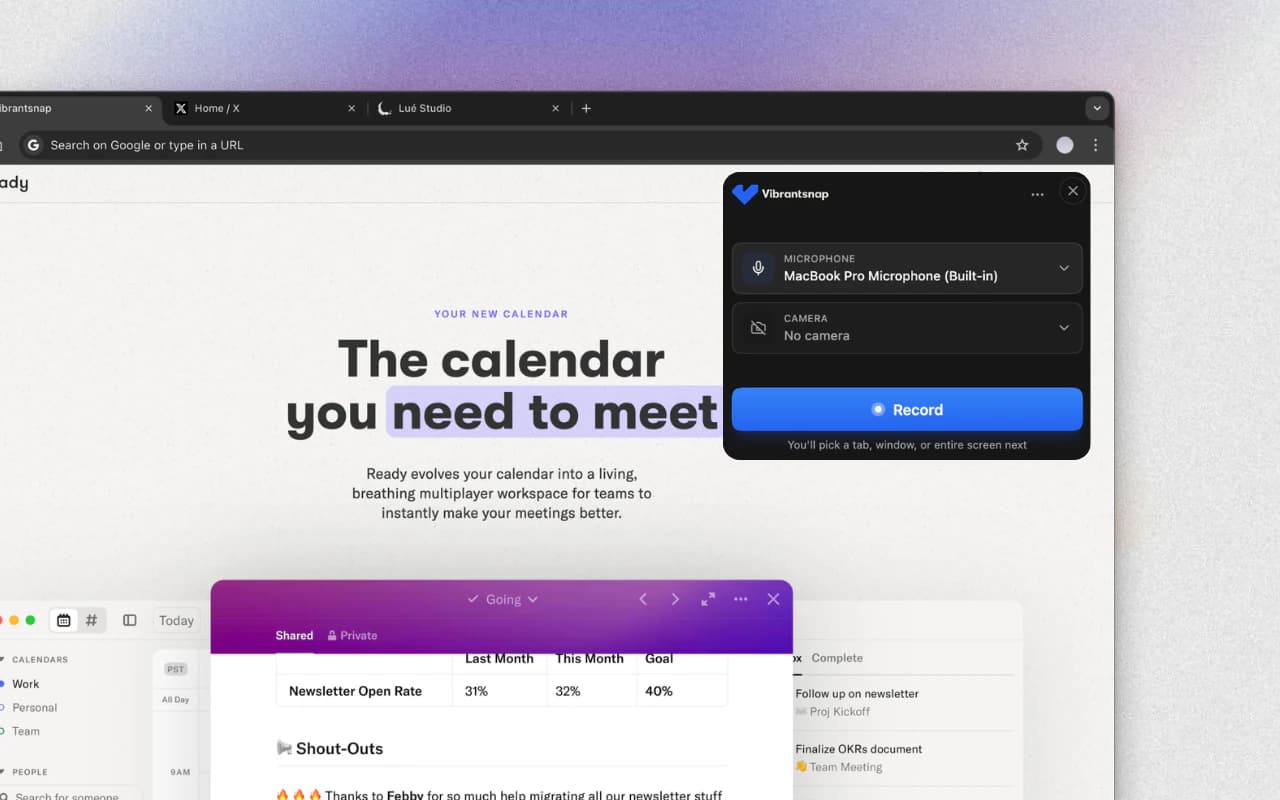
That last point is where Vibrantsnap saves the most time on release day. The Chrome extension records a tab, a window or the whole screen with your microphone. The AI transcribes your narration, rewrites it into a clean script so hesitations and false starts don't survive, reads it in a studio voice and retimes the video to match. Every click in a web page gets an automatic close-up; on desktop software, you place the zooms yourself. Processing takes about two minutes, so the video can go out with the release instead of a week later.
If someone already recorded the feature for a sprint review, you can import that file instead. The narration is transcribed and rewritten the same way. An imported video carries no cursor data, so you place the zooms yourself.
"Every time we ship a feature, I record a quick walkthrough and Vibrantsnap does the rest. The AI tidies up my narration, a studio voice reads it, and the video goes out to our customers the same day. Feature walkthroughs used to be the thing we kept putting off. Now every release ships with one."
Nacim Lahouioui, founder of Adwise AI and a Vibrantsnap customer
One video per feature
A release with three features gets three short videos, not one six-minute tour. Three reasons:
- Each video has its own home. The changelog entry, the help article and the sales follow-up for each feature link to that feature's video. Nobody has to scrub to 3:40 to find their part.
- Each goes to a different audience. An admin-only permission change and a feature for field teams don't interest the same people.
- Each ages on its own. When one screen changes next quarter, you re-record one 70-second video, not the whole tour.
The release email can still lead with one headline video and list the other features, each with its own link.
Versions for customers and prospects
The clicks are the same for everyone. What changes are the first and last lines, because customers and prospects need different things from the same minute.
| Customer version | Prospect version | |
|---|---|---|
| Opens with | "You can now [outcome]." | The problem it solves, in the prospect's terms |
| Assumes | They know the product | They've seen one demo at most |
| Availability line | Plans, roles and where to find it | Which plan includes it |
| Ends with | "Try it in your account today." | "Book 20 minutes to see it on your data." |
| Goes to | Release email, changelog, in-app announcement, help center | Sales follow-ups, open deals, the feature page on your site |
For the sales team, send the prospect version with two lines of context: who asked for this feature, and which objection it answers. Reps forward it to the deals where it came up. Customer success gets the customer version before the release email goes out, so they can answer questions on day one.
You don't need a second recording for the second version. In Vibrantsnap, the video splits into chapters, each with its own editable script. Rewrite the opening and closing chapters, and a new voiceover is generated for those lines.
Short cut-downs
Feeds and in-app messages need something shorter: 15 to 30 seconds, one click and its result, with the feature's name on screen. A cut-down isn't the full video sped up. It's the single moment that makes someone want the full minute: the calendar filling with twelve visits. Our breakdown of product demo video examples shows how Linear did this for its Releases feature: a 30-second clip next to a two-minute walkthrough, with the video at the top of the changelog entry.
Launch videos and cut-downs are two of the seven product marketing videos a SaaS team ships. Record the cut-down as its own short take while the click path is fresh, and export it in 1:1 or 4:5 for LinkedIn and in-app messages. Vibrantsnap exports 16:9, 4:5, 1:1 and 9:16, on a wallpaper or solid-color background, as an MP4 in 1080p, or 4K from the Pro plan.
Captions for muted autoplay
Many places a launch video appears play it muted: a changelog widget, a LinkedIn feed, a website section that autoplays. Chrome always allows muted autoplay, but blocks autoplay with sound unless the visitor has already interacted with the site or has a history of playing media with sound on it (Chrome for Developers). Without captions, a muted viewer sees the clicks and misses the explanation.
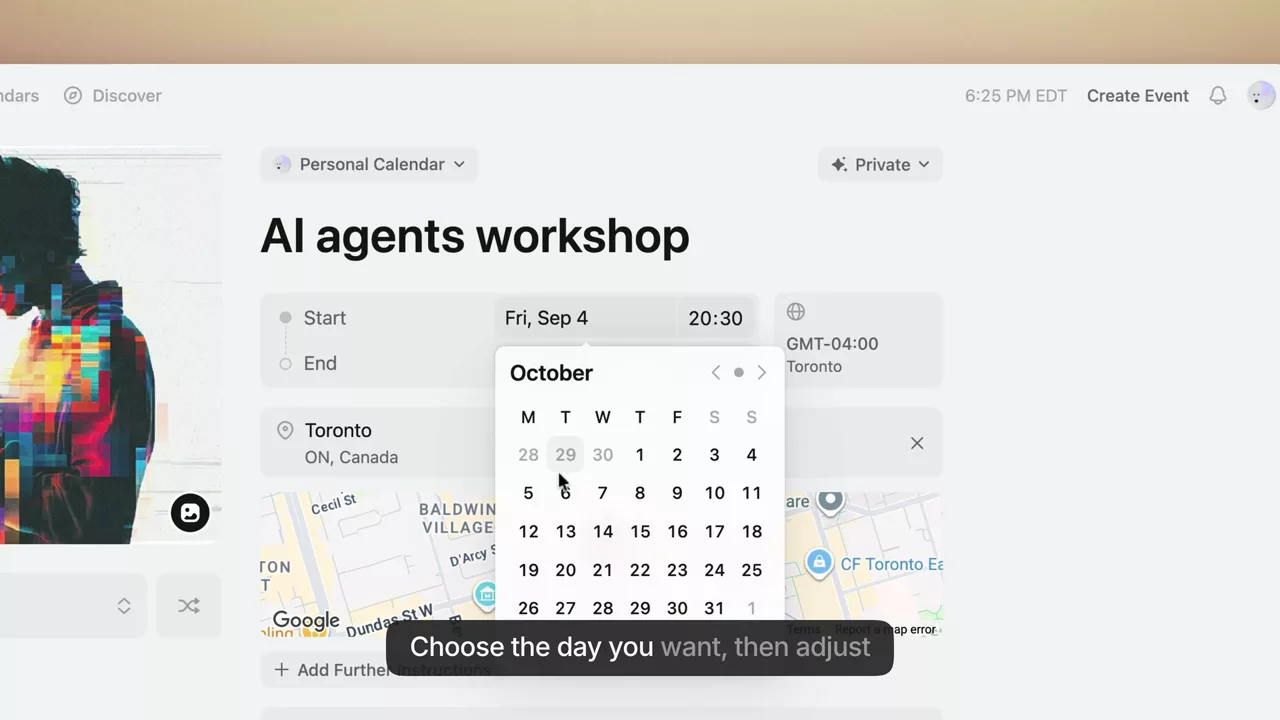
Captions also help customers who read your language more easily than they hear it. And WCAG success criterion 1.2.2, at Level A, requires captions for prerecorded audio in synchronized media (W3C). Vibrantsnap generates captions word by word, and you can edit them. Check the feature name and your product's acronyms before you publish.
A second language for the narration
If part of your customer base works in French, Spanish or German, a release video in their language is easier to act on than an English one they skim. It works the other way too: many founders and product managers narrate in English as a second language, and it shows in the recording.
Vibrantsnap narrates in 10 languages: English, French, Spanish, Portuguese, German, Italian, Japanese, Chinese, Korean and Hindi. You can record in the language you explain best in and publish in another, with captions in the new language. Interface labels and product names keep their spelling, so if your interface is only in English, the French narration still says "click Repeat", matching the button on screen.
Read the translated script before you publish. Check the terms your market uses, such as a regulation name or a form number, and fix any that were paraphrased.
Where to publish it
| Channel | Version | How to deliver it |
|---|---|---|
| Changelog or release notes | Customer | Embedded player next to the written entry |
| Release email | Customer | A still image linking to the video page |
| In-app announcement | Customer | The 1:1 or 4:5 cut-down, linking to the full video |
| Help center | Customer | Embedded in the feature's article until a tutorial replaces it |
| Sales follow-ups | Prospect | Share link, with your booking link on the page's button |
| Feature page on your site | Prospect | Embedded, click to play, captions on |
| Prospect | The cut-down, uploaded natively, captions on |
Two channels need care:
- Email doesn't play video. Gmail replaces the video tag, and Outlook on the web strips it (Can I email). Use a still frame of the result with a play icon, linked to the share page.
- In-app delivery happens in your own tools. Vibrantsnap gives you a share link and an embed code: paste them into the in-app messaging or changelog tool you already use.
The Vibrantsnap share page has a call-to-action button. For customers, point it at the feature itself with a deep link into your app. For prospects, point it at your booking page.
A release email template
Subject: New in [Product]: [the outcome, in your customers' words]

Hi [first name],

[Feature] is live. You can now [outcome], so you no longer
[the chore it removes].

[Still frame of the result, with a play icon, linked to the video]
Watch it in 70 seconds

Where to find it: [Menu] > [Screen] > [Button]
Who can use it: [plans], [roles or permissions]
[If they asked for it: You asked for this in [month]. Thanks for pushing us.]

Try it now: [deep link to the feature]

[Name], [role] at [Product]
Questions? Reply to this email. It comes straight to me.
The rules behind it:
- Put the outcome in the subject line. "New in [Product]: inspections that repeat on their own" says more than "September product update".
- Send it from a person, the founder or the product manager, with a reply address someone reads. Replies to release emails are feedback you want.
- Use two links, not ten: one to the video, one to the feature.
- Segment by access. Send the release to the plans and roles that can use it. Users on a plan without the feature get a version that says which plan includes it.
For prospects who asked about the feature, a shorter note works:
Subject: The [feature] you asked about is live

Hi [first name],

On our call in [month], you asked whether [Product] could [capability].
It can now. Here's a 70-second video: [link]

It's included in [plan]. Want to see it on your own [records]?
[booking link]
How to measure a release video honestly
A release video has one job: get the right people to use the feature. Measure it in layers, and don't let the easy number stand in for the real one.
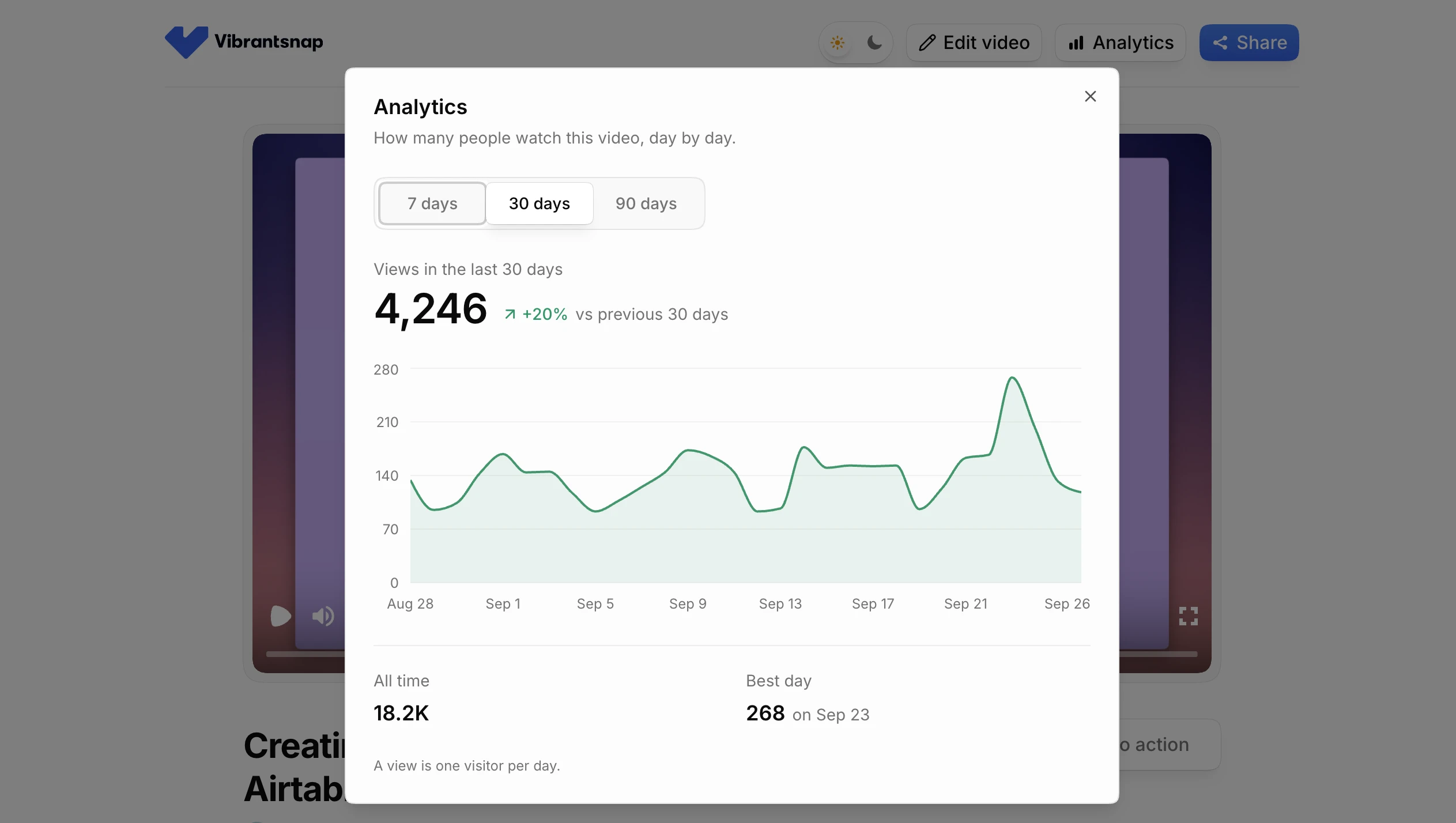
- Did people open it? Look at the views on the share link. From the Pro plan, Vibrantsnap shows the views on each share link. That is all it measures: not how far each person watched, where they stopped or who they are.
- Did the email work? Use clicks in your email tool, not opens. Apple's Mail Privacy Protection downloads remote content in the background, whether or not the reader opens the message (Apple), so open rates overcount. Clicks on the video image and on the "try it" link are the numbers to watch.
- Did they use the feature? This is the real result. In your product analytics, count the accounts that used the feature in the first two to four weeks, out of the accounts that have access to it.
- Did it help sales? Ask reps which deals they sent it to and what happened next. It's anecdotal, but for a small team it's the honest signal you have.
Two cautions:
- Tag the call to action. Add UTM parameters to the link behind the share-page button, so clicks from the video show up in your own analytics.
- Don't read adoption as video impact. The accounts that watch release videos are usually your most engaged accounts, and they would adopt more anyway. Compare several releases with and without a video before you draw conclusions, and treat small differences as noise.
If you need to know where viewers stop watching, publish a copy on a video host that reports audience retention.
Keep it current after launch
A launch video keeps working after release day: in the help center, on the feature page, in sales follow-ups. It has to keep matching the product.
- Drop "new" after launch. Retitle "New: recurring inspections" to "Recurring inspections" when it moves to the help center.
- Keep availability in its own chapter. Plans and packaging change more often than screens. If the availability line sits in its own chapter, updating it means rewriting one line.
- Keep a list. Feature, video link, date recorded, product version, screens shown. At each release, flag the videos whose screens changed.
- Fix the words without re-recording. When only the words are out of date, because a plan was renamed or you need another language, edit that chapter's script in Vibrantsnap and a new voiceover is generated. When the screen changed, re-record that one video.
- Replace it with a tutorial when the questions change. Once customers stop asking "what's new?" and start asking "how do I...?", the launch video has done its job. Record the tutorial.
Which tool to use for release videos
Any screen recorder can capture a release. The differences are in the narration, the zooms, the captions, the languages, and how many minutes you can export each month once every feature ships with a video. Prices below are as listed on each vendor's pricing page on September 28, 2026.
| Tool | Best for | Price | Keep in mind |
|---|---|---|---|
| Vibrantsnap | Narrated release videos from one take, in 10 languages | Free to record, edit and preview; Pro $49/month ($39 billed yearly) with 25 min of export a month | No written guides yet, no in-app delivery; analytics are views per share link |
| Clueso | A video and a step-by-step article from one recording | Free with 10 min of export a month and a watermark; Solo $40/month billed yearly with 15 min a month | Viewership analytics start on Business, $120/month billed yearly |
| Guidde | How-to guides for teams and customers | Free up to 25 videos; Pro $29/creator/month ($19 billed yearly) | In-app delivery (Broadcast) is on the Enterprise plan |
| Loom | A quick face-cam update from the product manager | Free plan with 5-min recordings; Business $18/creator/month | Keeps your voice, no AI voiceover |
| Screen Studio | Automatic zooms on a Mac | $29 month to month, $9/month billed yearly | Mac only |
Count your minutes before you pick a plan. Three features a month, each with a 70-second customer version, a 70-second prospect version and a 20-second cut-down, come to 8 minutes of video. Add a second language and it's 16 minutes, more than Clueso Solo's 15 minutes a month and within Vibrantsnap Pro's 25 min. If you're weighing the two, our Clueso comparison goes through the differences, including Clueso's written articles, which Vibrantsnap doesn't produce yet. See pricing for the Scale and Business plans.
Checklist before you publish
- The first sentence names the outcome.
- Who it's for is clear within the first 15 seconds.
- Two to four clicks, ending on a result with data in it.
- The menu path is said out loud and shown on screen.
- Availability is stated: plans, roles, rollout.
- The data is fictional, believable and free of real customer information.
- Captions are on, and the video makes sense muted.
- The feature name and labels are right in the script and the captions.
- Customers and prospects each get their own version and next step.
- The call-to-action link is tagged.
- The video is on your list, with the recording date and product version.
Frequently asked questions
What is a product launch video in B2B SaaS? A product launch video is a short screen recording that ships with a new feature. It shows the feature doing one real task in your product and tells customers and prospects what changed, who it is for, where to find it and which plans include it. It goes in the changelog, the release email, in-app announcements and sales follow-ups.
How long should a feature announcement video be? Most fit in 60 to 90 seconds: one sentence on what's new, who it's for, two to four clicks, where to find it and who has access. If it runs past two minutes, it is probably two features or a tutorial. Cut-downs for feeds and in-app messages run 15 to 30 seconds.
Should I make one video per release or one per feature? One per feature. Each video can then sit next to its own changelog entry and help article, go to the audience that cares about it, and be re-recorded on its own when that screen changes. The release email can lead with one headline video and link to the others.
What should a release email with a video include? A subject line that names the outcome, one sentence on what's new, a still image that links to the video (Gmail and most versions of Outlook don't play video inside an email), where to find the feature, which plans and roles have it, and one link to try it. Send it from a person, to the users who can access the feature.
Can I publish a release video in my customers' language? Yes. Vibrantsnap narrates in 10 languages: English, French, Spanish, Portuguese, German, Italian, Japanese, Chinese, Korean and Hindi. You can record in one language and publish in another, and interface labels and product names keep their spelling, so the narration matches the screen. Check domain terms in the translated script before you publish.
How do I measure a product release video? In layers. Views on the share link tell you whether people opened it; Vibrantsnap shows them from the Pro plan, without watch time or viewer identity. Clicks in your email tool tell you whether the email worked; opens overcount because Apple Mail Privacy Protection loads remote content in the background. Feature usage in your product analytics tells you whether the video did its job.
Can Vibrantsnap show the video inside my app? No. Vibrantsnap gives you a share link and an embed code, which you paste into the in-app messaging or changelog tool you already use. It doesn't deliver videos inside your app by itself. Guidde offers in-app delivery on its Enterprise plan.
Sources
- Chrome for Developers, Autoplay policy in Chrome
- W3C, Understanding Success Criterion 1.2.2: Captions (Prerecorded)
- Can I email, HTML video support in email clients
- Apple, Mail Privacy Protection & Privacy
Comparison