Published August 14, 2026 in Product Demos · Updated September 9, 2026
AI Demo Video Generators: 7 Tools Tested (2026)

Founder & Content Creator · 8 min read
An AI demo video generator takes the worst part of making product demos — the editing — and does it for you. You record your screen; the AI adds zooms where you click, cuts the silences and "ums," generates captions, and gives your narration a professional voiceover. What used to be an afternoon in a timeline editor becomes a review pass.
Searches for these tools have tripled in the past year, and the market has crowded fast. I build Vibrantsnap, one of the tools in this category, and I've tested all seven below on the same recording. Here's what these generators actually do, how they work, and which one fits which team.
What is an AI demo video generator?
An AI demo video generator turns a raw screen recording of your product into a finished demo video automatically: it detects your clicks and typing to place zooms, removes dead air and filler words, generates editable captions, and replaces or enhances your narration with a natural AI voiceover. The output is a publishable demo — not a raw screen share.
The category sits between two older options. Manual editors (Camtasia, Premiere) give total control and consume hours. Simple recorders (Loom) are instant but ship raw footage. AI generators take the recorder's speed and add the editor's polish, automatically.
How AI demo video generation works
Every tool in this list follows roughly the same five steps:
- Record. Capture your product — usually a browser tab or window — while narrating naturally. Don't worry about mistakes; that's the point.
- Auto-edit. The AI detects click and typing events to place zooms and pans, then cuts silences, hesitations, and filler words from the audio and video.
- Re-voice. Your narration is transcribed and either cleaned up (noise, clarity) or fully replaced with an AI voiceover — same words, professional delivery. Good tools let you edit the script text and regenerate.
- Dress. Captions, backgrounds, layouts, cursor styling, and your branding get applied from presets.
- Export or share. Download in up to 4K, or publish to a hosted share page — ideally one with a call-to-action and view analytics.
The differences between tools come down to which of these steps they automate well, what the output looks like, and how the pricing meters you.
The 7 best AI demo video generators in 2026
1. Vibrantsnap — the full auto-edit, free until you export
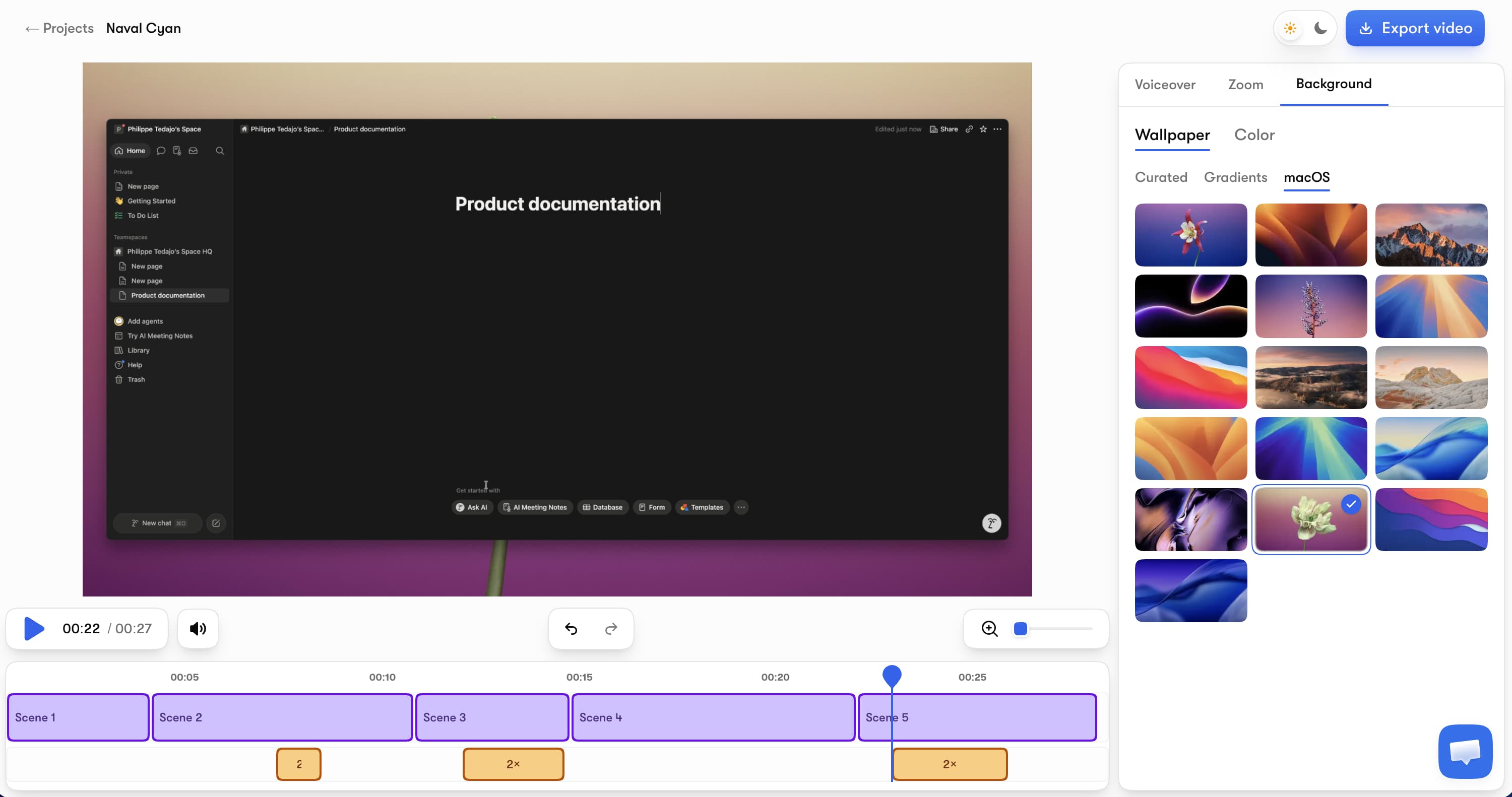
Vibrantsnap (our tool — judge the reasoning, not the placement) automates all five steps in one pass. Record any browser tab, and the AI applies auto-zoom on your actions, a rewritten script that leaves the silences and filler words behind, editable AI captions, and — the differentiator — a professional AI voiceover in multiple voices and languages that you can revert to your real voice any time.
Key features: AI voiceover in 30 voices across 10 languages, auto-zoom with smooth camera movement, AI captions free on every plan, 4K export, 16:9/9:16/1:1 exports, and share pages with a CTA button and link analytics.
Pricing: free to record, edit, and preview — no credit card. Watermark-free exports and the AI audio tools start with Pro at $49/month (90 min of export a month) and Scale at $149/month (400 min of export a month) for higher volume. Auto-editing, AI voiceover, and captions are on every plan, free included; recording length is never capped and there's no annual lock-in.
Honest limits: browser-tab capture (Mac and Windows) rather than full desktop, no written documentation output, no AI avatars.
Best for: founders and product teams that ship demos weekly and want the entire edit automated — recording and editing stay free and uncapped, and plans are sized simply by export minutes. It's also the engine behind our AI video editor workflow.
2. Clueso — AI generation plus written docs, enterprise-priced
Clueso pairs its AI video pipeline (500+ voices, voice cloning, script rewriting, translation, PPT-to-video) with automatic step-by-step article generation.
Pricing: Free allows 10 minutes of exports per month at 1080p. Solo is $40/month billed yearly with 3 hours of video exports per year; Business is $120/month (annual) for 2 users and 6 hours/year.
Honest limits: the yearly export quotas are tight for anyone shipping regularly, and the price assumes a documentation team's budget. More in our Clueso alternatives guide.
Best for: enterprise documentation and training teams that need video and articles from one recording.
3. Trupeer — dual video + guide output with metered minutes
Trupeer generates an AI-edited video and a written guide from each recording, with AI translation and avatars on higher tiers.
Pricing: free 10-day trial (10 AI video minutes, 8-minute recording cap); Pro $40/month (annual) with 20 AI video minutes per month and a 12-minute recording cap; Scale $199/month for 100 minutes.
Honest limits: 20 minutes of generated video a month runs out fast, and recordings are hard-capped at 12-15 minutes. Budget for Scale if you're serious.
Best for: teams that want Clueso-style output with a slightly different quota shape.
4. Guidde — fastest AI how-to videos for documentation
Guidde captures a browser workflow and generates a narrated how-to video with visual callouts in minutes — the lightest tool here.
Pricing: free up to 25 how-to videos; Pro $19/month (annual) for unlimited videos, no watermark, and brand kit; Business $39/month adds unlimited text-to-voice and desktop capture.
Honest limits: output is documentation-styled (step captures + TTS narration), not a cinematic marketing demo; voice quality on lower tiers is functional rather than impressive.
Best for: support and ops teams generating internal how-to libraries at speed.
5. FocuSee — local auto-editing app for Windows and Mac
FocuSee (by Gemoo) is a desktop app that auto-edits as you record: auto pan and zoom on clicks, cursor effects, 3D motion, dynamic layouts, AI audio enhancement, and a teleprompter — with a 60-day money-back guarantee. It's frequently pitched as the cross-platform answer to Mac-only cinematic recorders, often with a lifetime-license option that subscription-averse buyers appreciate.
Honest limits: no AI voiceover comparable to the cloud tools — the polish is visual, your narration stays yours — and the ecosystem (sharing, analytics) is thinner than the web-based platforms.
Best for: solo creators who want local files, one-time-purchase economics, and automatic visual polish.
6. Arcade — AI videos on credits, interactive demos at the core
Arcade is primarily an interactive demo platform, but it generates AI videos and visuals too. The free plan includes AI voiceovers, 1 published demo, 1 published video, and 200 credits/month; Growth is $50/seat/month ($42.50 annual) with 800 credits/month — and AI videos cost 50 credits per 30 seconds.
Honest limits: at 50 credits per 30 seconds, a monthly credit pool converts to a few minutes of generated video — fine as a companion to interactive demos, expensive as your main video pipeline.
Best for: GTM teams already using Arcade for click-through demos who want matching videos. For the full interactive-vs-video decision, see our product demo software guide.
7. Synthesia — avatar videos from a script (a different job)
Synthesia generates videos of AI avatars presenting a script in 160+ languages — no screen recording involved. Starter is $29/month for roughly 10 minutes of video per month (1,200 credits); Creator is $89/month for about 30 minutes.
Honest limits: it's not a demo generator in the screen-capture sense — you can't show your actual product UI in motion with it. It's here because people compare the two categories constantly, and the answer is: avatar tools for talking-head training content, screen-based AI generators for product demos. Our full Synthesia review goes deeper.
Best for: corporate training and L&D content where a presenter matters more than the product screen.
Where AI still falls short (and where it doesn't matter)
Testing seven of these tools back to back makes the limits obvious — and they're worth stating honestly:
- The script is still yours. AI fixes delivery, pacing, and audio quality. It doesn't know your positioning, your "aha" moment, or what to leave out. A great demo is written before it's recorded — our demo script generator helps with exactly that.
- Product feel is approximated. Auto-zoom guesses what matters from clicks. It's right most of the time; for a launch hero video you'll still want to nudge zoom timing by hand.
- Manual editing wins on narrative complexity. Multi-scene stories, b-roll, motion design — that's Camtasia/Premiere territory. AI generators win the 90% of demos that are "show the product clearly, quickly, and professionally."
For that 90%, the trade is unambiguous: in our tests, the same 4-minute walkthrough took 10-20 minutes end-to-end with AI generators versus 2-4 hours manually — with better audio than the raw take in every single case.
How we tested
I recorded the same 4-minute SaaS dashboard walkthrough with each tool (or generated the closest equivalent for Arcade and Synthesia), used each product's AI features end-to-end, and exported or published the result. I compared output quality, production time, metering (minutes, credits, or unlimited), and real monthly cost at 4 demos/month. Prices were verified on each vendor's official pricing page on August 14, 2026.
Frequently asked questions
What is an AI demo video generator? An AI demo video generator turns a raw screen recording of your product into a finished demo video automatically — it adds zooms on your clicks, cuts silences and filler words, generates captions, and replaces or enhances your narration with an AI voiceover. It replaces the hours of manual timeline editing that used to sit between a recording and a publishable demo.
What is the best AI demo video generator? For most founders and SaaS teams, Vibrantsnap — it automates the full edit (AI voiceover, auto-zoom, captions), is free to record and edit, and exports from $49/month with 90 min of export a month on Pro and 400 min of export a month on Scale. Clueso and Trupeer are strong if you also need written documentation generated, and FocuSee if you prefer a local desktop app. Synthesia is a different category: avatar videos from a script, not screen recordings.
Can AI make a product demo video for free? Partially. Vibrantsnap lets you record, auto-edit, and preview for free with AI captions included — the watermark only disappears on a paid export (plans from $49/month). Arcade's free plan includes AI voiceovers and one published video, and Clueso's free tier allows 10 minutes of exports per month at 1080p. A fully produced, watermark-free AI demo generally requires a small paid plan.
Do AI demo video generators replace video editors? For standard product demos — launches, feature walkthroughs, onboarding clips — yes, the AI edit is good enough to publish and takes minutes instead of hours. For brand films, complex narratives, or heavy motion design, a human editor with a manual tool like Camtasia still wins. The script also stays human: AI polishes delivery, it doesn't decide your story.
How long does it take to make a demo video with AI? In our tests, a 4-minute product walkthrough went from recording to exported, polished demo in 10-20 minutes with AI generators (most of it recording and reviewing), versus 2-4 hours editing the same footage manually. The AI handles zooms, cuts, captions, and voiceover in one pass; you review and adjust.
Next steps: Walk through the full production process in how to make a product demo video with AI, compare the whole market (video and interactive) in best product demo software, or see why avatar tools solve a different problem in our Synthesia review.
Comparison