Published August 14, 2026 in Product Demos · Updated September 9, 2026
10 Best Product Demo Software Tools Tested (2026)

Founder & Content Creator · 10 min read
"Product demo software" covers two very different families of tools, and picking the wrong family wastes more money than picking the wrong tool. Demo video software produces a polished film of your product — with narration, zooms, and captions — that plays anywhere. Interactive demo software builds a click-through replica of your product that prospects drive themselves, embedded on your site or sent by sales.
I build Vibrantsnap, a demo video tool, and I've tested all ten products below hands-on — same SaaS walkthrough recorded or rebuilt in each, exported or published, timed, and priced at a realistic team volume. This guide first helps you pick the right family, then the right tool inside it.
Demo video vs interactive demo: pick your medium first
Ask one question: who controls the demo?
- You control it → demo video. You script the story, the pacing, and the "aha" moment. Videos autoplay on landing pages, live on YouTube, get clipped for social, and slot into cold outreach. They're also the only format that works when your product's real UI isn't ready to be poked at.
- The prospect controls it → interactive demo. They click through your actual flows at their own pace. Interactive demos convert well embedded mid-funnel ("try it yourself" on a feature page) and in sales follow-ups, but they can't autoplay, can't live on YouTube, and take longer to build per flow.
Mature teams usually run both: a video for reach and narrative, interactive demos for self-serve evaluation. If you can only afford one, match it to your funnel — content-led growth favors video; sales-led and PLG website plays favor interactive. For the interactive side specifically, we keep a deeper ranking in our product tour software guide.
Quick comparison: the 10 best product demo software tools
| Tool | Type | Starting price | AI voiceover | Best for |
|---|---|---|---|---|
| Vibrantsnap | Video | From $49/mo (free to record & edit) | Yes | Polished demo videos, fast, on a budget |
| Screen Studio | Video | $29/mo or $108/yr | No | Cinematic Mac-only recordings |
| Tella | Video | $13/user/mo (annual) | No | Creator-style videos, manual polish |
| Clueso | Video + docs | $40/mo (annual) | Yes | Enterprise documentation teams |
| Trupeer | Video + docs | $40/mo (annual) | Yes | Video + written guides together |
| Camtasia | Video | ~$179.88/yr | Higher tiers | Frame-level manual editing |
| Arcade | Interactive | Free / $50/seat/mo | Yes | GTM teams, embedded product tours |
| Supademo | Interactive | Free / $38/mo (annual) | Yes | Fast click-through demos |
| Storylane | Interactive | Free (1 demo) | Yes | Marketing & sales demo hubs |
| Navattic | Interactive | Free (1 demo) | From paid tiers | HTML-capture product tours |
Demo video software: the 6 best tools
1. Vibrantsnap — the fastest path from recording to polished demo
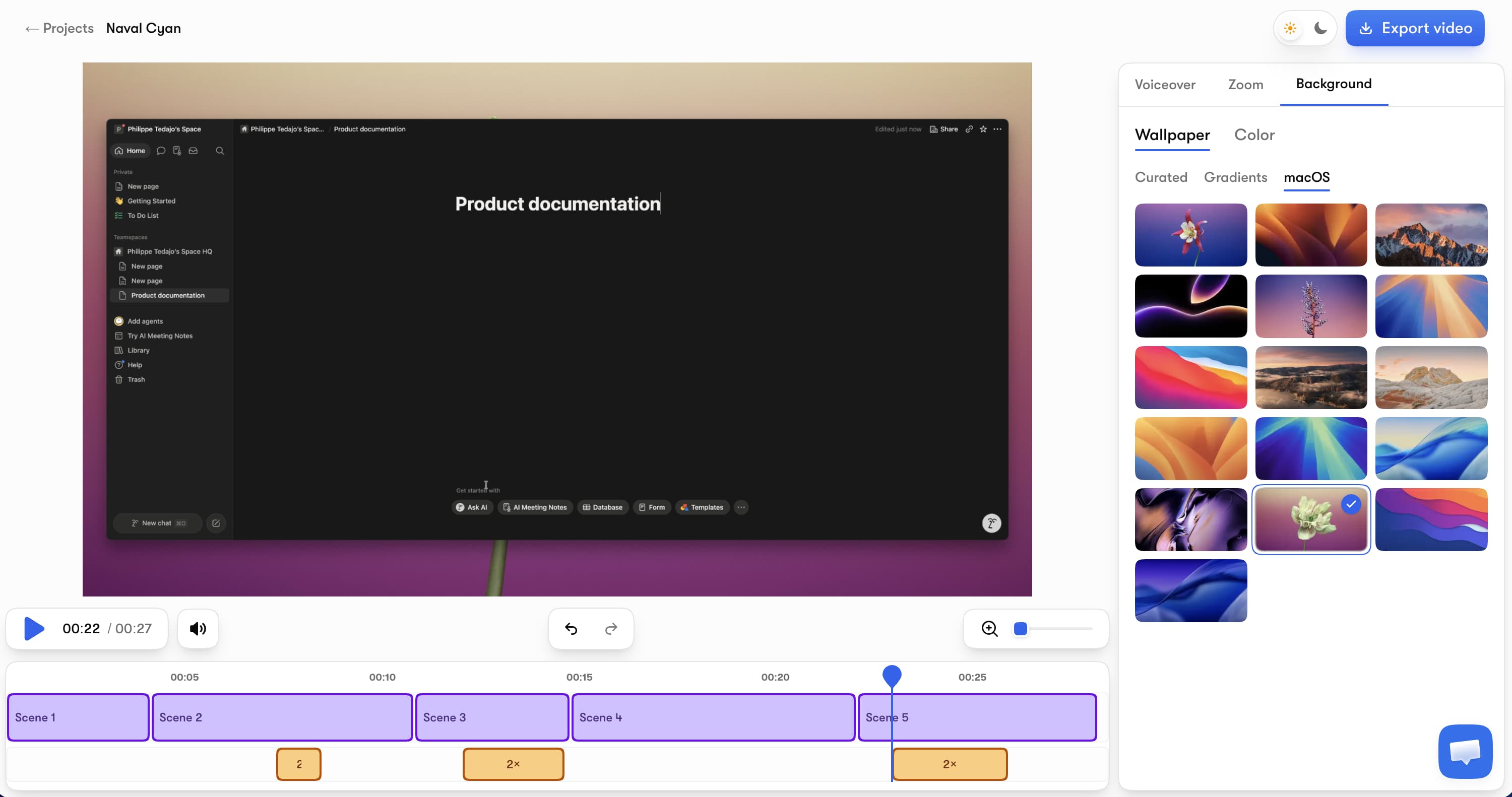
Vibrantsnap (our tool — judge the reasoning, not the placement) exists because most demo videos die in the edit. You record a browser tab while talking through your product naturally; the AI then replaces your narration with a professional voiceover, auto-zooms on your clicks and typing, cuts silences and filler words with rewrites the narration so the fillers don't survive, and generates editable captions — automatically.
Key features:
- AI voiceover in multiple voices and languages, revertible to your real voice any time
- Auto-zoom that follows the action with smooth camera movement
- A script that cleans itself — fillers and false starts don't survive the rewrite
- AI captions free on every plan, editable word by word
- 4K export in 16:9, 9:16, 4:5, or 1:1
- Share pages with a call-to-action button and built-in viewer analytics
Pricing: free to record, edit, and preview with no credit card. Watermark-free exports plus the AI audio tools start with Pro at $49/month (90 min of export a month) and Scale at $149/month (400 min of export a month) for higher volume — auto-editing, AI voiceover, and captions on every plan, free included, and no annual lock-in.
Honest limits: browser-tab capture only (no full-desktop native app), no written step-by-step doc generation, no AI avatars.
Best for: founders and SaaS teams who ship demos often — launches, feature walkthroughs, onboarding clips — and want studio output without an editor. Start with the free demo script generator if you want the narration written for you.
2. Screen Studio — cinematic polish, Mac only
Screen Studio made auto-zoom famous: smooth cursor movement, elegant backgrounds, beautiful motion out of the box. It records iPhone/iPad too, and exports up to 4K.
Pricing: $29/month or $108/year ($9/month billed annually). Subscription-only for new buyers — the old $229 one-time license was discontinued. No free tier: the app runs without a plan, but exporting requires one.
Honest limits: macOS only, no AI voiceover, and every word of narration is still on you. The subscription switch frustrated part of its base — which is why we wrote a full Screen Studio alternatives breakdown.
Best for: Mac-based creators who want maximum visual polish and don't need narration help.
3. Tella — creator-style videos with transcript editing
Tella records screen and camera, then lets you edit by transcript — delete a sentence in the text, it's cut from the video. Output is clean and personal, popular with YouTubers and founders who want their own face and voice front and center.
Pricing: Pro $13/user/month (annual, roughly half the monthly rate) with unlimited videos and 4K; Premium $19/user/month adds custom domain, no Tella branding, and 60fps. No permanent free plan — 7-day trial.
Honest limits: no AI voiceover or auto-zoom — the polish is manual, and your narration is your narration.
Best for: creator-led content where personality matters more than automation.
4. Clueso — video plus documentation at enterprise scale
Clueso turns recordings into polished videos and step-by-step articles, with 500+ AI voices, voice cloning, script rewriting, translation, and PPT-to-video.
Pricing: Free (10 min of exports/month, 1080p); Solo $40/month billed yearly with 3 hours of video exports per year; Business $120/month (annual) for 2 users and 6 hours/year; Enterprise custom.
Honest limits: the export quotas are the story — 3 hours per year on Solo is 15 minutes a month. Priced and shaped for documentation teams, not founders. Full breakdown in our Clueso alternatives guide.
Best for: enterprise teams producing training libraries and product docs in volume.
5. Trupeer — the doc-plus-video generator
Trupeer is Clueso's closest rival: one recording becomes an AI-edited video and a written guide, with translation and avatars on higher tiers.
Pricing: free 10-day trial; Pro $40/month (annual) with 20 AI video minutes/month and a 12-minute recording cap; Scale $199/month for 100 minutes and 3 editors.
Honest limits: minute quotas and recording caps bite fast; the comfortable tier is $199/month.
Best for: teams that need the dual output and stay inside the quotas.
6. Camtasia — manual control for training teams
Camtasia (TechSmith) is the veteran desktop editor: precise timeline control, callouts, quizzes, and a mature ecosystem. Mid-tier runs about $179.88/year; the AI-loaded Pro tier is $599/year.
Honest limits: everything the tools above automate — zooms, cuts, captions, narration — is manual work here. Budget hours, not minutes.
Best for: L&D teams building long-form courses that justify the editing time.
Interactive demo software: the 4 best tools
7. Arcade — interactive demos for GTM teams
Arcade captures your product via Chrome extension, desktop app, or Figma plugin and turns it into a click-through demo with hotspots, forms, CTAs, and AI voiceover — plus AI-generated videos on a credit system.
Pricing: Free includes AI voiceovers, 1 published demo, 1 published video, and 200 credits/month. Growth is $50/seat/month ($42.50 annual) with unlimited demos, 800 credits/month, MP4/GIF export, and custom branding. AI videos cost 50 credits per 30 seconds.
Honest limits: video output is credit-metered, so heavy video use gets expensive; the sweet spot is clearly the interactive side.
Best for: marketing and sales teams embedding product tours across the funnel.
8. Supademo — the fastest interactive demo builder
Supademo is the quickest way to get a guided click-through live: record a flow, get annotated steps with AI voiceover, share as link or embed.
Pricing: Free includes 5 interactive demos, 50 video recordings in 4K, and unlimited views. Scale is $38/month per creator (annual, $50 monthly); Growth at $350/month (annual) adds HTML demos and voice cloning.
Honest limits: screenshot-based capture approximates real product motion; the advanced HTML capture lives on the expensive Growth tier.
Best for: small teams that want interactive demos live this week, not this quarter.
9. Storylane — demo hubs for marketing and sales
Storylane builds guided demos from screenshots or video and organizes them into demo hubs for campaigns and sales cycles. The free plan includes 1 seat and 1 published demo with unlimited views; paid plans are billed per seat.
Honest limits: public per-seat pricing isn't fully published, and like all interactive platforms the output lives on the web — no autoplay video reach.
Best for: GTM teams running many demos across campaigns who want them organized and tracked.
10. Navattic — HTML-capture product tours
Navattic captures true HTML replicas of your product, which keeps interactive tours crisp and editable (swap text, blur data). Free Starter includes 1 seat and 1 demo with unlimited views; AI voiceovers and narrated demos start on paid annual tiers.
Honest limits: HTML capture has a learning curve, and pricing is annual-only beyond the single free demo.
Best for: PLG teams who want pixel-perfect interactive tours on marketing pages.
The best sales demo software: what actually matters
If demos are a sales motion for you, evaluate tools on three axes, not on feature counts:
- A CTA where the demo lives. A demo that ends without a next step is a dead end. Vibrantsnap share pages include a call-to-action button; Arcade and Storylane support CTAs and lead-capture forms inside the demo itself.
- Viewer analytics. Who watched, how far, and when they dropped off — that's follow-up intelligence. Vibrantsnap has view tracking built in; the interactive platforms track step-level engagement. We covered why this changes pipeline conversations in product demo analytics.
- Personalization speed. Sales demos work best when they feel made for the prospect. Video tools win here on speed (re-record 30 seconds, AI re-voices it); interactive tools win on letting the prospect explore their own use case.
How we tested
Same protocol for all ten: I recorded (or rebuilt, for the interactive tools) the same 4-minute SaaS dashboard walkthrough, produced a finished demo with each product's own features, and published or exported it. I measured production time, output quality, sharing/analytics options, and the real monthly cost at 4 demos per month. All prices were verified on each vendor's official pricing page on August 14, 2026.
Which product demo software should you pick?
- You need polished demo videos, often → Vibrantsnap. Free to test on your own product today.
- You're Mac-only and want cinematic control → Screen Studio.
- You want your own face and voice, creator-style → Tella.
- You need video + written docs at scale → Clueso or Trupeer (watch the quotas).
- You're building a training library with an editor's patience → Camtasia.
- You want prospects to click through the product themselves → Arcade or Supademo, with Storylane/Navattic for GTM-heavy or HTML-perfect variants.
Frequently asked questions
What is the best product demo software? It depends on the medium. For polished demo videos, Vibrantsnap is the strongest pick — it's free to record and edit, adds AI voiceover, auto-zoom, and captions automatically, and exports from $49/month. For interactive click-through demos embedded on your site, Arcade and Supademo lead the category. Many teams end up using one of each, because videos and interactive demos do different jobs.
What is the difference between a demo video and an interactive demo? A demo video is a produced film of your product — it plays everywhere (YouTube, social, email, landing pages) and you control the narrative. An interactive demo is a click-through replica of your product — the viewer drives, which is powerful embedded on a website or in sales follow-ups, but it can't autoplay on social platforms or YouTube. Video is push, interactive is pull.
What is the best sales demo software? For sales, prioritize three things: a call-to-action on the video page, viewer analytics (who watched, how far), and fast personalization. Vibrantsnap covers all three for video demos — share pages include a CTA button and built-in analytics. On the interactive side, Arcade and Storylane are built for GTM teams, with forms, CTAs, and engagement tracking.
Is there free product demo software? Yes, every category leader has a usable free tier. Vibrantsnap is free to record, edit, and preview (free exports carry a watermark). Supademo's free plan includes 5 interactive demos, Arcade's includes 1 published demo with AI voiceover, and Storylane and Navattic each offer 1 free published demo. For a $0 fully-produced video demo, expect a watermark somewhere.
What software do companies use to make demo videos? Small teams and founders mostly use AI-assisted recorders like Vibrantsnap, Screen Studio, or Tella, which automate zooms, cuts, and narration. Documentation-heavy teams use Clueso or Trupeer to get video plus written guides. Training and L&D teams still rely on Camtasia when they need frame-level manual control. The common thread: raw screen recordings are no longer shipped as demos — everything gets produced.
Next steps: Learn the full production workflow in how to make a product demo video with AI, see how the AI-first tools compare in AI demo video generators, or go deeper on the interactive side with our product tour software ranking.
Comparison