Published September 14, 2026 in Training & Documentation · Updated October 27, 2026
Customer Education Videos: Build a Program That Scales

Founder & Content Creator · 7 min read
Every SaaS company already does customer education. Most just do it one support ticket at a time. The same "how do I set this up?" question gets answered by a human, in text, hundreds of times, while the product knowledge that should compound into an asset evaporates in a closed ticket.
Customer education videos are how you turn that repeated answer into something that scales: record the workflow once, publish it where customers actually look, and let the video answer the next five hundred instances. Companies as different as Clueso and Trupeer's target accounts and the enterprise customers of Skilljar and Docebo all converge on the same finding: customers would rather watch the product being used than read about it.
This guide covers what a working program looks like, the four content types that matter, when you genuinely need a customer education platform versus just the videos, and how to keep the library alive after version 2 ships.
What customer education actually covers
Customer education is every structured attempt to make customers better at using your product. In practice it spans four jobs:
- Onboarding — getting a new account from signup to first value. This is the highest-leverage slice: onboarding videos measurably reduce churn because the drop-off risk is concentrated in the first weeks.
- Feature adoption — teaching existing customers the features they're paying for but not using. Expansion revenue lives here.
- Self-serve support — the how-to library that deflects tickets before they're filed.
- Certification and academies — formal courses with completion tracking, for products complex enough that "certified admin" is a job qualification.
Most companies need the first three long before the fourth, and the first three are mostly a content problem, not a platform problem. That distinction decides your budget, so let's make it explicit.
The four video types, in priority order
1. Getting-started series
Three to six short videos that walk a new customer from empty account to first result: initial setup, the core workflow, the first integration. Keep each video to a single milestone. This series earns a place everywhere a new customer looks: the welcome email, the empty states in your app, the top of the help center.
2. Workflow how-tos
The library that mirrors your support ticket topics. Each video answers one question a real customer asked, with the title phrased the way customers search: "How to invite your team," not "Collaboration features overview." This category grows forever, and it's where recording speed matters most: if a how-to takes a day to produce, the library stalls at ten videos.
3. Feature deep dives
Longer, opinionated videos on the features that separate power users from churn risks. Where a how-to shows the clicks, a deep dive shows the judgment: when to use the feature, how mature teams configure it, what to avoid.
4. Release updates
Short videos for each meaningful release, showing the change in the real product. These do double duty as customer success touchpoints: a 90-second "here's what's new and why you'd care" video outperforms a changelog nobody reads.
Building the program: five steps
Step 1 — Mine your support queue. Export the last 90 days of tickets and tag the repeated questions. The top ten topics are your content roadmap; you don't need a survey. Your support team can name most of them from memory.
Step 2 — Rank by volume × stakes. A question asked weekly during onboarding outranks one asked monthly by power users. Anything that blocks activation goes first.
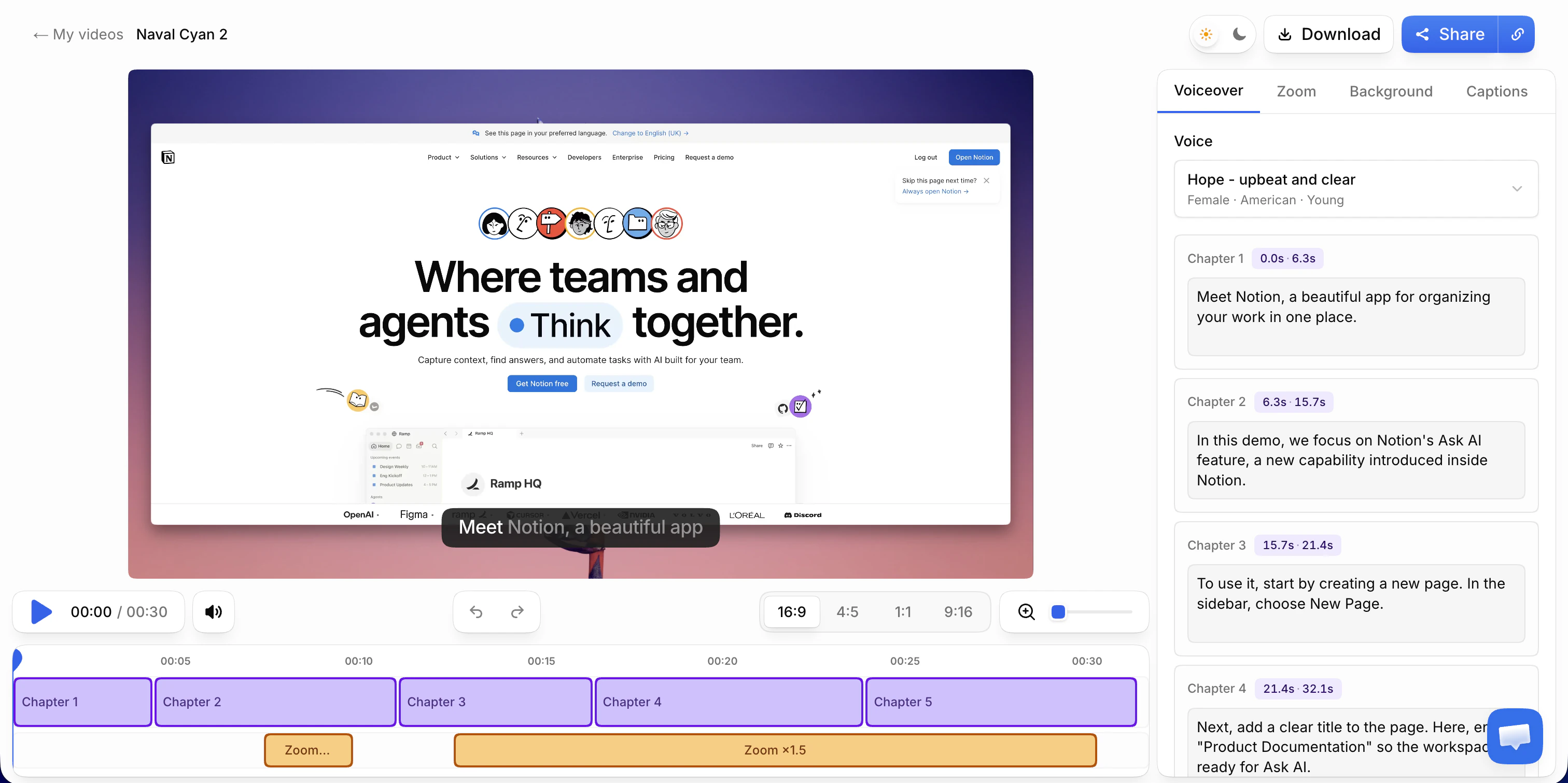
Step 3 — Record workflow-first. For SaaS, the product on screen is the content: record the real interface performing the real task while you explain it in plain words. Don't script for perfection; a natural take with the hesitations cleaned up afterward beats a stiff read-through. (This is precisely the part Vibrantsnap automates: the script rewrite drops the false starts, auto-zoom keeps the relevant control legible, and captions generate on every plan. The full production process is covered in our training video guide.)
Step 4 — Publish where customers already are. In order of impact: embedded in the relevant help center article, with the step-by-step guide from the same recording copied into the article text, linked from support replies ("here's your answer, and here's a 2-minute video"), placed in onboarding emails, and surfaced in-app next to the feature it explains. A video that lives only on a "Resources" page is a video nobody watches.
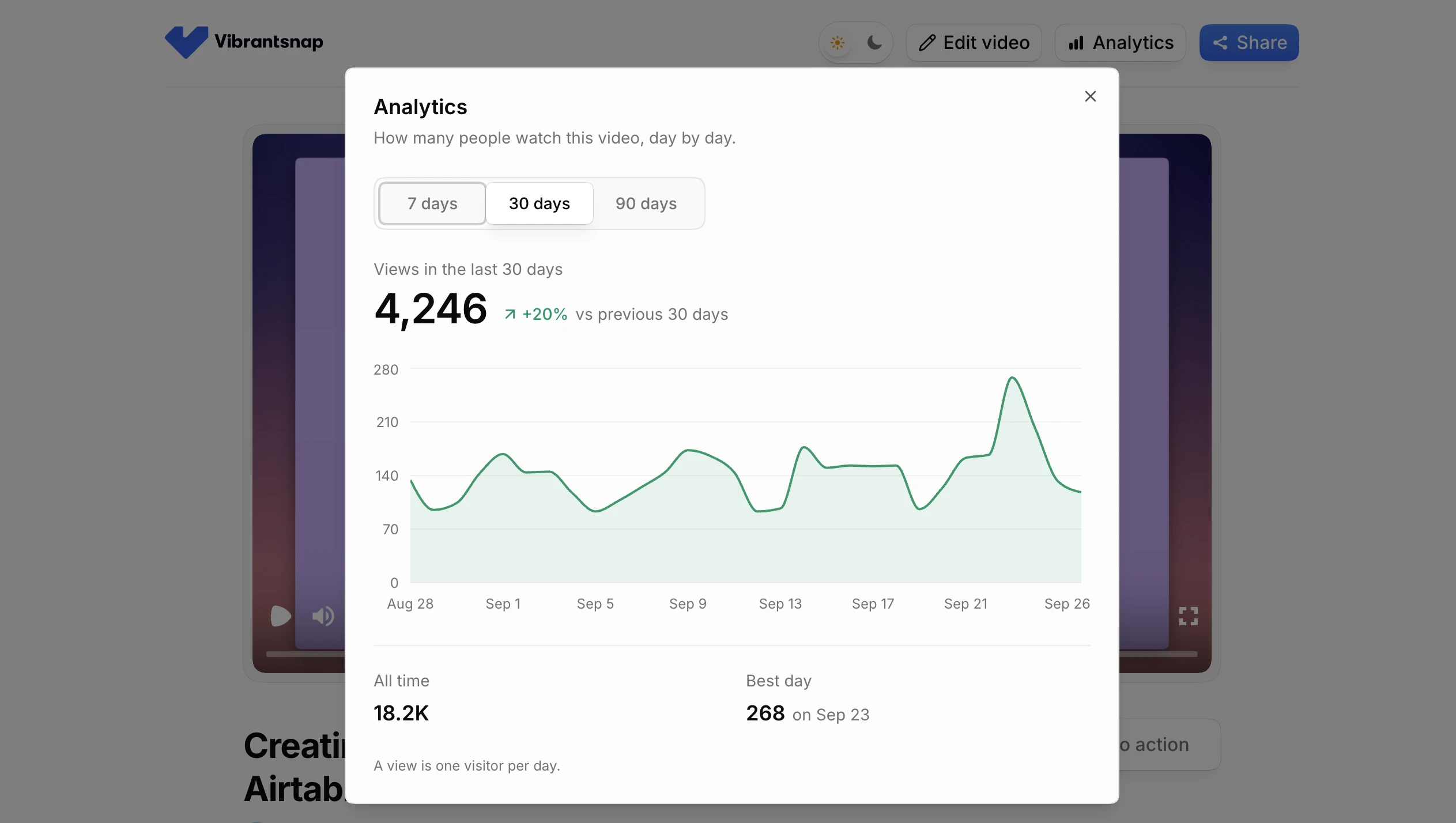
Step 5 — Measure use, deflection, adoption. Views per video tell you which topics matter. Ticket counts on covered topics, before versus after, tell you whether the library is working. If you publish with share links that carry view analytics, you get the first signal without any extra tooling.
Do you need a customer education platform?
Search for customer education platform and you'll meet a category of serious software: Skilljar, Docebo, Intellum, Thought Industries, WorkRamp. They're real products solving a real problem, but it's worth being precise about which problem, because they're priced as enterprise contracts (quote-based, typically annual commitments).
| You need | A platform delivers | You could instead use |
|---|---|---|
| Structured courses & learning paths | Course builder, prerequisites, sequencing | An ordered help-center collection |
| Certification | Assessments, certificates, expiry | None, this genuinely needs a platform |
| Completion tracking per learner | LMS-grade reporting, CRM sync | None: share links count views per video, not per learner |
| A branded academy | Hosted academy site | A "Learn" section in your help center |
| Content creation | Not included: bring your own videos | A screen recorder with auto-editing |
Two honest observations from that table. First, no customer education platform makes the videos: content creation is your job either way, which is why teams end up pairing a platform (or a plain help center) with a training video tool. Second, the only rows where a platform is irreplaceable are certification and per-learner tracking. If customers don't need certificates and your CS team doesn't need per-learner completion reports for contract renewals, a help center with embedded videos does the same job for roughly the cost of your video tooling alone.
The pragmatic sequencing: content first, platform when the content outgrows it. A 40-video library that customers actually use is a strong position from which to buy Skilljar. Twelve months of platform licence waiting on content that doesn't exist is the expensive version of the same journey.
Keeping the library alive when the product changes
The failure mode of every customer education program is not launch. It's month six, when the interface has changed and a third of the library shows the old navigation. Stale videos are worse than no videos: they actively teach customers the wrong thing.
Three habits prevent it:
- One task per video. Small videos are cheap to re-record. The 20-minute masterclass that covers six features is obsolete the moment any one of them changes.
- Tie videos to features, not campaigns. Keep a simple sheet mapping each video to the product area it shows. When a release touches that area, the affected videos are a lookup, not an archaeology project.
- Make re-recording cheaper than explaining. This is a tooling decision. If updating a video means a mic, a quiet room, and an editing timeline, it won't happen. If it means re-recording the tab and letting the AI redo the voiceover and captions, with the same voice reading the unchanged sections identically, it's a 15-minute task. Vibrantsnap's voiceover is deterministic (an unchanged script produces the exact same read), which means an updated video doesn't sound like a different narrator took over halfway.
Where Vibrantsnap fits
Vibrantsnap covers the production layer of customer education: record a browser tab with the Chrome extension or import a video you already have, and get back an edited video with an AI voiceover in a studio voice (30 voices, 10 languages), auto-zoom on the actions, editable captions, and a share page with a call-to-action and view analytics. From the same recording, it also writes a step-by-step guide with a screenshot for each step, free on every plan, that you copy into your help center editor. Recording and editing are free; exporting the video starts at $49/month, with no cap on exports and 25 AI credits a month (1 AI credit = 1 AI voiceover), the kind of budget that survives a "let's try making five videos" experiment. You can compare it directly with the other tools in the category.
Frequently asked questions
What are customer education videos? The videos a company makes to teach customers its product: getting-started walkthroughs, feature deep dives, workflow how-tos, and release updates. They live in help centers, onboarding emails, in-app messages, and academies, and they're measured in adoption and deflected tickets rather than signups.
Do I need a customer education platform to start? Usually not. Platforms like Skilljar, Docebo, Intellum, and Thought Industries add course structure, certification, and per-learner tracking on top of content you still have to produce yourself, at enterprise prices. Until certification or LMS-grade reporting is a requirement, a help center with embedded videos and share-link analytics covers the same jobs.
How long should a customer education video be? One task per video, usually 1–4 minutes. Five short, searchable videos beat one 20-minute overview both for findability and for how cheap they are to update when the product changes.
How do you measure customer education? Views tell you which topics matter, ticket volume on covered topics (before vs. after) tells you whether the library deflects work, and comparing activation between watchers and non-watchers tells you whether it moves adoption. The first two need nothing more than view analytics and your support tool's tags.
What tools do you need? For SaaS, a screen recorder with automatic editing covers most of the library, because the product on screen is the content. Course-authoring suites (iSpring, Articulate) enter when you need SCORM and assessments; AI avatar tools (Synthesia) fit policy-style content with no screen to show. The training video software comparison maps the whole field.
Next steps: Start with the highest-leverage slice in our SaaS onboarding videos breakdown, learn the production workflow in how to make a training video, or see which training video software fits which job.
Comparison