Published August 14, 2026 in Tools Comparison · Updated September 9, 2026
8 Scribe Alternatives That Make Real Videos (2026)

Founder & Content Creator · 9 min read
Scribe is excellent at what it does: watch you click through a process and spit out a written step-by-step guide with annotated screenshots. But that's also exactly why you're here — Scribe doesn't make videos. No narration, no motion, no walkthrough your customer can press play on. And searches for "Scribe alternatives" are up 23% year over year, largely from teams hitting that wall.
I build Vibrantsnap, an AI demo video tool, so this comparison comes from inside the category — and from hands-on testing. I documented the same SaaS workflow in every tool below and compared what actually came out the other side: a real video, a written doc, or both. Here are the eight alternatives worth considering in 2026, grouped by the output you actually need.
Quick comparison: Scribe alternatives at a glance
| Tool | Output | Starting price | AI voiceover | Best for |
|---|---|---|---|---|
| Vibrantsnap | Polished video | From $49/mo (free to record & edit) | Yes, multiple voices & languages | Product demos & onboarding videos |
| Guidde | How-to video | Free / $19/mo (annual) | Text-to-voice | Fast internal video documentation |
| Trupeer | Video + written doc | $40/mo (annual) | Yes | Dual output from one recording |
| Clueso | Video + written doc | $40/mo (annual) | Yes, 500+ voices | Documentation teams at scale |
| Loom | Raw video message | Free / $18/user/mo | No | Quick async explanations |
| Camtasia | Manually edited video | ~$179.88/yr | On higher tiers | Long-form training courses |
| Descript | Edited video/podcast | Free / $16/mo (annual) | Voice cloning | Text-based video editing |
| Tango | Written guide | Free tier | No | Staying with written docs |
TL;DR: If you're leaving Scribe because you need video, go Vibrantsnap for customer-facing demos and onboarding, or Guidde for internal how-to volume. If you need video and written docs from one recording, look at Trupeer or Clueso. If written guides are actually fine, Tango is the closest direct swap.
Why look for a Scribe alternative?
Scribe has a genuinely useful free tier and solid paid plans (Pro Personal at $25/month annual, Pro Team at $13/seat annual with a 5-seat minimum). People still leave for three reasons:
- No video, full stop. Every Scribe output is a written guide with screenshots. Retention data across the industry keeps showing the same thing: for software walkthroughs, people watch videos and skim docs. If your onboarding, sales, or training content needs motion and narration, Scribe can't produce it on any plan.
- Screenshots go stale silently. A written guide with 14 screenshots breaks the day your UI changes. Video isn't immune to that either — but re-recording a 3-minute video with an AI tool is often faster than re-capturing and re-annotating a long screenshot trail.
- Customer-facing polish. Scribe guides look like internal documentation because that's what they are. A product demo on your landing page or in a sales email needs to look produced.
If any of that is your situation, here's the field.
Video-first Scribe alternatives
1. Vibrantsnap — polished demo videos with AI voiceover
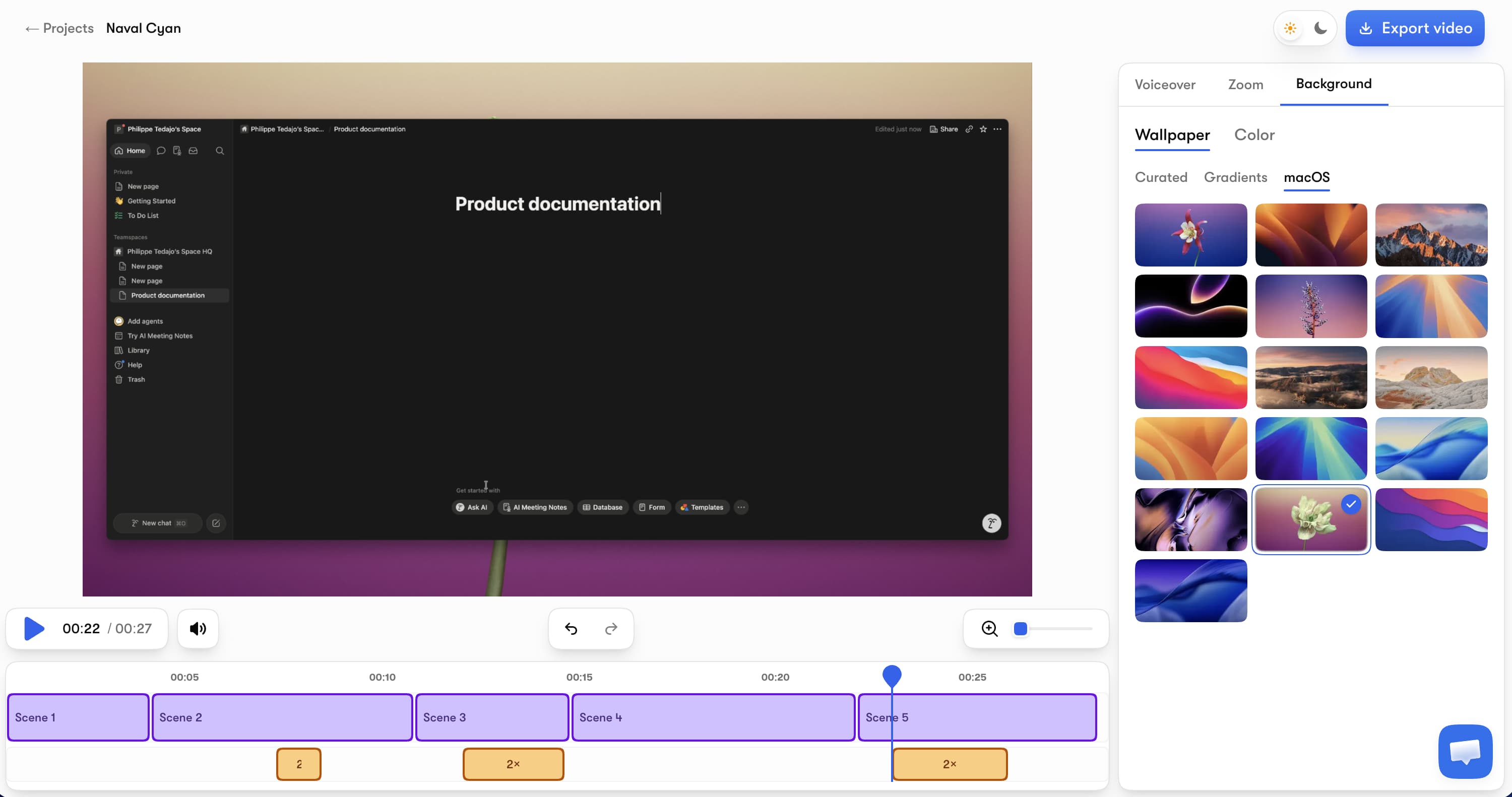
Vibrantsnap (our tool — judge the reasoning, not the placement) is the shortest path from "I recorded my screen" to "this looks like a produced demo." Record any browser tab while talking through the workflow naturally, and the AI does the post-production: your narration becomes a professional AI voiceover, auto-zoom follows your clicks, the rewritten script leaves the fillers behind, and captions generate automatically.
Key features:
- AI voiceover in multiple voices and languages — revertible whenever you want your original take back
- Auto-zoom that tracks clicks and typing with smooth camera movement
- A script that cleans itself — fillers, hesitations and false starts don't survive the rewrite
- AI captions on every plan, including free — editable word by word
- 4K export in 16:9, 9:16, 4:5, or 1:1
- Shareable pages with a call-to-action button and built-in analytics
Pricing: Free to record, edit, and preview — no credit card. Watermark-free exports plus the AI audio tools start with Pro at $49/month (90 min of export a month) and Scale at $149/month (400 min of export a month) for higher volume. Auto-editing, AI voiceover, and captions are on every plan, free included, and recording length is never capped.
Honest limits: Vibrantsnap records from the browser on Mac and Windows, and it deliberately doesn't do what Scribe does — there's no written step-by-step article generation and no AI avatars. It makes the video side exceptional instead.
vs Scribe: Different species. Scribe documents a process in text; Vibrantsnap turns the same recording into a video someone will actually watch to the end. Many teams run one of each — written SOPs in a docs tool, customer-facing walkthroughs in video. If you want the narration scripted before you record, our free demo script generator writes it for you.
2. Guidde — documentation-speed how-to videos
Guidde is the natural bridge for Scribe users: it's also a browser extension that captures a workflow step by step — but the output is a narrated how-to video with visual callouts instead of a written guide.
Pricing: Free covers up to 25 how-to videos. Pro at $19/month (annual, $29 monthly) unlocks unlimited videos, watermark removal, brand kit, and PDF/PPT export. Business at $39/month adds unlimited text-to-voice and desktop capture.
Honest limits: The output keeps a documentation feel — captured steps with zooms and TTS narration — rather than a cinematic demo look. Base-tier voices are serviceable, not impressive.
Best for: Support and ops teams that liked Scribe's speed but need the result to be watchable. It's the most Scribe-like workflow on this list; see our full Guidde alternatives breakdown for how it compares upward.
3. Trupeer — video and written doc from one recording
Trupeer answers the "why choose?" question: record once, get an AI-edited video and a written step-by-step guide. It adds AI translation, avatars, and custom voices on higher tiers.
Pricing: The free tier is a 10-day trial (10 AI video minutes, recordings capped at 8 minutes). Pro is $40/month billed annually ($49 monthly) with 20 AI video minutes per month and a 12-minute recording cap; Scale is $199/month for 100 minutes.
Honest limits: The monthly minute quotas are tight — 20 minutes evaporates fast if video becomes your main format — and recordings are hard-capped at 12–15 minutes.
Best for: Teams that genuinely need both formats and stay inside the quotas. We've covered the category in depth in our Trupeer alternatives guide.
4. Clueso — dual output at documentation-team scale
Clueso plays the same video + written docs game as Trupeer, with a heavier feature set: AI voiceovers with 500+ voices, script rewriting, translation, and PPT-to-video conversion.
Pricing: Free allows 10 minutes of video exports per month at 1080p. Solo is $40/month billed yearly with 3 hours of video exports per year; Business is $120/month (2 users, 6 hours/year, 4K).
Honest limits: The export quotas are measured in hours per year, and the pricing is shaped for documentation teams, not solo creators. Full analysis in our Clueso alternatives comparison.
Best for: Enterprise documentation teams producing training content and SOPs in volume.
5. Loom — the fastest raw video, no polish
Loom is async video messaging: record, get a link, send. Free allows 25 videos capped at 5 minutes; Business at $18/user/month removes limits and unlocks 4K.
Honest limits: No AI voiceover, no auto-zoom, no silence removal — a Loom looks like exactly what it is, one take of you talking over your screen. For internal "here's how you do it" moments that's fine; for anything customer-facing it usually isn't.
Best for: Quick internal explanations. We compared the whole async field in our Loom alternatives roundup.
6. Camtasia — full manual control for training teams
Camtasia (TechSmith) is the veteran desktop editor for tutorial and training video, sold as an annual subscription — mid tier around $179.88/year, Pro with unlimited AI features at $599/year.
Honest limits: Everything the AI tools above automate — zooms, cuts, captions, narration — is manual timeline work here. Budget real editing hours per video.
Best for: L&D teams building long-form, precisely edited courses.
7. Descript — edit video the way you edit text
Descript records your screen and lets you edit the video by editing its transcript — delete a sentence in the text, it's gone from the video. Free tier available; Hobbyist is $16/month (annual) with watermark-free 1080p, Creator at $24/month (annual) unlocks 4K.
Honest limits: It's a full editing suite with a real learning curve, built for long-form content and podcasts more than quick product demos. Powerful, not fast.
Best for: Creators already producing podcasts or long tutorials who want screen recording in the same workflow.
If written guides are actually enough
8. Tango — the closest like-for-like Scribe swap
Tango lives in Scribe's own category: interactive, in-app step-by-step guides captured from your workflow, with a free tier to start. If your honest conclusion after reading this far is "we don't need video, we need better written guides," Tango is the direct comparison to run against Scribe — not the video tools above.
Honest limits: Same fundamental constraint as Scribe — text and screenshots, no narrated video output.
How we tested
I documented the same 12-step SaaS workflow in every tool on this list: captured it, used each product's generation or editing features, and exported the result. I compared output format and quality, production time, real monthly cost at a documentation-team volume, and each plan's export and watermark restrictions. All prices were verified against each vendor's official pricing page on August 14, 2026 — if a number looks different today, it changed after publication.
Which Scribe alternative should you pick?
- Customer-facing demos, onboarding, launch videos → Vibrantsnap. Free to test on your own product; from $49/month when you export.
- Internal how-to videos at Scribe-like speed → Guidde.
- Video + written doc from every recording → Trupeer (watch the minute quotas) or Clueso (watch the yearly export hours).
- Quick, disposable explanations → Loom.
- Long-form training with frame-level control → Camtasia or Descript.
- Actually just better written guides → Tango, or stay on Scribe — it's still the category leader for what it does.
The one-line version: Scribe is a documentation tool that can't make videos, and most "Scribe alternative" searches are really "how do I turn my process knowledge into video" searches. Pick the tool that matches the output your audience will actually consume.
Frequently asked questions
What is the best alternative to Scribe? It depends on the output you need. If you're leaving Scribe because you need real video — demos, onboarding, training — the best alternatives are Vibrantsnap (polished videos with AI voiceover from $49/month), Guidde (fast how-to videos, free up to 25), and Trupeer (video plus written docs together). If you just want a different written-guide tool, Tango is the closest like-for-like option.
Does Scribe make videos? No. Scribe captures a workflow and generates a written step-by-step guide with annotated screenshots. There is no video output on any plan. If your team needs narrated video walkthroughs, you need a video-first tool like Vibrantsnap, Guidde, or Loom.
Is there a free alternative to Scribe? Yes. For video output, Vibrantsnap is free to record and edit with AI captions included (free exports carry a watermark), Guidde's free plan covers up to 25 how-to videos, and Loom's free plan allows 25 videos of up to 5 minutes. On the written side, Scribe's own Basic plan is free, and Tango also offers a free tier.
How much does Scribe cost? Scribe's Basic plan is free in the browser. Pro Personal costs $25 per seat per month billed annually ($35 monthly). Pro Team costs $13 per seat per month billed annually ($17 monthly) with a 5-seat minimum, and adds desktop/mobile capture, branding, screenshot redaction, and PDF/HTML/Markdown export. Enterprise pricing is custom.
What should I use for video documentation instead of Scribe? For customer-facing demo videos, Vibrantsnap produces the most polished output with AI voiceover, auto-zoom, and captions. For internal how-to videos at documentation speed, Guidde is the fastest. If you want each recording to produce a video and a written article at once, Trupeer and Clueso both do dual output — with monthly video-minute quotas to watch.
Next steps: Learn the full workflow in our guide to making a product demo video with AI, see how the whole demo software market compares, or compare Vibrantsnap to more tools.
Comparison