Published September 14, 2026 in Training & Documentation · Updated October 27, 2026
8 Best Camtasia Alternatives for Training Videos (2026)

Founder & Content Creator · 8 min read
Camtasia has been the default answer to "how do we make training videos?" for two decades, and the reasons people leave it haven't changed in years: the per-author annual licence ($179.88 mid-tier, $599 for Pro), the desktop-suite learning curve, and above all the hours. Every zoom, cut, caption, and callout is manual timeline work, multiplied by every video, multiplied again every time the product UI changes.
The good news is that "Camtasia alternatives" is no longer one category. Depending on which pain sent you searching, the right replacement might be an AI tool that does the editing for you, a cheaper manual editor, or a course-authoring suite that goes further than Camtasia. This guide sorts the eight serious options by the job they actually win.
Prices were checked against each vendor's published plans in September 2026.
Quick comparison
| Tool | Type | Editing effort | Entry price | Best for |
|---|---|---|---|---|
| Vibrantsnap | AI screen recorder | Automatic, review after | Free to record; $49/mo to export the video | Software & process training |
| ScreenPal | Recorder + light editor | Manual, simpler | ~$3–8/mo (annual) | Budget manual editing, education |
| Descript | Text-based editor | Manual via transcript | Free; $12/mo Hobbyist | Editing by editing the words |
| OBS Studio | Recorder only | None (bring an editor) | Free | Capture with zero budget |
| Loom | Async messenger | Minimal trims | Free; $18/user/mo | Quick internal explanations |
| Guidde | AI how-to capture | Automatic | Free (25 videos); $19/mo (annual) | High-volume internal how-tos |
| iSpring Suite | Course authoring | Structured authoring | Several hundred $/author/yr | SCORM courses with quizzes |
| Screen Studio | Mac recorder | Auto-polish, light edit | $29/mo or $108/yr | Beautiful Mac-only demo clips |
TL;DR: most Camtasia refugees are making standard software training videos, and for that job Vibrantsnap replaces the timeline hours with an automatic editing pass. ScreenPal is the budget manual option, Descript the "edit like a doc" option, iSpring the "we actually needed an LMS-grade course tool" option.
Why people leave Camtasia
Worth being precise, because the right alternative depends on the exit reason:
- The time per video. A polished 4-minute walkthrough routinely costs an afternoon in the timeline. At ten videos a quarter, editing becomes someone's part-time job.
- The price structure. $179.88–$599 per author per year means every additional person who might make a training video is a licensing decision.
- The learning curve. Camtasia is a professional editing suite; the colleague who knows the workflow usually isn't the colleague who knows the software.
- Update rot. Manual edits don't survive UI changes: updating a video means reopening the project and redoing the affected work by hand.
And the honest counterpoint: if you need frame-accurate control, in-video quizzing, and deep callout systems, Camtasia is still genuinely good. Two tools on this list (iSpring, Descript) compete on control; the rest compete on making control unnecessary.
The 8 best Camtasia alternatives in 2026
1. Vibrantsnap — the editing pass, automated
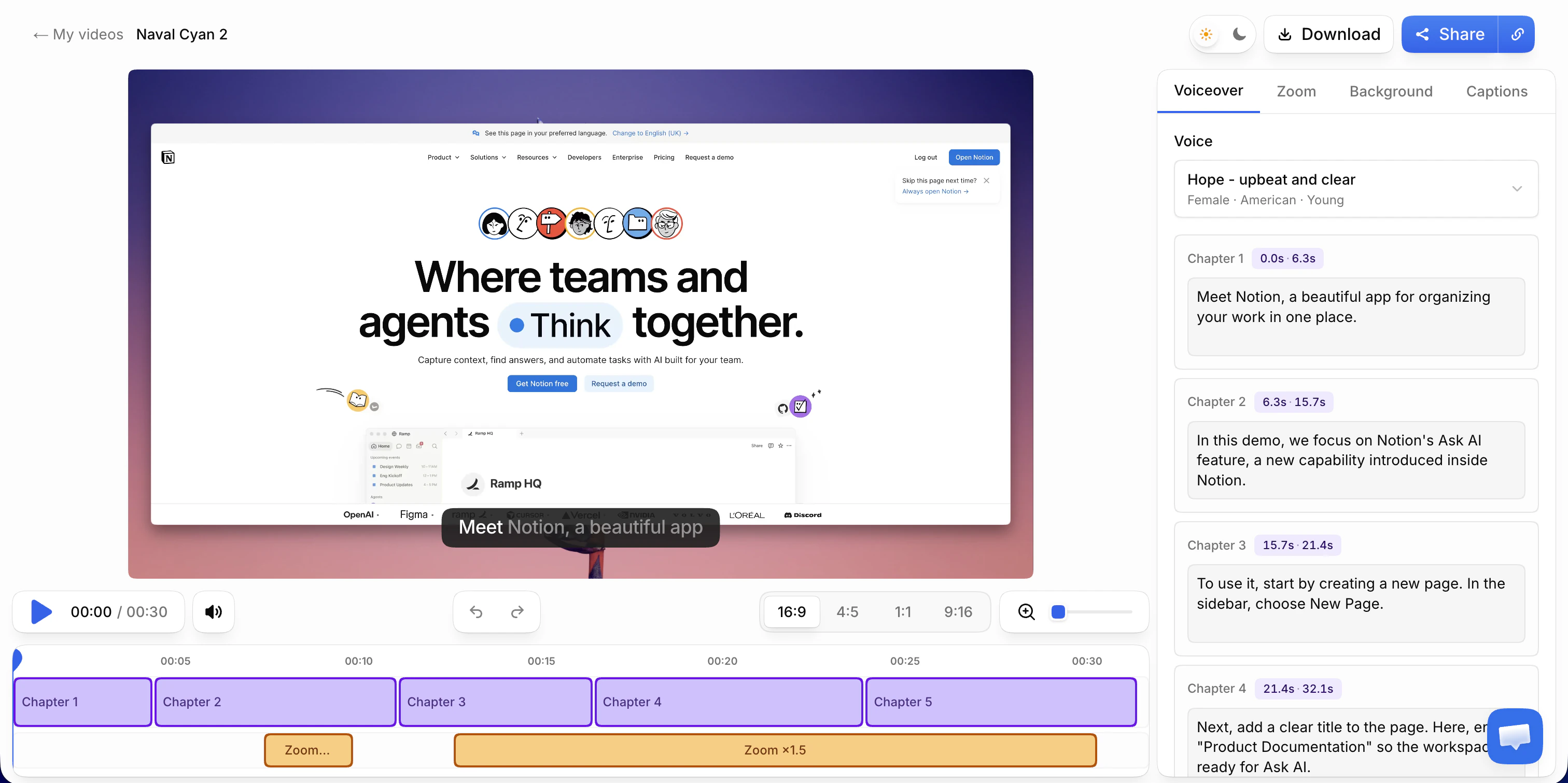
What changes: everything Camtasia makes you do on a timeline happens automatically when you stop recording. Record a browser tab through the Chrome extension, explain the task naturally, and the AI rewrites your narration into a clean script (fillers and false starts gone), reads it in one of 30 studio voices across 10 languages (or keeps your voice) while auto-zoom follows your clicks and word-timed captions generate themselves. You review and adjust chapters instead of assembling from clips.
Key advantages over Camtasia for training work:
- Minutes of review instead of hours of editing, per video
- No recording length cap, 4K export, 16:9 / 9:16 / 4:5 / 1:1 formats
- Share pages with a call-to-action, and the views on each link from Pro
- Updates are cheap: re-record the changed section and the voiceover regenerates identically for unchanged text, so libraries survive UI changes
- A free step-by-step guide written from the same recording, with a screenshot for each step, to copy into a help center or download as a PDF
Pricing: free to record, edit, and preview, with no credit card. Video export starts at $49/month, with unlimited 4K exports and 25 AI credits a month (1 AI credit = 1 AI voiceover); Scale, from $149/month for a team of 2, includes 65 AI credits a month shared by the team plus a brand kit and priority rendering. Monthly billing, no annual lock-in: the structural opposite of a per-author annual licence.
The full head-to-head with Camtasia is here.
2. ScreenPal — the budget manual editor
What changes: the price, mostly. ScreenPal (formerly Screencast-O-Matic) covers recording plus a genuinely usable simple editor at ~$3–8/month billed annually (an order of magnitude below Camtasia), with an education-friendly feature set that made it a schools staple.
What doesn't change: it's still manual editing, just lighter. Cuts, zooms, and captions remain your job.
Best for: educators and small teams that want Camtasia's workflow at a fraction of the cost and accept simpler tooling.
3. Descript — edit the words, not the waveform
What changes: the editing model. Descript transcribes your recording and you edit the video by editing the text: delete a sentence, and that footage disappears. Filler-word removal is semi-automatic, and for interview-style or talking-head training content the speed gain over a timeline is real. Free tier covers 1 transcription hour/month (watermarked); Hobbyist is $12/month, Creator $24/month.
What doesn't change: visual work. Zooms, callouts, and screen emphasis are still manual, and screen-recording workflows are not its center of gravity.
Best for: narration-heavy training where the words are the edit.
4. OBS Studio — free capture, no editor
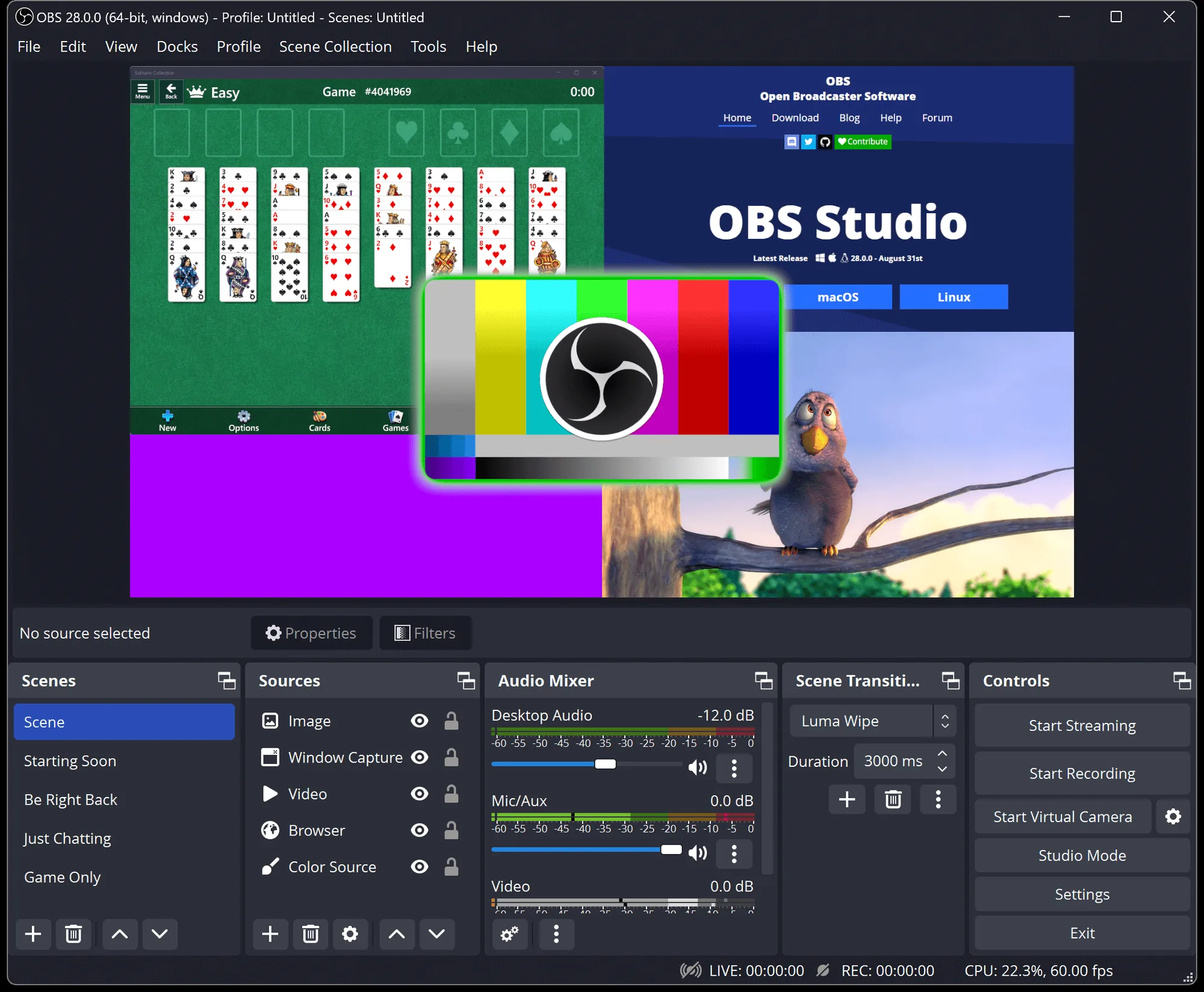
What changes: the cost. OBS is free, open-source, and records anything: multiple sources, scenes, overlays, any resolution.
What doesn't change: you've replaced Camtasia's recorder and kept its problem, because OBS has no meaningful editor. Every OBS workflow ends in "and then import it into…", whether that's an editor or an AI tool that does the pass automatically.
Best for: zero-budget capture, complex multi-source recordings, and pairing with a separate editing step.
5. Loom — when the video is a message, not an asset
What changes: the intent. Loom optimizes for "record, get a link, send it". That's perfect for a quick explanation to a colleague, with a free tier of 25 videos capped at 5 minutes and Business at $18/user/month.
What doesn't change: the output is intentionally raw. No auto-zoom, no script cleanup, no voiceover: a Loom is a video message, not a produced training video. If your Camtasia use was really async communication, see how Loom compares for customer-facing video.
Best for: internal updates and one-off explanations that don't need to survive the quarter.
6. Guidde — high-volume how-to documentation
What changes: the format. Guidde's browser extension captures a click-through and produces a narrated, step-callout how-to video in minutes: documentation-styled output optimized for volume, with a free tier of 25 videos and Pro at $19/month (annual).
What doesn't change: polish ceiling. The output reads as annotated steps with text-to-speech, not a produced walkthrough. Fine for internal knowledge bases, thin for customer-facing training.
Best for: support and ops teams shipping dozens of short internal how-tos.
7. iSpring Suite — when the answer is more structure, not less
What changes: direction. iSpring isn't a lighter Camtasia. It's the heavier path: PowerPoint-based course authoring with assessments, branching, and SCORM/xAPI export for LMS tracking, at several hundred to a couple of thousand dollars per author per year.
Best for: compliance and certification programs where completion must be proved. If your Camtasia frustration is "we need real courses, not videos," this is the honest answer, and the training video software guide maps that whole decision.
8. Screen Studio — the beautiful-clips specialist
What changes: the aesthetics. Screen Studio (Mac-only, now subscription-only at $29/month or $108/year) produces gorgeous auto-zoomed, motion-smoothed recordings beloved for product marketing clips.
What doesn't change: it's a polish tool, not a training pipeline: no voiceover system, no captions workflow at training scale, and no Windows. Our Screen Studio alternatives page covers the category in depth.
Best for: Mac teams making short, beautiful product moments rather than training libraries.
How we compared
Each tool was evaluated against the job Camtasia actually does for training teams: record a real software workflow, produce a watchable, captioned, narrated video, and update it when the product changes. Prices and quotas come from each vendor's published pricing pages, checked September 2026, with billing terms stated wherever annual and monthly prices differ. Test Vibrantsnap free on a real workflow and judge the output against your current Camtasia time-per-video.
Which Camtasia alternative should you pick?
- You make software training videos and the editing hours are the pain → Vibrantsnap. The how-to-make-a-training-video walkthrough shows the full workflow.
- You want cheap manual editing → ScreenPal.
- Your content is narration-first → Descript.
- You need free capture and will edit elsewhere → OBS Studio.
- You're really doing async messaging → Loom.
- You need dozens of internal how-tos, fast → Guidde.
- Your how-tos need a narrated video and a written guide from the same recording → Vibrantsnap.
- You need SCORM, quizzes, and proof of completion → iSpring Suite.
- You're on Mac making short beautiful clips → Screen Studio.
And if none of those pains is acute, Camtasia keeps being a competent, controllable editor. The case for switching is strongest where training video is a recurring production line, because that's where per-video hours and per-author licences compound. The broader AI tool category is compared here.
Frequently asked questions
What is the best alternative to Camtasia? It depends on the exit reason: Vibrantsnap if the manual editing hours are the problem (the pass happens automatically), ScreenPal if price is the problem, Descript if you want to edit by editing text, OBS if you only need free capture, and iSpring Suite if you actually need SCORM courses with quizzes rather than videos.
Is there a free alternative to Camtasia? OBS Studio is completely free and records anything, but includes no real editor. Vibrantsnap is free to record, edit, and preview: zooms, captions and 3 AI credits a month for the AI editing are in the free tier, and you subscribe from $49/month to export the video without a watermark. Clipchamp and CapCut cover basic free timeline editing, though neither is built around screen-recording workflows.
Is Camtasia still worth it in 2026? For frame-level control, in-video quizzing, and LMS-friendly output, yes. For standard software walkthroughs (most training content), the manual hours are the hidden cost, and automation-first tools produce comparable output in a fraction of the time.
How much does Camtasia cost? An annual subscription per author: around $179.88/year mid-tier, and $599/year for Camtasia Pro with the unlimited AI features. No meaningful free tier beyond a trial.
How does Vibrantsnap compare to Camtasia? Opposite philosophies: Camtasia gives you a manual timeline with total control; Vibrantsnap performs the editing pass automatically (script rewrite, auto-zoom, captions, studio voiceover) and you review the result. For a standard walkthrough that's minutes against an afternoon; for frame-accurate custom work, Camtasia keeps the crown. Full comparison on our Camtasia alternative page.
Next steps: see the entire training video software market compared, learn the production process end to end, or check how the AI-generator category works.
Comparison


