Published January 12, 2026 in SaaS Growth · Updated September 28, 2026
SaaS Onboarding Videos: A Playbook to Reduce Churn

Founder & Content Creator at Vibrantsnap · 13 min read
Every SaaS founder has heard the advice: "Create onboarding videos to reduce churn."
But does it actually work? Or is it just another best practice that sounds good but doesn't move the needle?
There is no public, cross-company study that isolates what onboarding videos do to churn, so be wary of any single number. What is well understood is the mechanism: users who reach a first result early tend to stay, and users who stall in the first weeks leave. Onboarding videos are one of the cheapest ways to get people to that first result, but only if they're built for it.
This guide covers what separates onboarding videos that help from the ones that don't, a five-video sequence you can copy, what to do after onboarding, and how to measure the effect on your own cohorts.
The Churn Problem: Why It Matters More Than Acquisition
Before we dive into video, let's understand what's at stake.
The Real Cost of Churn
The math most founders ignore: you paid to acquire every customer who churns, and a churned customer brings in nothing more.
The multiplier effect:
Fred Reichheld of Bain & Company found that in financial services, a 5% increase in customer retention produces more than a 25% increase in profit (Bain & Company). SaaS isn't financial services, but the reasons carry over.
Why?
- You've already paid to acquire them
- Retained customers expand over time
- Retention compounds; churn compounds too (negatively)
Where Churn Actually Happens
The timeline of churn:
| Time Period | What Usually Goes Wrong |
|---|---|
| First week | Never activated / didn't understand product |
| First month | Didn't find value / wrong fit |
| Months 2-3 | Found alternative / budget cuts |
| After that | Changed needs / company changes |
The insight: the first two rows are the onboarding window, and they're where a video helps most directly. A user who never understood the product can be shown it. A budget cut can't be fixed with a tutorial.
If you can keep users engaged and successful in the first 30 days, you remove the causes of churn that are most within your control.
The Onboarding-Churn Connection
Why users churn early:
- Confusion: "I don't know how to use this"
- No quick win: "I haven't gotten value yet"
- Overwhelm: "This is too complicated"
- Wrong expectations: "This isn't what I thought it was"
What onboarding videos can solve:
- Reduce confusion with visual guidance
- Accelerate time-to-value with focused tutorials
- Simplify complexity with step-by-step walkthroughs
- Set expectations with honest product demonstrations
What Separates Effective Videos from Ineffective Ones
Five differences separate onboarding videos that reduce churn from videos that don't.
Difference 1: Timing of First Video
When users see their first onboarding video:
Ineffective videos:
- Shown a day or more after signup, usually in an email
- Only available in the help center, where the user has to go looking
Effective videos:
- Shown in the first session, within minutes of signup
- Triggered automatically or offered prominently on the first screen
Why timing matters:
- Motivation is highest right after signup
- Confusion starts immediately
- Every hour of delay gives confusion a head start
- "I'll watch it later" means "I'll never watch it"
Difference 2: Video Length
Ineffective videos:
- Run four or five minutes
- Try to cover the whole product in one go
Effective videos:
- Run about a minute
- Cover one action, then stop
Suggested length by content type:
| Video Type | Suggested Length |
|---|---|
| Welcome/Overview | 30-60 seconds |
| First Action Tutorial | 60-90 seconds |
| Feature Walkthrough | 90-120 seconds |
| Advanced Training | 2-3 minutes |
What the data says: Wistia's analysis of more than 13 million videos uploaded to its platform puts the sweet spot for how-tos and product demos at 1 to 5 minutes, with viewers typically watching over half. Since most viewers drop off around the halfway point, Wistia advises putting the most important information in the first half (Wistia). The same analysis finds longer videos work in help centers and onboarding hubs, where people come looking for answers. First-session videos are the opposite case: nobody asked for them yet, so keep them short.
Difference 3: Focus (One Goal vs. Many Goals)
What the videos try to accomplish:
Ineffective videos:
- Several goals per video
- "Complete product overview" approach
- Feature tours covering everything
- "You should know about..." structure
Effective videos:
- One goal per video
- "Complete this one action" approach
- Focused on specific outcomes
- "Do this now" structure
Examples:
Ineffective: "Welcome to [Product]. In this video, we'll show you the dashboard, explain our reporting features, walk through integrations, cover team settings, and show you how to export data."
Effective: "Let's create your first report together. Click 'New Report.' Select 'Traffic Overview.' Done, you've got your first insights. Watch the next video to customize it."
The insight: one video, one action. If you need "and" to describe what a video teaches, split it.
Difference 4: Call-to-Action Clarity
What happens after the video ends:
Ineffective videos:
- No clear next step
- A vague "explore the product"
Effective videos:
- One specific, immediate next action
- A link to the next video
- A prompt in the app to do the action now
Effective CTA examples:
- "Now click the blue 'Create' button to try it yourself"
- "Your next step: Watch 'Customizing Your Dashboard' (60 seconds)"
- "Try this now, create your first project in the next 2 minutes"
The insight: the video's job ends when the user does the thing, not when the video ends.
Difference 5: Progressive Disclosure
How information is structured:
Ineffective approach:
Video 1: Everything about the product (5 minutes)
Result: Overwhelmed users, low retention
Effective approach:
Video 1: Quick win (60 seconds) → Day 1
Video 2: Core workflow (90 seconds) → Day 2-3
Video 3: Customization (90 seconds) → Day 4-7
Video 4: Advanced features (2 minutes) → Day 14+
Why it works:
- Matches information to user readiness
- Creates achievable milestones
- Prevents overwhelm
- Maintains engagement over time
The Effective Onboarding Video Framework
Here's a five-video onboarding sequence that puts those principles together.
Video 1: The Welcome (30-45 seconds)
When: Immediately post-signup (autoplay or prominent) Goal: Set expectations and create excitement Content:
- "Here's what you'll accomplish in the next 5 minutes"
- Show one impressive result
- Promise quick value
- Link to Video 2
Example script:
"Welcome to [Product]. In the next 5 minutes, you'll [achieve specific outcome].
Here's what that looks like [quick demo].
Let's get you there. Click 'Start' to create your first [output]."
Video 2: The Quick Win (60-90 seconds)
When: Triggered after welcome video or first login action Goal: User completes one valuable action Content:
- Step-by-step walkthrough of core action
- Show the result they'll achieve
- Celebrate completion
- Link to Video 3
Example script:
"Let's create your first [output].
Click [button]. Now [next step]. See that? That's [result].
You just did it. This [result] will [benefit].
Next up: Let's customize this to fit your needs."
Video 3: The Core Workflow (90-120 seconds)
When: Day 2-3, triggered by return visit or email Goal: User understands the primary use case Content:
- Complete workflow from start to finish
- Real-world scenario
- Tips for best results
- Link to Video 4
Video 4: Customization (90 seconds)
When: Day 4-7, triggered by engagement milestone Goal: User personalizes the product for their needs Content:
- Settings and preferences
- Common customizations
- "Make it yours" positioning
- Link to Video 5
Video 5: Power User Preview (2 minutes)
When: Day 14+, triggered by consistent usage Goal: Show future value and advanced capabilities Content:
- Advanced features overview
- "What's possible" inspiration
- Community/support resources
- Upgrade path (if applicable)
After Onboarding: Customer Success Videos
The sequence ends around day 14. Churn doesn't. Past activation, the same short, one-goal videos help a small customer success team reach every account, not only the largest ones.
- Adoption nudges. A short feature spotlight for features an account pays for but doesn't use, and one for each meaningful release. A structure that works: what the feature does (10 seconds), why it matters (20 seconds), how to use it (60-90 seconds), next step (10 seconds). Send it when usage data shows the account hasn't touched the feature.
- At-risk check-ins. When an account's health score drops, send a two-minute video walking through the workflow they stopped using. It gives the customer something concrete to act on, which a "just checking in" email doesn't.
- Answer videos. One recurring support question per video, embedded in the help center article and linked from support replies and chatbot answers.
- QBR recaps. Before or after a business review, a short walkthrough of what changed in the product since the last review and which changes matter for that account. Stakeholders who missed the meeting can watch it.
If your accounts work in different languages, record once and publish the voiceover in each customer's language. Vibrantsnap reads your script in 10 languages and keeps interface labels and product names as they are spelled on screen.
Implementing Effective Onboarding Videos
Here's how to put this into practice.
Step 1: Map Your Activation Journey
Before creating videos, define your activation milestones.
Questions to answer:
- What's the one action that indicates a user "gets it"?
- What do retained users do in their first week?
- Where do churned users get stuck?
- What's the fastest path to value?
Common activation milestones by SaaS type:
| SaaS Type | Primary Activation | Secondary Activation |
|---|---|---|
| Analytics | View first report | Create custom dashboard |
| Project Management | Create first project | Invite team member |
| Email Marketing | Send first campaign | Build first automation |
| CRM | Add first contact | Log first activity |
| Design Tool | Create first design | Export/share design |
| Inspection / Field Service | Complete first inspection | Send first report to a client |
Step 2: Create Your Video Sequence
Production process:
Week 1: Script all 5 videos
- Keep each under 2 minutes
- Focus on one goal per video
- Write clear CTAs
- Plan the trigger for each video
Week 2: Record and edit
- Record each flow with Vibrantsnap and narrate as you go, in whichever language comes naturally
- Let the AI rewrite your narration into a clean script and read it in a studio voice, in your customer's language if it differs from yours
- Check the zoom on each key UI element: automatic on clicks in web apps, placed by hand for desktop software
- Keep the word-by-word captions for viewers who watch without sound
Week 3: Implement and test
- Set up video triggers
- Test the full sequence
- Verify tracking is working
- Soft launch with new signups
Step 3: Set Up Triggers
Vibrantsnap gives you a share link and an embed code for each video. The triggers below live in your product or your onboarding tool.
Video 1 (Welcome):
- Trigger: Signup completion
- Placement: Full-screen modal or embedded in onboarding UI
- Skip option: After 5 seconds
Video 2 (Quick Win):
- Trigger: Welcome video completion or first product interaction
- Placement: In-context tooltip or sidebar
- Skip option: Available but de-emphasized
Video 3 (Core Workflow):
- Trigger: Day 2-3 return visit or email click
- Placement: In-app notification or email embed
- Skip option: Available
Video 4 (Customization):
- Trigger: Quick win completion + 3 days
- Placement: Settings page or email
- Skip option: Available
Video 5 (Power User):
- Trigger: 14+ days active + usage milestone
- Placement: Email or in-app celebration
- Skip option: Available
Step 4: Measure and Optimize
Track these metrics:
Video performance:
- Play rate (% of triggers that result in plays)
- Completion rate (% who finish each video)
- Drop-off points (where do they stop?)
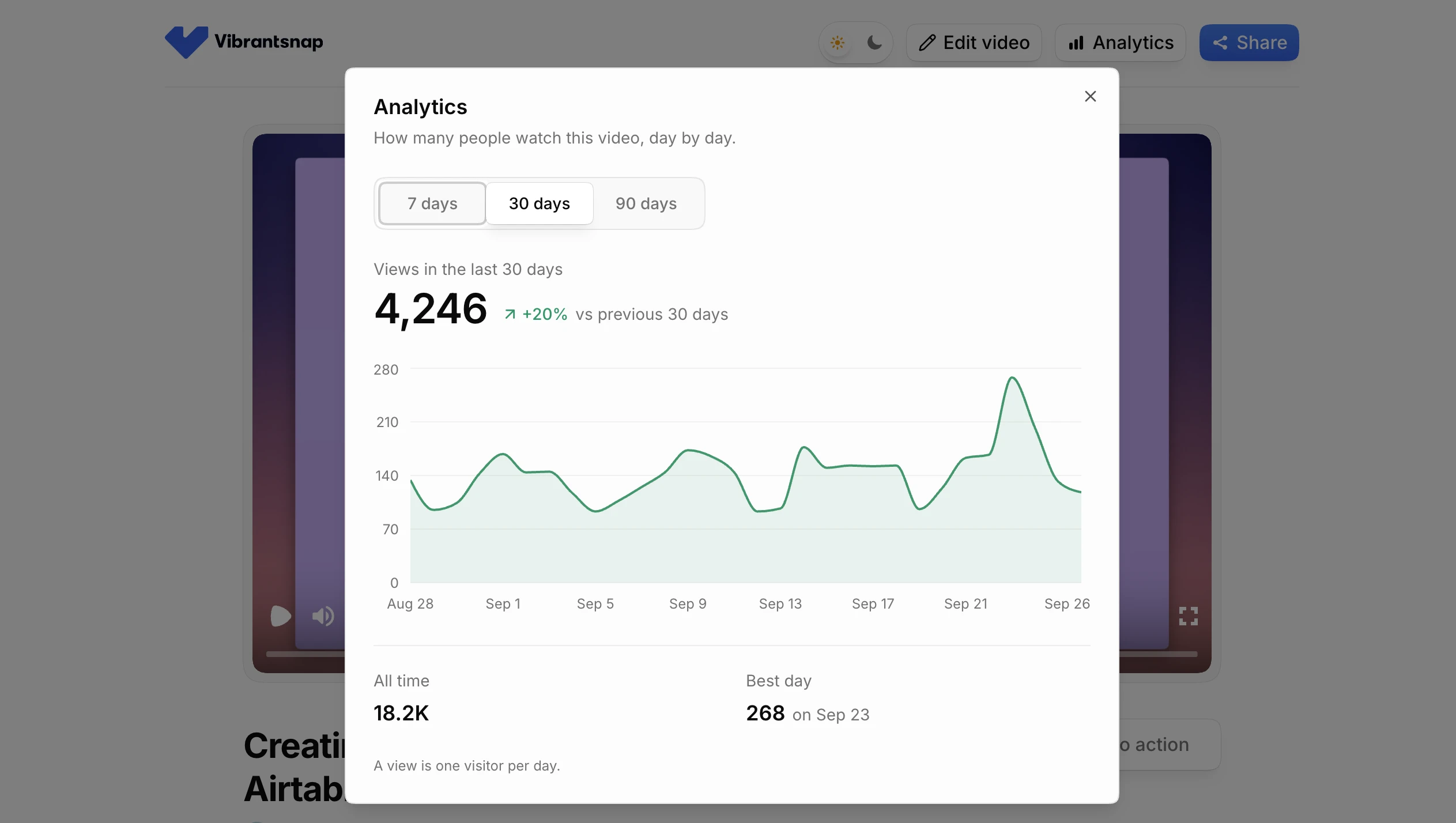
Know where each number comes from. Vibrantsnap's share-link analytics count the views on each link, day by day (Pro and up). How far each viewer watched needs a video player that reports it, and per-user viewing needs your product analytics, for example an event when the video opens and another when it closes.
Activation correlation:
- Activation rate for video watchers vs. non-watchers
- Time to activation by video engagement
- Feature adoption by video completion
Churn correlation:
- 30-day churn by video engagement level
- Churn timing (before vs. after video sequence)
- Reactivation rates for churned users who watched videos
Optimization priorities:
- Videos with low play rates: Improve triggers and positioning
- Videos with low completion: Shorten or split
- Videos with low activation correlation: Re-examine content
- Videos with no churn impact: Consider removing or replacing
Common Mistakes That Kill Video Effectiveness
Mistake 1: Video Graveyard in Help Center
The problem: Creating videos, then burying them in documentation. A user who is stuck in their first session rarely goes looking for a help center.
The fix: Proactively surface videos at the right moment:
- Auto-play welcome video on first login
- Trigger tutorials when users access features
- Send video links in onboarding emails
- Use in-app notifications for new videos
Mistake 2: The "Comprehensive Tour" Approach
The problem: One 10-minute video covering everything.
The fix: Break into multiple focused videos:
- 5 videos × 90 seconds > 1 video × 7.5 minutes
- Each video = one action
- Progressive disclosure over time
Mistake 3: Generic Videos for All Users
The problem: Same onboarding for every user persona.
The fix: Segment your onboarding:
- Ask user role/goal during signup
- Route to persona-specific video sequence
- Customize examples and use cases
Example:
"What's your primary goal with [Product]?"
[ ] Manage marketing campaigns → Marketing video sequence
[ ] Track sales pipeline → Sales video sequence
[ ] Analyze customer data → Analytics video sequence
Mistake 4: No Measurement = No Improvement
The problem: Creating videos without tracking impact.
The fix: Set up analytics from day one:
- Track video plays and completions
- Correlate with activation events
- Monitor churn by video engagement
- A/B test video variations
Mistake 5: Set It and Forget It
The problem: Creating onboarding videos once, never updating. A video that shows screens the user can't find creates the confusion it was meant to remove.
The fix: Quarterly video audits:
- Check all videos against current UI
- Update immediately after major changes
- Review metrics quarterly
- Remove underperforming videos
In Vibrantsnap, each chapter of a video has its own editable script, so a renamed feature means editing a line of narration rather than re-recording your voice. A redesigned screen still needs a new recording.
A Worked Example: From One Tour to a Sequence
Here's how the framework applies to a common starting point: a small B2B inspection software company whose only onboarding asset is a six-minute product tour in the help center. The usual symptoms: few new users find it, fewer finish it, and support keeps answering the same setup questions.
The New Sequence
- Video 1: Welcome (about 40 seconds)
- Video 2: Create your first inspection template (about 70 seconds)
- Video 3: Assign an inspection to a teammate (about 55 seconds)
- Video 4: Customize the report your clients receive (about 90 seconds)
- Video 5: Power tips (about 2 minutes)
The Triggers
- Video 1: Autoplay modal on first login
- Video 2: After Video 1 or the first click in the template editor
- Video 3: Day 2 email + in-app prompt
- Video 4: After the first three inspections
- Video 5: Day 14 email
The Measurement
- Views on each share link in Vibrantsnap (Pro and up)
- Activation events in your product analytics: first template created, first inspection assigned
- 30/60/90-day retention for each monthly signup cohort, compared with the cohorts from before the change
The Cost
The whole sequence is about six minutes of finished video. Vibrantsnap Pro at $49/month includes 25 min of export a month, enough for the sequence and its re-exports after UI changes. The larger cost is the time to script and record.
We won't promise a churn number for this example. Compare your own cohorts after 60 to 90 days and let that decide what you build next.
Frequently Asked Questions
How quickly do onboarding videos impact churn?
Activation moves first; churn takes longer to read.
Timeline:
- Week 1-2: Activation rates for new signups
- Week 3-4: First cohort retention data
- Day 30: First 30-day churn number for the new cohort
- Day 60-90: Enough cohorts to trust the difference (longer if you have few signups)
Important: Don't expect overnight results. Churn reduction is measured in cohorts over time.
What if users skip the onboarding videos?
Some users will always skip, even with proactive triggers. That's okay.
- Skippers can come back to the videos when they get stuck
- A video linked from a support reply still answers the question
Optimize for engagement, not enforcement:
- Make videos easy to watch (short, relevant)
- Make skipping easy (no dark patterns)
- Make returning easy (video library accessible)
Should onboarding videos use real people or screen recordings?
For onboarding, show the screen with screen recordings.
Why?
- Onboarding is about "how to do this"
- Users need to see the actual product
- Face is less important than clarity
Exception: Welcome video can include founder face (builds trust).
How do I measure churn reduction from onboarding videos?
Use cohort analysis with video engagement segmentation.
Setup:
- Tag users by video engagement level (none, partial, full sequence)
- Track 30/60/90-day retention by segment
- Compare cohorts over time
Example analysis:
Cohort: January signups
- No video engagement: [A]% churned by Day 30
- Partial video engagement: [B]% churned by Day 30
- Full sequence completed: [C]% churned by Day 30
Attribution: Calculate the lift from video engagement vs. baseline. Motivated users both watch more and churn less, so also compare signup cohorts from before and after the videos went live.
Per-user viewing has to come from your own product analytics. Share-link view counts tell you how often a video is watched, not who watched it.
What's the minimum viable onboarding video setup?
If you can only do one thing: Create a 60-second quick win video.
Specs:
- Show user completing one valuable action
- Trigger immediately after signup
- End with clear "now try it yourself" CTA
- Compare activation for the cohorts that see it with the cohorts before it
Conclusion: Videos Reduce Churn, When Done Right
Onboarding videos can reduce early churn, but only when they're built for it. Most that fail are:
- Too long
- Too late
- Too unfocused
- Too hidden
What works:
- Show videos immediately (within the first session)
- Keep videos short (60-90 seconds each)
- Focus on one goal per video
- Use progressive sequences (5 videos over 14 days)
- Measure and optimize on your own cohorts
Your early churn problem might be an onboarding problem, and a short video is one of the cheapest places to start fixing it.
Onboarding is also just the first chapter: the same videos, extended past activation into feature adoption and self-serve support, become a customer education program. That guide covers the full build.
Ready to make your first onboarding video? Vibrantsnap is free to record, edit and preview; you pay when you export (see pricing). It doesn't generate written step-by-step guides yet: if you need a written guide from every recording, compare it with Clueso, Trupeer and Guidde.
About the Author
Healsha is the founder of Vibrantsnap, a product demo and tutorial video maker for software teams who record their own videos.
Comparison
