Published September 28, 2026 in Product Demos
SaaS Explainer Video: Animated or Screen-Recorded?

Founder & Content Creator at Vibrantsnap · 15 min read
The short answer
A SaaS explainer video is a 60 to 120 second video that shows a prospect what your software does, who it's for and what result it delivers, then asks for one next step. There are two ways to make one:
- An animated explainer, made by a studio, from a template or with an AI generator. It draws your product instead of showing it.
- A product explainer made from a screen recording. Your real interface, with a script and a voice on top.
For a small B2B SaaS team, the choice usually comes down to four questions:
- Is there a product to show? Before launch, or when the value happens out of sight (a sync job, an API, a risk model), animation can show what a screen can't.
- How often does your interface change? An animated explainer is a drawing of your product on the day the storyboard was approved. A recording can be redone the week the screen changes.
- How many languages do you sell in? Each animated version needs new voice work and re-timed scenes. A recorded explainer keeps its pictures and swaps the script.
- What are your budget and deadline? At the studios cited below, a standard animated explainer takes three to six weeks and costs thousands of dollars. A recorded explainer can ship this week.
If the product is the proof, record it. If an idea has to land before the product makes sense, animate that part, and consider recording the rest.
Vibrantsnap, our product demo video maker, is built for the second approach.
Animated vs screen-recorded at a glance
Prices are as listed on each vendor's site on September 28, 2026. Sources are in the sections below.
| Studio animation | Template animation | Screen-recorded product explainer | |
|---|---|---|---|
| What the viewer sees | Custom illustrations of your product and its users | A template's scenes with your text, colors and screenshots | Your real interface doing a real job |
| Cash cost | $2,500 to $5,000 for 60 seconds in the two studios' published packages; a 2022 survey found a $5,400 median quote | Envato Elements from $16.50/month billed yearly, plus editing software | Free to record, edit and preview in Vibrantsnap; export from $49/month ($39 billed yearly) |
| Time to a first version | 3 to 6 weeks for a standard package at the studios cited below | Days, if someone on the team knows After Effects or a similar editor | Usually within the week; the script is the slow part |
| When the UI changes | Back to the studio, or to the project files if you own them | Re-edit the template file | Re-record it from the same script and click path |
| Another language | New voice recording, re-timed scenes, translated on-screen text | The same work, done by you | Same recording, new script and voice; the interface stays as recorded |
| Best for | Pre-launch, invisible value, long-lived brand pieces | Short promos and social teasers | Homepages, product pages, sales follow-ups, onboarding |
What a SaaS explainer is, and what it isn't
Explainers, demos and tutorials get mixed up because they can all show the product. They answer different questions:
- Explainer: "What is this, and is it for me?" For a stranger on your homepage. 60 to 120 seconds. Ends on a trial or a demo booking.
- Product demo: "How does it handle my case?" For someone evaluating. One workflow, often 2 to 5 minutes. See how to make a product demo video.
- Tutorial: "How do I do this task?" For a customer. As long as the task needs.
The explainer is the shortest of the three and has the least room for detours. Wistia analyzed more than 13 million videos for its 2026 State of Video report. It puts explainer videos and product overviews in a 1 to 5 minute sweet spot, and notes that most viewers drop off around the halfway point (Wistia). For a homepage explainer, that argues for the short end of the range and for showing the result early.
Option 1: an animated explainer
Hiring a studio
A studio handles the script, storyboard, illustration, voice, music and animation, with an approval round at each stage. Here is what that costs:
- Survey data. In Q4 2022, Wyzowl, itself an explainer studio, asked 242 studios to quote a 60-second animated explainer against the same two reference videos. 116 gave a price. Quotes ran from $600 to $250,000. The median was $5,400, and the average without the highest and lowest 5% was $8,457 (Wyzowl). The data is from late 2022, so treat it as an order of magnitude.
- Published packages (as listed on September 28, 2026). Magic Motion Studio charges $2,500 for a 60-second 2D explainer, delivered in 3 to 4 weeks (Magic Motion Studio). Gisteo's full-service package is $4,000 for the first 60 seconds plus $500 per extra 30 seconds, with an average turnaround of 5 to 6 weeks; its rush package is $5,000 and takes 2 to 3 weeks (Gisteo).
A studio explainer is worth it when:
- There is nothing to show yet, or the interface isn't the product: a pre-launch waitlist, hardware plus software, a service.
- The value is invisible on screen. Data syncing between systems, an encryption model, a pricing engine. Animation can draw what the interface hides.
- The video is a brand piece for a launch, a fundraise or a trade show, and should run unchanged for a long time.
- You have the budget and the weeks, and someone who can give quick, clear approvals at each stage.
Using a template
Template marketplaces sell ready-made SaaS scenes: animated dashboards, feature cards, logo reveals. An Envato Elements subscription costs $16.50/month billed yearly, or $39 month to month (Envato). Its SaaS explainer templates are built for After Effects, Premiere Pro, Apple Motion, Final Cut Pro or DaVinci Resolve (Envato).
The cash cost is low. The real cost is skill and time: someone has to replace the placeholder screens with yours, rewrite the text, record or buy a voice and re-time every scene. The other risk is sameness. A popular template shows up in many other companies' videos.
Generating it with AI
Two kinds of AI tools make explainers without a studio:
- Prompt-to-video generators such as Agent Opus from OpusClip build a video from a brief, a script or a blog URL, with motion graphics, stock visuals, an AI voice and optional avatars. Its own page notes that auto-sourced stock visuals may not match your interface unless you upload screenshots and mockups, and that it has no traditional editing timeline (OpusClip).
- Avatar generators such as Synthesia put an AI presenter on screen to read your script, in more than 160 languages. Synthesia's free Basic plan includes 10 minutes of video a month, and Starter costs $29/month billed monthly. An avatar can introduce your product, but it can't click through it. See how Vibrantsnap compares with Synthesia.
The maintenance problem
This is the cost most quotes leave out. An animated explainer shows a redrawn version of your interface as it looked when the storyboard was approved. B2B SaaS interfaces change every few sprints. Within a year, the video can show a navigation, a dashboard or a settings page that no longer exists, and fixing it means reopening the project.
Before you sign, ask two questions:
- Who holds the project files? At Magic Motion Studio, for example, the source files come with the $5,000 Pro package, not the $2,500 Standard one. Without them, every change goes back to the studio.
- What does a change after delivery cost? Revision rounds cover production, not a redesign six months later.
Languages add to the bill. Each new language needs a new voiceover and often re-timed scenes and translated on-screen text.
If you do animate, keep the interface abstract. Explain the idea with shapes, diagrams and characters, and avoid screen-accurate copies of pages you know will change.
Option 2: a product explainer from a screen recording
A product explainer follows the same script as an animated one, but the pictures are your real product. The viewer sees the screens they will use, with your labels and your data model. For a buyer of compliance, inspection or finance software, that is often the question behind the question: does the product really do this, and does it look like something my team can use?
Why it suits a small SaaS team:
- It's credible. Nothing on screen is a mockup.
- It's cheap to update. When a screen changes, you re-record instead of commissioning a new video.
- It travels across languages. The pictures stay; the script and the voice change.
- The people who know the product can make it. A founder or product manager can record it between two calls.
Its weak spots, honestly:
- It can't show what isn't on screen. If the value is a background process, a recording shows a loading state. Explain that part in the narration, or open with a short animated or diagram section made in another tool.
- It needs a product that reads well on video. Small labels and dense tables need zooms, and the sample data has to look real.
- Raw narration shows. Hesitations, restarts and sentences that search for the right word make a self-recorded explainer sound unsure, especially when you narrate in a second language. That is the part to fix.
How to make one in Vibrantsnap
- Record a tab, a window or your whole screen with the Chrome extension and your microphone, or import a video you already have. Talk through the script the way you would explain it on a call.
- Let the AI rewrite the narration. It transcribes what you said, rewrites it into a clean script, reads it in one of 30 studio voices and retimes the video to match. Hesitations and false starts don't survive. You can keep your own voice, or switch back to it at any time.
- Check the script chapter by chapter. The video splits into chapters, each with its own editable script. Fix any term your market uses that was paraphrased: a regulation, a form number, a feature name.
- Add zooms and captions. Every click in a web page gets a close-up, from the cursor data the extension captures. On desktop software or an imported video there is no cursor data, so you place zooms yourself. Captions are generated word by word, and you can edit them.
- Publish. Pick a wallpaper or solid-color background and a format: 16:9 for the homepage, 1:1, 4:5 or 9:16 for social. Share a link with a call-to-action button, embed the player on your site, or export an MP4 in 1080p, or in 4K from the Pro plan. Processing takes about two minutes.
Languages. Record in the language you explain best in, and publish in the language your buyers speak: English, French, Spanish, Portuguese, German, Italian, Japanese, Chinese, Korean or Hindi. Interface labels and product names keep their original spelling, so what the viewer hears matches what they see. The interface itself stays in the language you recorded it in, so if your product is localized, record in the matching locale.
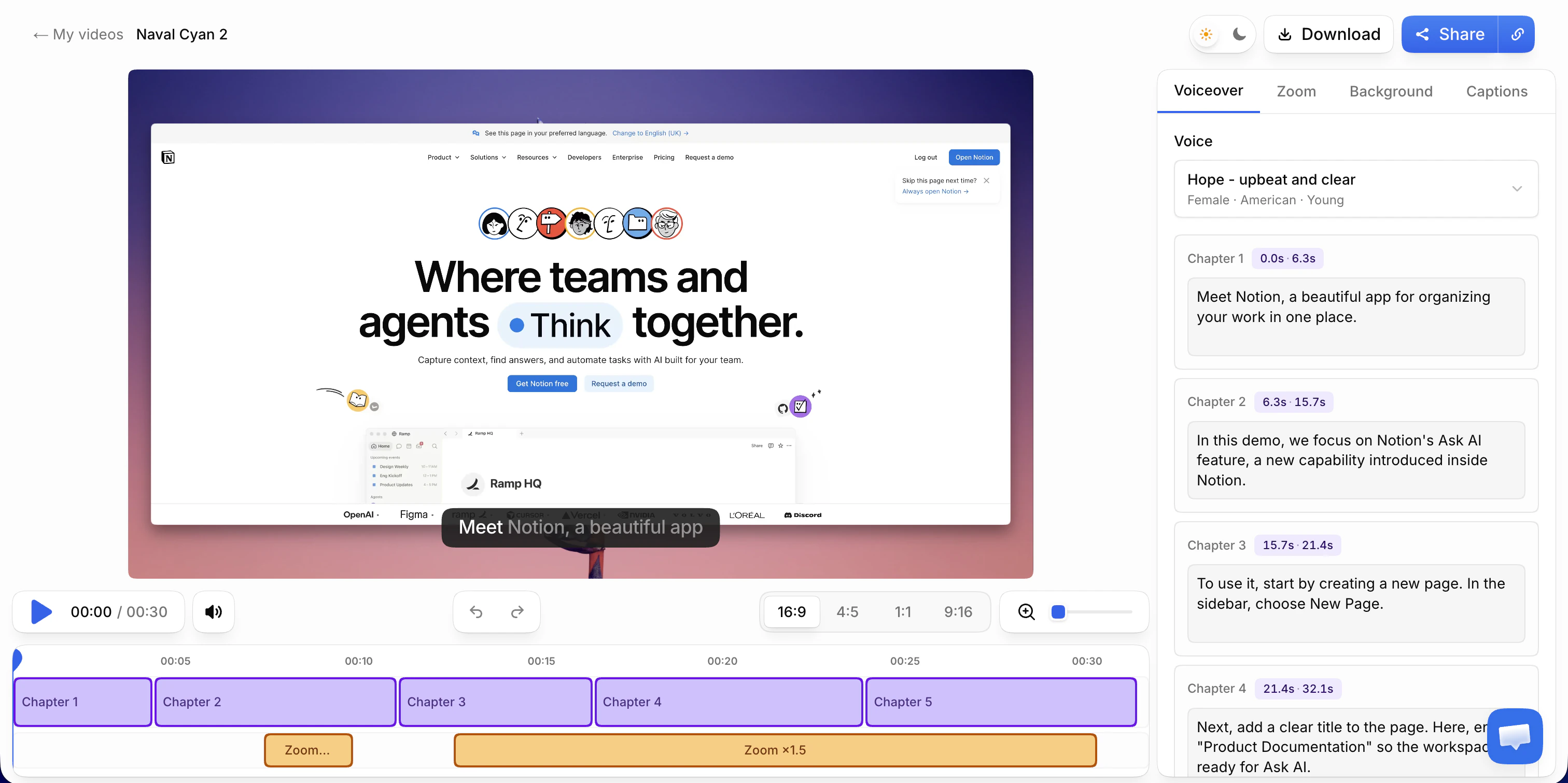
Recording, editing and previewing are free, with every AI feature; the free share link carries a watermark and a Vibrantsnap badge, and there is no export. Pro costs $49/month, or $39/month billed yearly, with 90 min of export a month, link analytics and 4K. The other plans are on the pricing page.
How to script a 60 to 120 second SaaS explainer
Write the script before you record anything or brief anyone. A studio needs it, a template needs it, and a recording needs it. It decides more than any production choice.
Word budget. Voice actors average about 150 words a minute (Voiceovers.com). An explainer needs quiet beats while the screen changes, so write below that: roughly 130 words for 60 seconds, 200 for 90 seconds and 260 for 120 seconds. Then read it aloud with a timer. The timer wins over any rule of thumb.
The six beats, timed for a 90-second version:
| Beat | Time | What to say | What to show |
|---|---|---|---|
| 1. Outcome | 0 to 8 s | The result the viewer wants, in their words | That result, finished: the signed report, the booked job, the reconciled account |
| 2. Problem | 8 to 20 s | How they do it today, and what it costs them | The old way if you can show it (the spreadsheet, the email thread), or stay on the result |
| 3. Product | 20 to 30 s | What the product is and who it's for, in one sentence | The main screen, uncluttered |
| 4. How it works | 30 to 70 s | Three steps, each an action and its effect | Three clicks, each with a close-up and a pause on what changed |
| 5. Proof | 70 to 82 s | One concrete detail the buyer checks: the audit trail, the offline mode, the export format | That detail, on screen |
| 6. Next step | 82 to 90 s | One action, stated plainly | The URL or button the viewer should use |
For 60 seconds, keep beats 1, 3, 4 and 6, with two steps instead of three. For 120 seconds, add a second proof point or a second role (the manager who reviews what the field user submitted), not more features.
A skeleton you can adapt. Here is a 90-second script for a fictional field-inspection app. It is an illustration, not a real customer:
0:00  SAY   Every inspection signed and filed before you leave the site.
      SHOW  A finished inspection report with photos and a signature

0:08  SAY   Today that means paper checklists, photos on your phone
            and an evening of typing it all up.
      SHOW  A scanned paper checklist, or stay on the finished report

0:20  SAY   [Product] is the inspection app for [trade] teams.
      SHOW  The inspector's job list for today

0:30  SAY   Open today's job. The checklist is already there.
      SHOW  Click the job; close-up on the checklist
0:44  SAY   Tick each item, and add a photo where something fails.
      SHOW  Tick two items; attach a photo to a failed one
0:58  SAY   Sign, and the report goes straight to the office.
      SHOW  Sign; close-up on "Sent to office"

1:10  SAY   Every change is dated and signed, ready for the regulator.
      SHOW  The report's history tab

1:22  SAY   Start your free trial at [product].com.
      SHOW  The signup page
Rules that make the script work:
- Open on the outcome, not on your logo or "Hi, I'm the founder of...".
- Write for the ear. Short sentences, one idea each. If you stumble reading it aloud, rewrite the sentence.
- Use the interface's exact labels. If the button says "Sign & send", say "Sign & send".
- Show one job, not a feature list. Three steps of one workflow beat ten features in ten seconds.
- Only use numbers you can back up. An invented "saves 40% of your time" is the line a skeptical buyer remembers.
If you'd rather start from a draft, the free demo script generator writes one from a description of your product. Rewrite the first line yourself: it decides whether anyone keeps watching.
Four structures that work
These are patterns, not case studies. Pick the one that matches the doubt your buyer has. For real videos broken down scene by scene, see our product video examples.
- Before and after. Ten seconds of the old way (the spreadsheet, the paper form), then the same job in your product. Best when you replace a manual workflow and the buyer knows the pain.
- One job, start to finish. A single workflow from trigger to result, and nothing else. Best for vertical software with one core job, such as an inspection, a claim or a compliance check.
- The question, answered. Open on the question buyers ask on every call ("Does it work offline?", "Can we export for the auditor?"), then answer it in the product. Best on a pricing page or in a sales follow-up.
- Two roles, one record. The field user submits and the manager reviews: the same record on two screens. Best when the person who buys is not the person who uses it.
A fifth option combines both approaches: a short animated opening for the part no screen can show, then the real product for the rest. The animation comes from a studio, a template or an AI generator. The product part can come from a recording.
Where to put it and how to keep it current
- Homepage and product pages. Next to the headline, click to play, captions on. Chrome always allows muted autoplay, but blocks autoplay with sound unless the visitor has interacted with your site or regularly plays media with sound on it (Chrome for Developers). Assume many visitors meet your explainer muted, and make sure it still makes sense.
- Sales emails. Send a link to the share page, not a file.
- The welcome email. The explainer reminds a new signup why they signed up. Tutorials do the rest.
To keep a recorded explainer current:
- Save the click path and the sample data next to the video, so a re-recording after a redesign takes one session.
- Fix the words without re-recording when only the words changed. If the screen is still right but the wording is dated, or you need another language, edit that chapter's script in Vibrantsnap and a new voiceover is generated.
- Check the explainer at every release that touches a screen it shows.
Which route to take
- Pre-launch, or the value can't be seen on screen: animate. Hire a studio if the video must carry the brand for a long time and you can wait three to six weeks. Use a template if someone on the team edits video. Try an AI generator for a quick first version.
- You want a presenter without filming anyone: an avatar tool such as Synthesia.
- The product is the proof, it changes often, or you sell in several languages: record it. Vibrantsnap rewrites your narration and reads it in a studio voice in 10 languages, with zooms and captions. Clueso and Trupeer also work from screen recordings and also write step-by-step articles from them, which Vibrantsnap doesn't do yet; compare Clueso and Trupeer.
- Unsure: make the recorded version first. It is the cheaper experiment, and the script you write for it is the script a studio would ask you for anyway.
Frequently asked questions
What is a SaaS explainer video? A SaaS explainer video is a short video, usually 60 to 120 seconds, that shows a prospect what your software does, who it is for and what result it delivers, then asks for one next step. It is either animated (by a studio, from a template or with an AI generator) or made from a narrated screen recording of the real product.
Is there an AI that can create explainer videos? Yes, and they work in three different ways. Prompt-to-video generators such as Agent Opus from OpusClip build an animated video from a brief or a script, with motion graphics, stock visuals and an AI voice. Avatar tools such as Synthesia put an AI presenter on screen to read your script. Screen-recording tools such as Vibrantsnap, Clueso and Trupeer start from a recording of your real product, then rewrite the narration, read it in an AI voice and zoom in on the clicks. Only the third kind shows your actual interface.
How much does it cost to create an explainer video? For an animated explainer made by a studio, Wyzowl collected quotes from 116 studios for a 60-second video in late 2022: the median was $5,400, and quotes ranged from $600 to $250,000. Published packages on September 28, 2026 include $2,500 at Magic Motion Studio and $4,000 at Gisteo for the first 60 seconds. Templates cost less in cash (Envato Elements is $16.50/month billed yearly) but need an editor such as After Effects and someone who can use it. A screen-recorded explainer costs your time plus the tool: Vibrantsnap is free to record, edit and preview, and export starts on the Pro plan at $49/month, or $39/month billed yearly.
How long should a SaaS explainer video be? 60 to 120 seconds for a homepage or product-page explainer, and 30 to 60 seconds for a single feature. Wistia's 2026 State of Video data puts explainer videos and product overviews in a 1 to 5 minute sweet spot and notes that most viewers drop off around the halfway point, so show the result in the first half.
Should a SaaS explainer video be animated or show the real product? Show the real product when the interface is the proof, when it changes often or when you sell in several languages: a screen-recorded explainer is cheaper to make and to update. Choose animation when there is nothing to show yet, when the value happens where no screen shows it (a background sync, an API, a security model), or when the video is a brand piece meant to run unchanged for a long time. Many teams combine the two: a short animated opening, then the product.
Can I make a SaaS explainer video in several languages? Yes. With an animated explainer, each language usually means a new voice recording, re-timed scenes and translated on-screen text. With a screen-recorded explainer in Vibrantsnap, you keep one recording and publish the script in any of 10 languages, read by a studio voice, with interface labels and product names kept in their original spelling. The interface on screen stays in the language you recorded it in.
Does Vibrantsnap make animated explainer videos? No. Vibrantsnap does not make animated explainers, motion graphics or AI avatars. It makes product explainers, demos and tutorials from a screen recording of your real product, or from a video you import: the AI rewrites your narration into a clean script, reads it in a studio voice, retimes the video, zooms in on your clicks and captions every word. If you need animation, use a studio, a template or an AI animation tool, and use Vibrantsnap for the part that shows the product.
Sources
- Wyzowl, How Much Does An Explainer Video Cost? (survey run in Q4 2022, page updated September 4, 2026)
- Magic Motion Studio, Explainer video pricing, checked September 28, 2026
- Gisteo, Explainer video cost and pricing, checked September 28, 2026
- Envato, Plans and pricing and SaaS explainer video templates, checked September 28, 2026
- OpusClip, Agent Opus SaaS Explainer Video Maker
- Synthesia, Pricing, checked September 28, 2026
- Wistia, How to choose the right marketing video length, based on the 2026 State of Video report
- Voiceovers.com, What is WPM?
- Chrome for Developers, Autoplay policy in Chrome
Comparison