Published December 25, 2025 in Product Demos · Updated September 28, 2026
Founder-Led Product Demos: A Playbook for B2B SaaS

Founder & Content Creator at Vibrantsnap · 11 min read
In a B2B software company of 5 to 50 people, the founder is often still the person who records the product demos. The homepage video, the release announcement, the follow-up after a sales call, the how-to a customer asked for last week: all of it goes through the same laptop, usually squeezed between two other jobs.
That is not a delegation problem to fix right away. Early on, founder-led demos are one of the best sales assets a small vertical SaaS company has. The problem is doing them without a system: every video starts from zero, takes an afternoon, and goes stale at the next release. This playbook covers which demos a founder should record, a weekly routine that fits in one short block, how to record when English is your second language, how to keep the library current, and when to hand it to a PM or a customer success hire.
Why founder-led demos work early
A demo recorded by the founder carries things that are hard to brief into someone else.
- Domain judgment. In vertical software, the founder usually knows why every screen exists: the inspection standard behind a field, the audit question a report answers, the reason a step can't be skipped. A demo that explains why, not just where to click, reads as expertise.
- Speed. The founder can record the announcement the day a feature ships and answer a prospect's objection the afternoon of the call. Nobody has to brief anybody.
- Credibility with early buyers. A customer who signs with a 12-person company is partly betting on the people behind it. Seeing how the person who builds the product thinks about their problem lowers that risk.
Buyers also do more of the evaluation without you. In a Gartner survey of 646 B2B buyers conducted from August through September 2025, 67% said they prefer a rep-free buying experience, and 45% had used AI during a recent purchase (Gartner). Your demos explain the product when you are not on the call, and when your champion forwards it to the person who signs.
One point matters for the rest of this playbook. What makes a demo founder-led is the judgment in it: which problem you open with, which customer situation you show, which limitation you say out loud. None of that depends on whose voice reads the script.
The four demos a founder should record
You can't record everything. These four cover the moments where a founder's demo does the most work.
| Demo | Who watches | Length | Where it lives | When to redo it |
|---|---|---|---|---|
| Website overview | Prospects comparing tools | 60 s to 2 min | Homepage, pricing page | When the main workflow screen changes |
| Feature announcement | Customers and active trials | 1 to 3 min | Release notes, customer email | Never: record the next one |
| Sales follow-up | One prospect after a call | 2 to 5 min | Email reply | Never: one per deal |
| Onboarding how-to | Your customers' admins and users | 1 to 3 min each | Help center, support replies | When the screens it shows change |
The website overview
Show one workflow end to end, from the customer's side. Not a tour of the menu. If you sell inspection software, show an inspector closing a report and the office receiving it, not the settings page. Open with the outcome in one sentence, show three to five steps, end on the result and one call to action.
Keep it under two minutes. Wistia's analysis for its 2026 State of Video report puts how-tos and product demos in the 1 to 5 minute range and notes that short videos work well on homepages and product pages. Videos under a minute average a 52% engagement rate, which means viewers typically watch about half of them (Wistia). A homepage overview has to earn the next click before attention drops.
Feature announcements
When a feature ships, record one to three minutes that show the problem it solves and the feature solving it, in the real product. Say who it is for ("for admins who approve reports from the field"), show where to find it, and stop. Put it in the release notes and the customer email. Announcements are dated by nature, so you don't refresh them. You record the next one.
Follow-ups after a sales call
This is where founder-led demos pay off most. After a discovery call, record two to five minutes that answer the exact question the prospect asked, in their vocabulary, with demo data shaped like their business. A generic overview says "here is our product". A follow-up says "here is the problem you described, handled".
Record it the same day, while the call is fresh, from a five-line outline. For example:
PROSPECT    Operations lead at a 40-person inspection firm
QUESTION    "Can a supervisor approve a report from the field?"
OUTCOME     A report goes from inspector to approved, on a phone.
STEP 1      The inspector submits a roof inspection.
STEP 2      The supervisor opens it from the notification.
STEP 3      The supervisor approves it with a comment.
NEXT        Book 30 minutes to set this up with your own templates.
Send it as a link with one next step. A share page with a button to book the next meeting keeps the ask in front of the viewer, including the colleague your champion forwards it to.
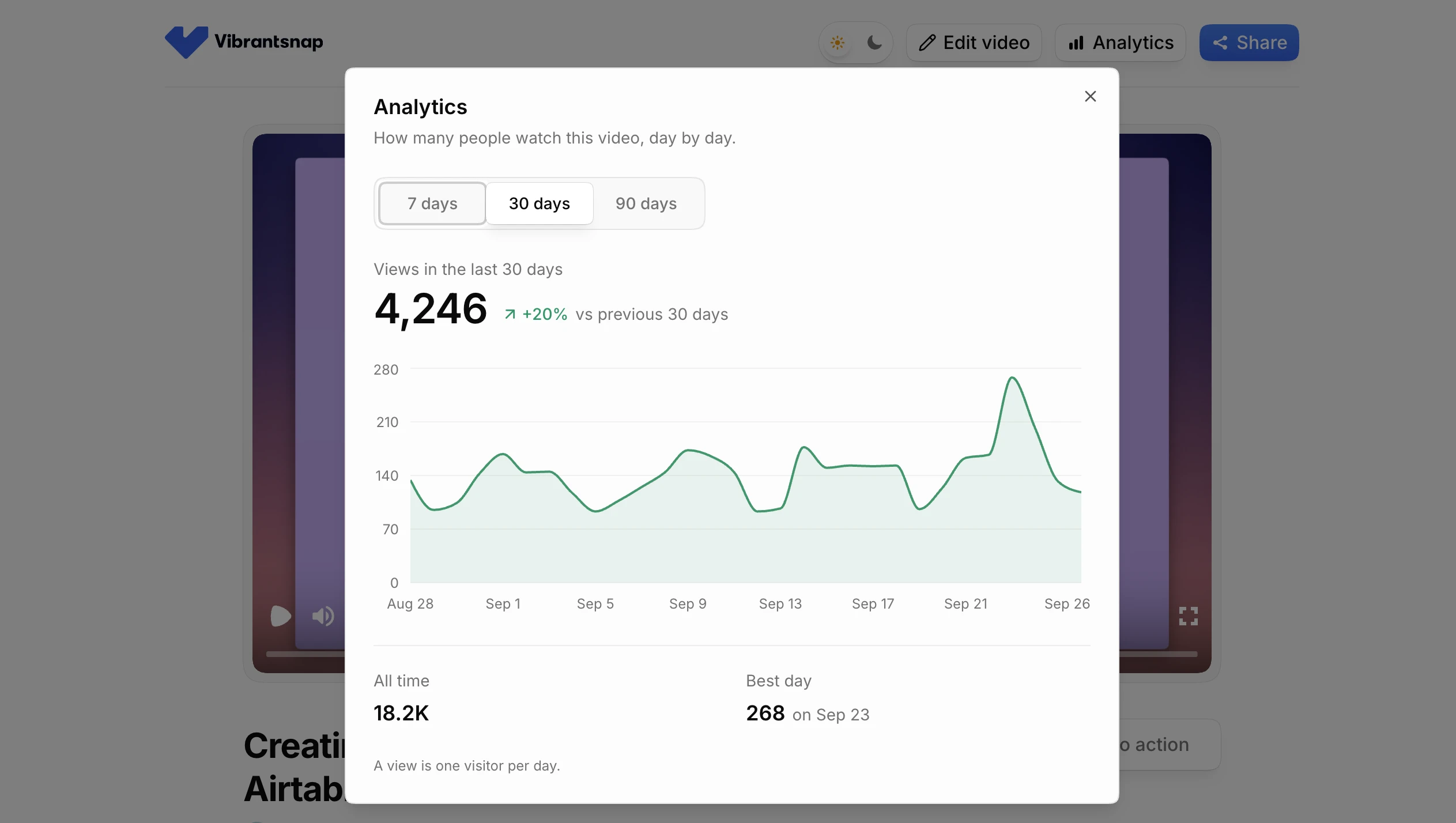
On Vibrantsnap's paid plans, each share link shows its views day by day. Several views on a link you sent to one person is a good sign it was passed along. It won't tell you who watched: views are counted per link, not per person.
If you send follow-ups with Loom today, the difference is the narration. Loom keeps your voice and your wording, and its AI plan removes filler words and silences. Vibrantsnap rewrites what you said into a clean script and can read it in a studio voice. See how Vibrantsnap compares with Loom for videos your customers and prospects watch.
Onboarding how-tos
Every question a new customer asks twice deserves a one to three minute video. One task per video, titled as the task: "Invite an inspector and set their permissions", not "User management overview". Link them from support replies and onboarding emails, and embed them in your help center. These are the videos that save you the most time later, and the first ones to hand off.
A weekly demo routine for a busy founder
What works is a fixed block once a week, plus follow-ups recorded the same day as the call. Here is a version that stays under 90 minutes.
- Collect the list (10 minutes). Three sources: this week's release notes, the questions asked on sales calls, and the support tickets that got the same answer twice.
- Pick three videos at most. An overview fix, one announcement and one how-to is a full week. Everything else waits.
- Outline each one (5 minutes per video). Five lines: outcome, who it's for, the steps, the result, the next step. Our free demo script generator drafts this structure if you'd rather not start from a blank page.
- Record once (10 minutes per video). Demo account open, notifications off, one browser tab. Narrate the way you would explain it to a colleague. A stumble is not a reason to restart, because the wording gets fixed in the script.
- Review the script, not the footage (5 minutes per video). Read the rewritten script chapter by chapter. Fix domain terms, numbers and product names. This is where your founder judgment goes in.
- Publish and log it (5 minutes per video). Share the link or embed the video, then add one line to your demo inventory: title, screens shown, date recorded, where it's used.
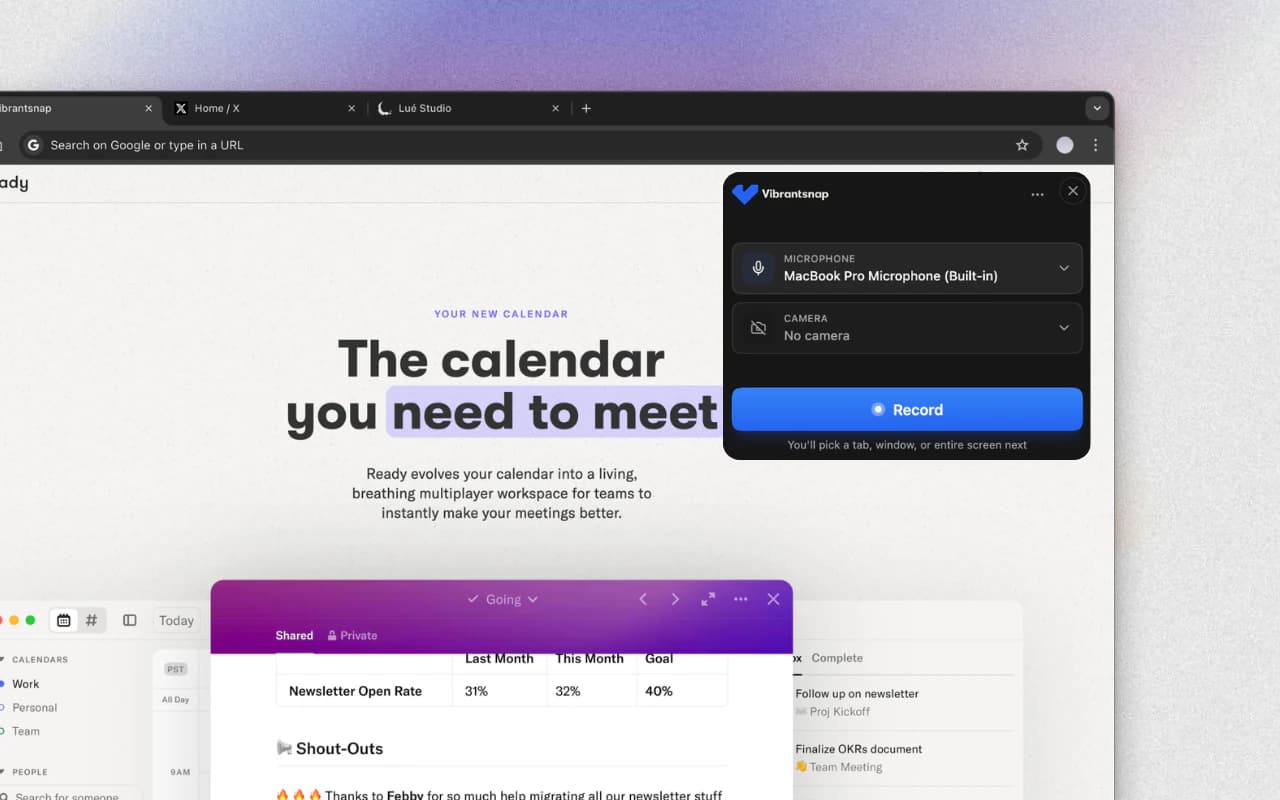
Follow-ups sit outside the block. Record them within a few hours of the call, from the outline above. The answer is most useful while the prospect still remembers asking the question.
Recording demos in a second language
Many small B2B SaaS companies build in one country and sell in another. A product team in India, Poland, Brazil or France selling to US buyers is common, and the founder ends up narrating demos in English as a second language.
The accent is rarely the real problem. The cost is the process: searching for words mid-sentence, restarting every time a phrase comes out wrong, and turning a three-minute video into an hour of retakes. Written copy can be reread and fixed. Narration is heard once, at the speed you spoke it.
A workflow that removes the retakes:
- Separate what you show from how you say it. Record the screen with the narration that comes naturally, in English or in your first language. Get the clicks right. The words get fixed next.
- Rewrite the narration into a clean script. Hesitations, false starts and rambling go. Then read it as your buyer would: US spelling, the terms your market uses, your product names spelled right.
- Choose the voice per video. For a follow-up to a prospect who heard you on a call, your own voice can be the right choice. For the website overview and the help center, one studio voice keeps the whole library consistent, whoever recorded each video.
- Keep interface labels exactly as they appear on screen. The viewer should hear the same word they see on the button.
- Caption everything. Captions help viewers who watch on mute, and viewers whose first language isn't the one you publish in.
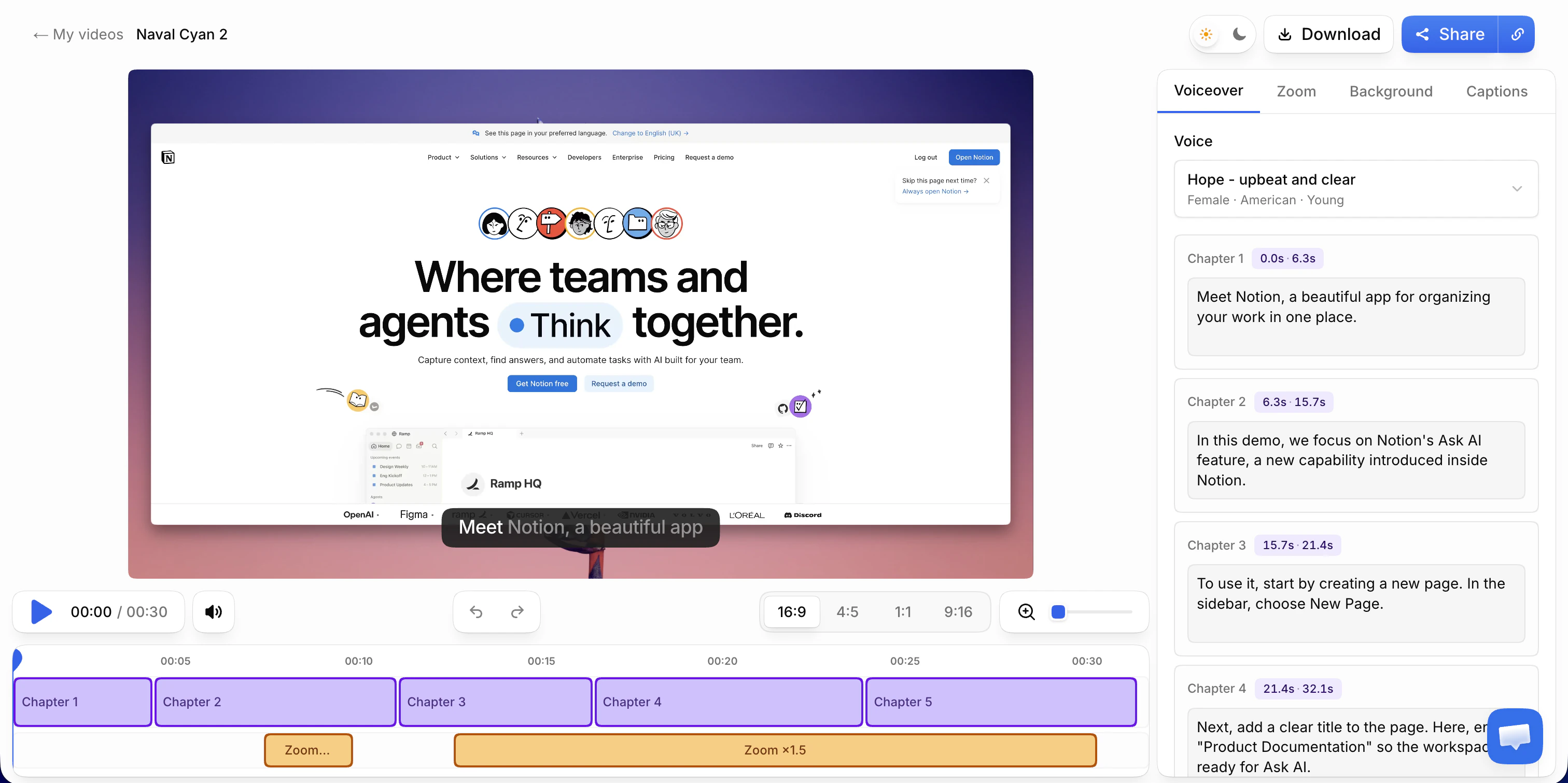
In Vibrantsnap, this is the default workflow. You narrate in the language that comes naturally. The AI transcribes your narration, rewrites it into a clean script, reads it in one of 30 studio voices in any of 10 languages (English, French, Spanish, Portuguese, German, Italian, Japanese, Chinese, Korean and Hindi), and retimes the video to match. Interface labels and product names keep their spelling, and you can keep your own voice on any video or switch at any time. One thing it doesn't do is voice cloning: the studio voice is not your voice speaking English.
Keeping demos current when the UI changes
In a small SaaS company the interface changes every few weeks, and an outdated demo can do more harm than a missing one. The prospect sees a screen that no longer exists. The new customer can't find the button. Five habits keep the library accurate.
- Keep a demo inventory. A spreadsheet with one row per video: title, the screens it shows, date recorded, where it's embedded. When the release notes mention a screen, filter the sheet and you know what to redo.
- One task per video. A UI change then breaks one two-minute how-to, not a 20-minute tour.
- Separate wording changes from screen changes. If the screen is still accurate but the explanation is off (a step described badly, a term your customers use differently, a new language), edit the script and regenerate the voice. The footage stays. In Vibrantsnap each chapter has its own script, so fixing one step means editing one chapter. If the screen itself changed, re-record that video from the saved outline.
- Keep dates and versions out of the narration. "Our new June release" ages in a month. "Here's how to approve a report" doesn't.
- Refresh in order of exposure. The website overview first, since every prospect sees it. Then the how-tos linked from support replies. Leave announcements alone.
When to hand demos to a PM or CS hire
Founder-led demos are an early-stage advantage, not a permanent job. Four signals say it's time to hand some of them off:
- A video has waited more than a week because you haven't found the time.
- Your first customer success or onboarding hire is answering how-to questions that videos should answer.
- A product manager writes the release notes.
- Someone other than you now runs discovery calls.
Hand them off in this order:
| Demo | Hand off to | When | Founder's role after |
|---|---|---|---|
| Onboarding how-tos | Customer success or onboarding lead | First, as soon as they're hired | Review the first scripts |
| Feature announcements | Product manager | When they own the release notes | Record the big launches yourself |
| Sales follow-ups | Whoever ran the call | When you stop running discovery calls | Record for strategic deals |
| Website overview | Keep it | Last, if ever | Refresh it when the main workflow changes |
A handoff kit is the difference between a library that stays consistent and one that sounds like four different companies:
- The outline template from the routine above.
- The demo account with believable data, and one rule: no real customer data on screen.
- The inventory sheet, with an owner column.
- The voice choice. If the library uses one studio voice, a video recorded by your CS lead sounds like the one you recorded last year.
- A review rule for the first month. You read the scripts, not the footage. It takes five minutes a video and catches the domain mistakes a new hire can't see yet.
Where Vibrantsnap fits
Vibrantsnap is built for this job: a founder or a small team recording demos and tutorials themselves, often in a second language.
- Record a Chrome tab, a window or the whole screen with your microphone, or import a video you already have. Recording length is never capped.
- Rewrite and re-voice. Your narration is transcribed, rewritten into a clean script and read in a studio voice, and the video is retimed to match. The video splits into chapters, each with an editable script.
- Zoom and caption. Every click gets a close-up on web apps recorded with the extension. On desktop software or an imported video, you place the zooms yourself. Captions are generated word by word and stay editable.
- Share. A share link with a call-to-action button, an embed, or an MP4 export in 1080p or 4K. Processing takes about two minutes.
Recording, editing and previewing with every AI feature are free. On the free plan, the share link carries a watermark and a Vibrantsnap badge, and there is no export. Pro is $49/month, or $39/month billed yearly, with 25 min of export a month, link analytics, 4K and no watermark. See pricing for Scale and Business.
For the full recording workflow, see how to make a product demo video. For the six demo videos a SaaS company needs as it grows past the founder, see how to create SaaS demo videos that convert.
Frequently asked questions
What is a founder-led product demo? A founder-led product demo is a demo recorded by the company's founder, usually a screen recording of the real product with narration. In a small B2B SaaS company it covers the website overview, feature announcements, follow-ups after sales calls and onboarding how-tos. What makes it founder-led is the founder's judgment about which problem to show and how, not necessarily the founder's voice.
How much time should a founder spend on demos each week? About 90 minutes in one fixed block is enough for up to three short videos, plus follow-ups recorded right after sales calls. The block covers collecting topics, outlining, recording one take per video, reviewing the script and logging each video in a demo inventory.
Should a founder narrate demos in their own voice? It depends on the video. For a follow-up to a prospect who heard you on a call, your own voice can be the right choice. For the website overview and help center how-tos, one studio voice keeps the library consistent, even after someone else starts recording. In Vibrantsnap you can keep your own voice or switch to a studio voice on any video.
Can I record a demo in my first language and publish it in English? Yes, with a tool that rewrites the narration instead of only translating the captions. In Vibrantsnap you narrate in the language that comes naturally, the script is rewritten in the language you publish in (one of 10) and read by a studio voice, and interface labels and product names keep their spelling.
When should a founder hand off product demos? When videos wait more than a week for your time, when a customer success hire is answering how-to questions, when a product manager owns the release notes, or when someone else runs discovery calls. Hand off onboarding how-tos first and keep the website overview longest.
Sources
- Gartner, Gartner Sales Survey Finds 67% of B2B Buyers Prefer a Rep-Free Experience (March 9, 2026; survey of 646 B2B buyers, August to September 2025)
- Wistia, How to choose the right marketing video length (data from the 2026 State of Video report, over 13 million videos)
Comparison