Published September 28, 2026 in SaaS Growth
Sales Demo Follow-Up Video: Script, Email and Timing

Founder & Content Creator at Vibrantsnap · 14 min read
The demo went well. The person you spoke with liked what they saw and asked a sharp question. Now they have to explain your product to a boss, a finance lead and the people who would use it every day, in a meeting you won't attend.
A recap email with five bullet points leaves them to do that from memory. A short follow-up video that answers their question on screen does the explaining for them, and it can be forwarded as is. This guide is for founders and small sales teams at B2B SaaS companies: when a follow-up video is worth recording, what to put in it, a script structure with a worked example, how to record it the same day (including in a second language), the email that carries it, and what you can honestly measure.
What a demo follow-up video is
A sales demo follow-up video is a 2 to 4 minute screen recording, sent within a day of the call, that answers the one question the prospect asked, on data shaped like their business, and ends on one next step. It is made to be forwarded.
Five rules cover most of it:
- One question per video. The one they asked, in their words.
- Context first. The first 15 seconds must make sense to someone who wasn't on the call.
- Their data, not your demo tour. Records, volumes and terms that look like their business.
- Same day. While they remember asking and you remember their exact words.
- One next step. A concrete meeting or action with a proposed time, in the video and in the email.
Why a recorded follow-up helps after a demo call
Your call is a small slice of how a B2B company buys. In Gartner's 2017 survey of 750 B2B buyers, buying groups spent 17% of their purchase time meeting with potential suppliers, all suppliers combined, and 22% meeting among themselves. When they compared several vendors, any one sales rep got perhaps 5% to 6% of their time (Gartner). Most of the decision happens in rooms you are not in.
The group is also bigger than the person on your call. In a Gartner survey of 632 B2B buyers conducted in August and September 2024, buying groups ranged from five to 16 people across as many as four functions. Of those buyer teams, 74% showed unhealthy conflict during the decision, and groups that reached consensus were 2.5 times more likely to report a high-quality deal (Gartner).
So after a good call, your champion has a job: sell your product internally. The follow-up video is the version of you that shows up in those meetings. It works when it makes sense to a finance lead who opens it cold, three days later, from a forwarded email.
The same survey has a finding that shapes what goes in the video. Content tailored to the buying group improved consensus by 20%. Content tailored to one person's individual preferences had a 59% negative impact on consensus. In practice: answer your champion's question, but frame the answer around the problem the whole team shares, not the feature your champion happens to like.
A video isn't always the right follow-up. Pick the format by what happens next.
| Situation after the call | Send | Why |
|---|---|---|
| They asked 'can it do X?' and need to show others the answer | A narrated follow-up video | The answer travels without you |
| Your champion must present to a boss, finance or IT who wasn't there | A narrated follow-up video, context first | It explains the product in a meeting you won't attend |
| A quick thank-you or a one-line answer to the person you spoke with | A plain email, or a quick face-cam message | Speed and a personal tone matter more than the narration |
| Logistics: a contract, a security questionnaire, a pricing sheet | The documents themselves | A video doesn't replace a signed PDF |
| The answer depends on their real data or a custom setup | A second call | You can't show it credibly in a demo account |
What to put in it, and what to leave out
Put in:
- Their question, word for word. "Can site managers see expired certificates before a subcontractor shows up?" beats "Compliance tracking overview".
- Their situation, in their words and numbers. How they do it today, how many sites, users or records, what goes wrong.
- The answer on screen, in two to four steps. Only the screens that answer the question. Start on the first of them, not on the login page or the dashboard.
- The objection from the call. If someone asked who maintains the data, or whether it works offline, answer it. Admit one limit if there is one. Naming it yourself costs less than letting one of their colleagues find it later.
- One next step. Who should join, what you will do together, and a date.
Leave out:
- Features they didn't ask about. Save them for the next call.
- Pricing. Put it in the proposal. The video gets forwarded, and it outlives the quote.
- Anything real that isn't theirs. No other customer's data, names or logos on screen. Use a demo workspace with believable data shaped like their business.
Length follows from the content. Two to four minutes at about 150 words a minute, with pauses for the clicks, is roughly 300 to 500 words of narration. If the outline needs more, you have two questions. Record two short videos or book a second call.
A script structure for a 2 to 4 minute follow-up
| Part | Time | What you say | What you show |
|---|---|---|---|
| 1. Context | 0:00 to 0:15 | Who you are, who you spoke with, and their question in their words | The screen that answers it, already open |
| 2. Their situation | 0:15 to 0:35 | How they do it today, with their numbers | Data shaped like theirs: their industry, their kind of records |
| 3. The answer | 0:35 to 2:30 | Two to four steps, one or two sentences each, and why each matters to the team | Each click, with a pause after it |
| 4. The open question | 2:30 to 3:10 | The objection raised on the call, answered, and one honest limit | The screen that addresses it |
| 5. One next step | 3:10 to 3:30 | One step, who should join, and when | The finished result, held for two seconds |
Two details make the difference between a follow-up and a demo tour.
The first sentence carries the context. If the video will only ever go to the person you spoke with, "Hi [first name]" is fine. If it's meant to be forwarded, open with a sentence a stranger can follow: who you are, who you spoke with, what they asked. Then talk about your champion rather than to them. The forwarded viewer is the audience.
Go slower than you would live. On a call, the prospect can stop you. In a video they can't, so pause after each click and name buttons exactly as they are labeled.
Our free demo script generator has a "Follow-up after a sales call" template. Enter who the prospect is, what they asked to see, what they said about their situation and the steps you'll show, and it drafts this structure with timings.
Worked example: a follow-up for a construction compliance prospect
A fictional but typical case. A 12-person company sells subcontractor compliance software to construction firms. The founder ran a demo with Dana, operations director at a 60-person electrical contractor. On the call, Dana asked: "Can my site managers see which subcontractors have an expired certificate before they show up on site?" Today her office tracks about 40 subcontractors across 14 sites in a spreadsheet updated at month end. The CEO signs, two site managers would use it daily, and the office admin keeps the spreadsheet.
The outline, written right after the call:
FOR          Dana (ops director), then her CEO, site managers, office admin
QUESTION     "Can site managers see expired certificates before a sub shows up?"
THEIR WORDS  "We find out at the gate, or during the audit."
OUTCOME      Tomorrow's site list, with every expired certificate flagged
STEP 1       Open tomorrow's schedule: 14 sites, about 40 subcontractors
STEP 2       Filter subcontractors with a certificate expiring within 30 days
STEP 3       Open one flagged subcontractor and send the renewal request
STEP 4       Show the same flag on a site manager's phone
OBJECTION    "Our admin won't retype 40 subcontractors" -> import the spreadsheet once
LIMIT        Paper certificates still need to be scanned once
NEXT         30 minutes with the office admin to import their real list
The opening, as narrated:
"Hi, I'm Sam, founder of [product]. On Tuesday I spoke with Dana, who runs operations at [company]. She asked whether site managers can see which subcontractors have an expired certificate before they arrive on site. Today the team finds out at the gate, or during the audit. Here is how it works on a schedule set up like theirs: 14 active sites and about 40 subcontractors."
The close:
"Dana also said the office admin won't retype 40 subcontractors. They don't have to: the admin imports the existing spreadsheet once, and each subcontractor renews their own certificate from the email link. One thing it doesn't do: paper certificates still need to be scanned once. If this matches what your team needs, the next step is 30 minutes with your office admin to import your real list. I've suggested two times in the email."
Notice what the video skips: the login, the settings, the reporting module nobody asked about, and the price. It runs about three and a half minutes.
Record it the same day
Speed is most of the value. The prospect still remembers asking. Your notes still hold their exact words. And your champion may brief the rest of the group this week. A routine that fits between two calls:
- Write the outline (5 minutes). Right after the call. Copy their question and one phrase about their situation word for word from your notes.
- Set up the data (5 to 10 minutes). Keep a demo workspace for each industry you sell into, so you rename records instead of building them. No real customer data on screen.
- Record once (5 to 10 minutes). One browser tab, notifications off. Explain it the way you would to Dana. A stumble is not a reason to restart if your tool rewrites the narration.
- Review the script, not the footage (5 minutes). Check their terms, their numbers and your product names, spelled the way they say them.
- Send before the end of the day.
In Vibrantsnap, the Chrome extension records a tab, a window or the whole screen with your microphone. The AI transcribes your narration, rewrites it into a clean script (hesitations, rambling and false starts don't survive), reads it in a studio voice and retimes the video to match. Every click in a web app gets a close-up from the cursor data the extension captures. If your product is desktop software, or you import a recording, there is no cursor data, so you place the zooms yourself. Captions are generated word by word and stay editable, and processing takes about two minutes.
For the full recording workflow, from demo data to export, see how to make a product demo video. For a weekly demo routine that keeps follow-ups outside your fixed recording block, see the founder-led product demo playbook.
Narrating in a second language
Many small B2B SaaS teams sell in English from somewhere else. The founder who ran a good call in English now has to record three minutes of English narration for people who have never heard them speak. On a live call, people ask you to repeat a sentence. A forwarded video can't be interrupted.
You have two honest options:
- Keep your own voice. For a quick reply to the person who just spent 45 minutes with you, that's fine.
- Rewrite and re-voice. For a video meant to be forwarded, narrate in whatever language comes naturally, then publish a clean script read by a studio voice. In Vibrantsnap that means one of 30 studio voices in any of 10 languages: English, French, Spanish, Portuguese, German, Italian, Japanese, Chinese, Korean and Hindi. Interface labels and product names keep their spelling. It also works the other way: record in English and send a German prospect's team the follow-up in German.
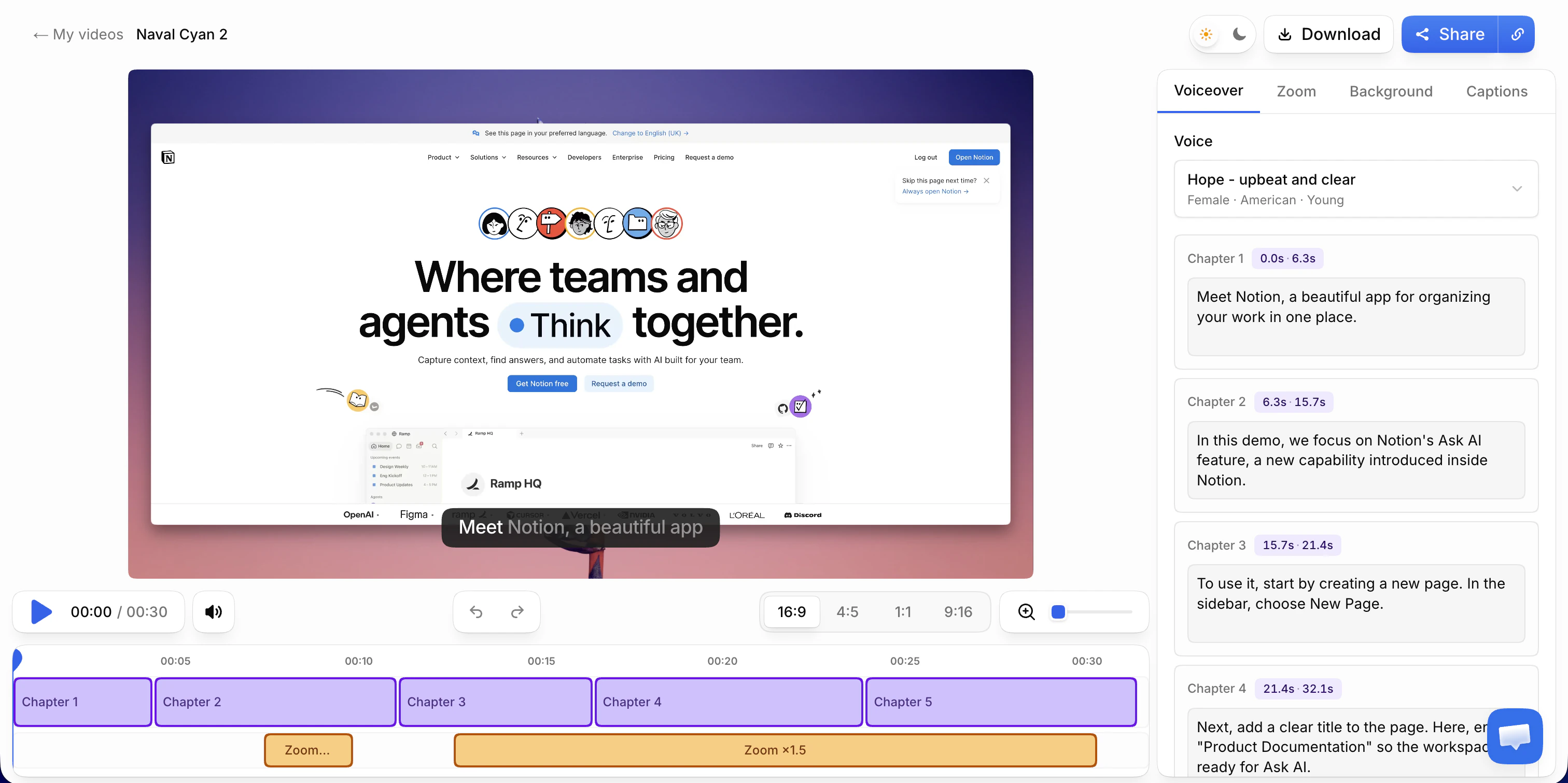
Two rules either way:
- Say it in the email. The prospect heard your real voice on the call. One line, such as "the narration is an AI voice reading my script", avoids a surprise.
- Keep captions on. Forwarded videos get watched with the sound off in open-plan offices, and by colleagues whose first language isn't the one you publish in.
The email that carries it
The email decides whether the video gets opened, and it travels with the video when it's forwarded. Keep it short.
- Send a link, not an attachment or an embedded player. Gmail and Outlook for Windows don't play the video element inside an email (Can I email). Use a screenshot of the key screen, linked to the video, plus a plain text link.
- Name their question in the subject line. It tells your champion, and everyone they forward it to, why to press play.
- Write the first line for a forwarded reader. Who you are and what you discussed, in one sentence.
- Give one next step with two proposed times. Not "let me know if you have questions".
- Ask them to forward it. Say who it's for.
Subject lines that work, because they name the question:
- "Expired certificates before the gate: your question in 3 minutes"
- "How audit history works across your 14 sites (3-min video)"
- "For you and your CEO: the approval flow you asked about"
Subject lines to avoid: "Following up", "Great chatting today", "Quick recap". They could be about any call.
A template, using the worked example:
Subject: Expired certificates before the gate: your question in 3 minutes
Hi Dana,
Thanks for walking me through how your team tracks subcontractor certificates today.
You asked whether site managers can see expired certificates before a subcontractor shows up. This 3-minute video answers that on a schedule set up like yours, and covers your question about importing the spreadsheet: [link to the video]
It's made to be forwarded, so feel free to share it with your CEO and the site managers. The narration is an AI voice reading my script, and captions are on.
Next step: 30 minutes with your office admin to import your real subcontractor list. Would Thursday at 10 a.m. or Friday at 2 p.m. work?
Sam
On the share page, point the call-to-action button at the same next step, for example your booking link. A colleague who opens the forwarded link then sees the same ask Dana saw.
If you decide a video isn't worth it for this deal, the same email works without one: the context line, the answer in three short bullets, one next step.
What to measure, honestly
Judge the follow-up by what it should cause: a reply and a booked next step. Everything else is a clue.
| Signal | Where you see it | What it tells you | Limit |
|---|---|---|---|
| A reply | Your inbox | They read it and engaged | None: this is the result |
| Next step booked | Your calendar or CRM | The follow-up did its job | None: this is the result |
| New names in the thread or on the next call | Inbox, calendar | It was forwarded and taken seriously | You only see it if they reply or join |
| Email opens | Your email tool | Very little | Apple Mail Privacy Protection can load remote content in the background, opened or not |
| Link clicks | Your email tool | Someone clicked | Not who, and not whether they watched |
| Share-link views | Vibrantsnap, from the Pro plan | How many visitors opened the video, day by day | No names, no watch time, no drop-off |
| Booking clicks from the share page | Your booking tool or analytics, with UTM tags | The button on the video page drove the next step | Needs tagged links |
Opens are the weakest signal. Apple's Mail Privacy Protection downloads remote content in the background by default, regardless of whether the recipient engages with the email (Apple). An "opened" status can mean nobody read it.
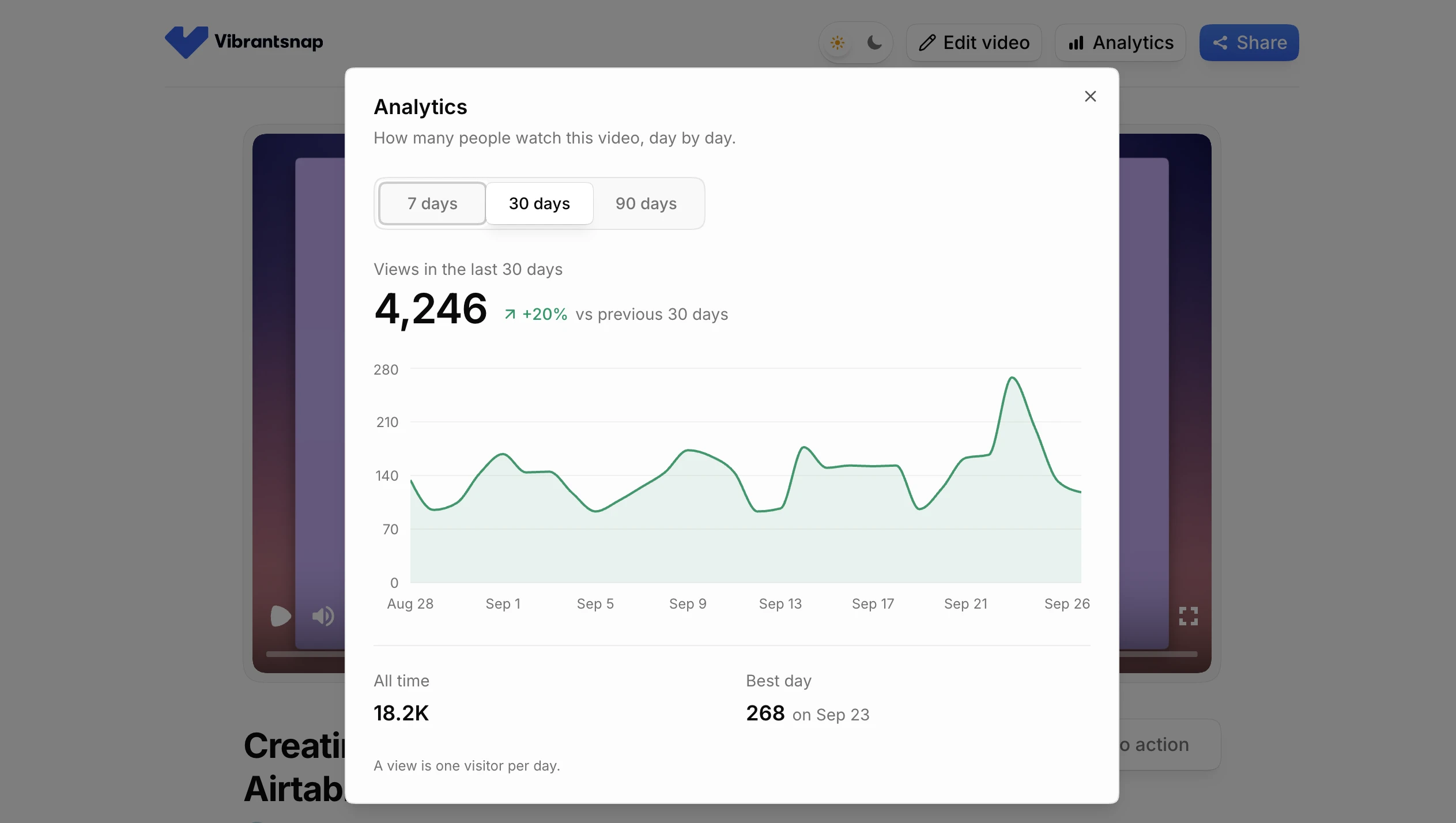
In Vibrantsnap, link analytics count the views on each share link, day by day, where a view is one visitor per day. They start on Pro. Several views on a link you sent to one person is a good sign it was passed along. It is not proof of who saw it.
To learn whether follow-up videos help your deals, keep a simple log: deal, call date, what you sent, reply yes or no, next step booked yes or no, new stakeholders yes or no. After 15 or 20 deals, compare the ones with a video to the ones with a text recap. The sample is small and the deals differ, so treat it as a sanity check, not proof.
Mistakes that waste a good call
- A generic tour. "Here's our product" instead of "here's your question, answered". If the video could go to any prospect, it's a website demo, not a follow-up.
- Too long. Past four minutes, you are answering questions nobody asked. Split it or book a call.
- No next step, or three. "Let me know if you have questions" is not a next step. Neither is a menu of options.
- No context up front. A forwarded viewer who can't tell in 15 seconds who you are and why this video exists will close it.
- Tailored to one person only. Your champion's favorite feature may not be the team's problem. Frame the answer around what the group shares.
- Waiting a week. By then the question has been answered by someone else, or forgotten.
- Real data on screen. Another customer's records in a demo is a privacy incident, especially in health, finance or compliance software. Fix the data before you record.
Loom or Vibrantsnap for follow-up videos
Loom is fine for quick personal replies. A 60-second answer to one person who knows you, your face in the corner, sent two minutes after the call: that is what Loom is built for. Its free Starter plan allows 5-minute recordings, as listed on September 28, 2026, which is enough for a short follow-up. Loom keeps your recorded voice and your wording. Its Business + AI plan removes filler words and silences, and it has no AI voiceover.
The difference shows when the video gets forwarded to people who never met you. Vibrantsnap rewrites what you said into a clean script, reads it in a studio voice in one of 10 languages and retimes the video, with a close-up on every click and word-by-word captions. The share page has a call-to-action button for the next step. See the full Loom vs Vibrantsnap comparison for what else differs, including the comments, reactions and meeting notes that Vibrantsnap doesn't offer.
Pricing, honestly: recording, editing and previewing with every AI feature are free, and recording length is never capped. On the free plan the share link carries a watermark and a Vibrantsnap badge, and there is no export, so for prospects you'll want Pro. Pro is $49/month, or $39/month billed yearly, with 90 min of export a month, link analytics, 4K and no watermark. See pricing for Scale and Business.
What it doesn't do, so you pick the right tool:
- It makes videos, not interactive click-through demos.
- It doesn't clone your voice. You keep your own recording or switch to a studio voice.
- It doesn't identify viewers, track watch time or sync with your CRM. Link analytics count views per share link.
Frequently asked questions
How long should a sales demo follow-up video be? Two to four minutes. That covers one question, answered on screen in two to four steps, plus the objection raised on the call and one next step. At about 150 words a minute with pauses for the clicks, that is roughly 300 to 500 words of narration. If you need more, you have two questions: record two videos or book a second call.
When should I send a follow-up video after a demo call? The same day, or within 24 hours at most. The prospect still remembers asking the question, your notes still hold their exact words, and your champion may brief the rest of the buying group that week.
What should a follow-up email after a demo include? A subject line that names their question, one line of context a forwarded reader can follow, what the video answers and how long it is, a link to the video, one next step with two proposed times, and an explicit invitation to forward it. Send a link or a linked thumbnail, not an embedded player: Gmail and Outlook for Windows don't play video inside an email.
Should I narrate a follow-up video in my own voice or with an AI voice? Your own voice is fine for a quick reply to the person you spoke with. For a video meant to be forwarded, especially if you narrate in a second language, a rewritten script read by a studio voice is easier to follow for people who never heard you. Say so in the email. Vibrantsnap does not clone voices: the studio voice is not your voice.
How do I know if my follow-up video was forwarded? You can't know who watched, but you can see signs. Several views on a link you sent to one person suggests it was passed along; Vibrantsnap shows the views on each share link from the Pro plan, without viewer names. The strongest sign is new names in the email thread or on the next call. Email opens are unreliable, because Apple Mail Privacy Protection can load remote content in the background whether or not the email is opened.
Is Loom good enough for sales follow-up videos? For a quick personal reply to someone who knows you, yes: record your face and voice and send it. Loom keeps your recorded voice and wording, and its Business + AI plan removes filler words and silences. When the video will be forwarded to people who weren't on the call, Vibrantsnap rewrites your narration into a clean script and reads it in a studio voice, with zooms on your clicks and captions.
Sources
- Gartner, Gartner Sales Survey Finds 74% of B2B Buyer Teams Demonstrate "Unhealthy Conflict" During The Decision Process (May 7, 2025; survey of 632 B2B buyers, August to September 2024)
- Gartner, Win More B2B Sales Deals (2018; Gartner 2017 Digital B2B Buyer Survey, 750 B2B buyers)
- Apple, Mail Privacy Protection & Privacy
- Can I email, video element support
- Loom, pricing (checked September 28, 2026)
Comparison

