Published December 2, 2025 in Product Demos · Updated September 28, 2026
Product Demo Analytics: What You Can Actually Measure

Founder & Content Creator · 10 min read
The short answer
"Product demo analytics" can mean four different things, and the tools that sell it rarely say which one:
- Views per link. How many people opened the demo you shared, day by day. Video share tools give you this, Vibrantsnap included.
- Who watched, and how far. A named viewer and the share of the video they watched. Video platforms such as Vidyard and Wistia do this, as long as they can identify the viewer.
- Step-level engagement and lead capture. Where people stop inside a click-through demo, plus a form to capture them. Interactive demo tools such as Arcade, Storylane, Supademo and Navattic do this.
- CRM attribution. Which contacts and deals the demo touched. It needs one of the above, a CRM integration and enough deals to show a pattern.
For a 5-to-50-person B2B SaaS company, the numbers that decide most things are simpler than any dashboard: the replies and meetings that follow a demo. Level 1 plus a spreadsheet covers a lot of ground.
Every vendor's features and prices below were checked on that vendor's own site on September 28, 2026.
The four levels at a glance
| Level | What you see | Where you get it | Decision it helps you make |
|---|---|---|---|
| 1. Views per link | How many visitors opened each link, day by day | Video share links, including Vibrantsnap (from Pro) | Was the demo opened? When to follow up. Which tutorials people use |
| 2. Viewer identity and percent watched | Who watched, how much, and whether they clicked | Video platforms such as Vidyard and Wistia | Which prospect to call first. Which part of the video to cut |
| 3. Step-level engagement and lead capture | Where viewers stop in a click-through demo, form fills, companies | Interactive demo tools such as Arcade, Storylane, Supademo and Navattic | Which step to fix. Which use case prospects pick. Who enters the pipeline |
| 4. CRM attribution | Demo activity on contact and deal records | CRM integrations in the tools above | Which demos influence deals, and where to spend time and budget |
Level 1: views per link
A share link counts views. That's the whole level, and it's more useful than it sounds, because a demo link usually has a known audience: one prospect, one onboarding email, one help article.
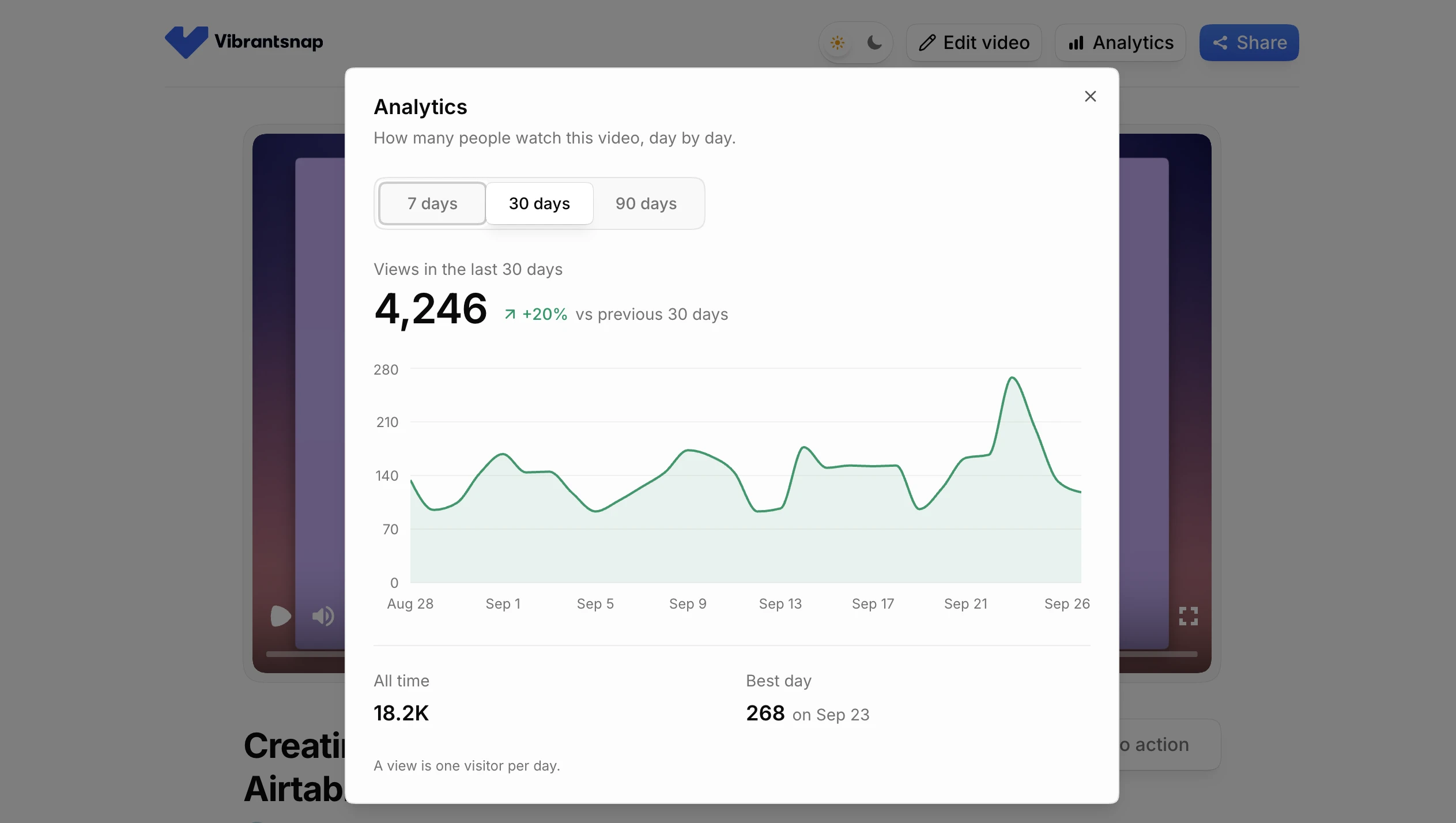
What Vibrantsnap shows. Every share link has an Analytics panel: "How many people watch this video, day by day." You pick 7, 30 or 90 days and see:
- the views over that period, with the change against the previous period
- a chart of views per day
- all-time views
- the best day and its view count
A view is one visitor per day, so the same person reopening the link on the same day counts once. Read the number as a signal, not a headcount. Link analytics come with Pro, at $49/month or $40/month billed yearly, as the pricing page shows.
Decisions it helps you make:
- Was it opened? A demo sent to one prospect that has no views after three days wasn't opened. Change the subject line, or ask on the phone.
- When to follow up. Views the day after your follow-up mean it landed. Reply while the demo is fresh in their mind.
- Was it passed around? More visitors on one day than people you sent it to means someone forwarded it. More on this below.
- Which tutorials people use. Compare views across the links in your help center and onboarding emails, and keep the busiest ones up to date first.
- Did a change move anything? The comparison with the previous period shows whether a new placement, email or post changed the traffic.
What it can't tell you: who watched, how far they got, which part they replayed, or whether they clicked your button.
Level 2: who watched and how far
Video platforms built for sales and marketing attach views to people.
Vidyard. On Starter and higher plans, Video Insights list each view with the viewer, when and where they watched, the percent watched (including segments watched more than once) and whether they clicked the video's call to action. A viewer is named only when Vidyard can identify them, usually by email through a tracking token in the link. Otherwise the view shows as "someone." Vidyard's help center notes that this happens, for example, when a video goes to several recipients in one email from Gmail or Outlook. CRM and marketing automation integrations start on the Teams plan, priced on request.
Wistia. Each public view produces a heatmap of that single session: the sections watched, rewatched and skipped. A viewer is identified when they fill in a Wistia Form placed in the video or arrive from an email campaign link. Heatmaps and engagement graphs come with the Business plan, listed at $79/month billed annually.
Decisions it helps you make:
- Who to call first. A prospect who watched almost all of it and clicked the button is warmer than one who stopped after 20 seconds.
- What to cut. If most viewers leave at the same moment, that part of the demo is too long or comes too early. Fix the demo, then check the next batch of views.
The catch. Identity depends on how the link was sent, or on a form. An anonymous view stays anonymous, and a form in front of the video asks for an email before the viewer has seen any value. For a founder sending ten demos a week, the reply in the inbox often says more than the percent watched.
Level 3: step-level engagement and lead capture
A click-through demo is a series of steps, and every step is a click, so interactive demo tools can measure each one.
- Arcade. On paid plans, Insights track views, play rate, completion rate, CTA clicks, average play time, step-by-step drop-off, branch choices and form submissions. On Growth, Audience Reveal matches anonymous views to companies by IP address, and Arcade's docs say form submissions sync to HubSpot or Salesforce once connected. Growth is $50 per seat a month, or $42.50 billed yearly, and adds CTAs and forms.
- Storylane. Each session shows the exact steps the viewer took and the time spent on each. The free plan includes lead capture and basic analytics. Starter, at $50/month or $40/month billed yearly, adds Account Reveal for up to 250 demo visitors a month and a HubSpot integration.
- Supademo. Tracking links and analytics start on Scale, at $50 per creator a month or $38 billed yearly.
- Navattic. The free plan has basic analytics. Base, billed annually with no price listed, adds account identification and Salesforce and Marketo integrations.
Decisions it helps you make:
- Which step to fix. A step where many viewers leave is usually unclear or unnecessary.
- What prospects care about. When a demo branches by role or use case, the branch people pick tells you what they're shopping for.
- Who enters the pipeline. A form inside the demo turns an anonymous visitor into a lead.
If you're choosing between a click-through demo and a narrated video, Arcade vs Vibrantsnap compares the two formats, and the best product demo software covers both, with prices.
Level 4: CRM attribution
The last level puts demo activity on contact and deal records, so you can ask: did the deals we won watch the demo, and which one?
- Vidyard's Teams plan adds CRM and marketing automation integrations.
- Wistia's Automation Suite connects HubSpot, Adobe Marketo Engage and Pardot to "measure pipeline and revenue impact." It comes in Wistia's $329/month tier, billed annually.
- Storylane's Premium plan, at $1,500/month or $1,200/month billed yearly, adds a Salesforce integration and Deal Intelligence, which measures a demo's pipeline and deal influence.
- Navattic lists Salesforce and Marketo integrations from Base.
Decision it helps you make: where to put time and budget across demos, channels and content.
The catch. Attribution needs volume and a clean CRM. With five new deals a month, you can read each deal's history yourself and learn more than a chart would show.
What Vibrantsnap measures, and what it doesn't
Vibrantsnap is built for making the demo. It rewrites your narration into a clean script, reads it in a studio voice, zooms in on your clicks and adds captions, then gives you a share link with a call-to-action button. Its analytics are simple.
It measures the views on each share link, day by day, over 7, 30 or 90 days, with the change against the previous period, all-time views and the best day. From Pro.
It does not measure:
- who watched: no viewer names, emails or companies
- how far anyone watched: no completion rate, drop-off or heatmap
- clicks on the call-to-action button of the share page
- anything in your CRM: no sync to HubSpot, Salesforce or any other
- form fills or A/B tests: there are no lead capture forms and no test variants
If you need any of those, pair Vibrantsnap with a tool from levels 2 to 4, or use the methods in the next section.
What a small team can measure today
None of this needs a new tool.
Replies and meetings booked after a demo
This is the metric closest to revenue. Keep a log in your CRM or a spreadsheet, one row per demo sent: the date, the prospect, the demo link, whether they replied, and whether a meeting got booked.
After a month, compare the demos you sent with each other. If one version gets replies and meetings and another doesn't, send the first by default and re-record the second. With small numbers, look for big gaps, not decimals.
Views after a follow-up
When a demo was recorded for one prospect, its link has one audience, so the daily chart works almost like a read receipt. Check it the morning after each follow-up.
- No views after a few days: the email wasn't opened, or the link didn't earn a click. Try a new subject line, or ask on a call.
- Views on several different days: someone keeps coming back to it. It's a good moment to ask for a meeting.
- Several views on the same day: a view is one visitor per day, so that's several visitors. The link was probably forwarded to a colleague or a manager. Ask who else should join the next call.
A demo you send to many prospects only gives you a total. For the accounts you want to follow closely, send a demo recorded for them.
Help-center views against tickets on the same topic
For customer tutorials, the question is whether they reduce support load. Pick the three to five topics that generate the most tickets. Record one tutorial per topic, embed it in the matching help article, and tag those tickets in your help desk. Each month, put each tutorial's views next to the ticket count for its topic.
- Views up, tickets down: the tutorial answers the question.
- Views up, tickets flat: people watch and still get stuck. Read the ticket threads and re-record the step they ask about.
- Views flat: people don't find it. Link it from your in-app help menu and your onboarding emails.
That's a correlation over a month, not proof, but it's enough to decide which tutorial to redo first. More on building them: customer education videos.
UTM parameters and CTA tracking on your landing page
Your website analytics (GA4, PostHog, Plausible or similar) already count signups and bookings. Make the demo show up there:
- Tag the button on the share page. Point the call-to-action button at a URL with UTM parameters, for example
?utm_source=vibrantsnap&utm_medium=video&utm_campaign=onboarding-demo. The clicks then arrive in your analytics as their own source, which covers the click tracking Vibrantsnap doesn't do. - Tag the links you send. Use a different
utm_campaignfor outbound emails, LinkedIn posts and your newsletter, so you can see which channel brings visitors who sign up. - Track the button next to an embedded demo. On a landing page with a demo video, track clicks on the signup or booking button beside it, and compare the page's conversion over the same number of weeks before and after you added the video.
Which level do you need?
- Founder-led sales, a few demos a week: level 1 and a log of replies and meetings. Spend the time you save on the demo itself: how to make a product demo video.
- A sales team sending video to named prospects every day: level 2. Vidyard or Wistia tell you who watched.
- A self-serve demo on your website, meant to capture leads: level 3, with an interactive demo tool that has forms and company identification.
- A marketing team allocating budget across channels: level 4, once your CRM is clean and you close enough deals to see a pattern.
Vibrantsnap fits the first case: you record demos and tutorials yourself, often in a second language, and the hard part is making a video worth sending. See how Vibrantsnap makes product demos.
Frequently asked questions
What is product demo analytics? Data on what happens after you share a product demo. It comes in four levels: views per link, viewer identity and percent watched, step-level engagement and lead capture in interactive demos, and CRM attribution that ties demo activity to deals. Most small B2B SaaS teams get far with the first level plus a record of the replies and meetings that follow each demo.
What does Vibrantsnap's link analytics show? The views on each share link, day by day, over 7, 30 or 90 days, with the change against the previous period, all-time views and the best day. A view is one visitor per day. Link analytics come with Pro. Vibrantsnap does not identify viewers, show how far anyone watched, count clicks on the call-to-action button or sync to a CRM.
How can I see who watched my demo video? You need a tool that identifies viewers. On Starter and higher plans, Vidyard shows each viewer and the percent they watched, and names them when it can identify them, usually by email through a tracking token in the link. Wistia identifies viewers who fill in a Wistia Form or click an email campaign link. Interactive demo tools such as Arcade, Storylane and Navattic use forms, tracking links or company identification. Vibrantsnap does not identify viewers; it counts the views on each link.
Which demo metrics matter most for a small B2B SaaS team? Replies and meetings booked after you send a demo, because they sit closest to revenue. Next come views after a follow-up, which tell you whether a demo was opened or passed around, and, for customer tutorials, help-center views compared with tickets on the same topic. Viewer-level and CRM analytics pay off once you send demos at volume.
Can I track clicks on the call-to-action button of a Vibrantsnap share page? Not inside Vibrantsnap. Point the button at a URL with UTM parameters, such as utm_source=vibrantsnap and utm_medium=video, and the clicks arrive as their own source in your website analytics, next to the signups and bookings they lead to.
Comparison